Playbook
Will Switching Websites Cost Your Insurance Agency Rankings?
Rankings don't punish the platform you're on. They punish the redirects nobody mapped before launch.

20 min read

The scary migration statistics measure the wrong thing for most agencies. A study of 892 real domain changes found the average full recovery took 523 days, and 17% still hadn't recovered after 1,000 days3. That study measures moving to a brand new domain. Google's own documentation says a well executed move that keeps your existing domain, the far more common case when an agency switches platforms, should show new URLs taking over within a few weeks for a small or medium site1. Different question, different answer. Here's how to tell which one applies to you, and how to land on the safe side of it.
The site you can't stand but won't leave
You know your website is slow. You've probably watched it load on your own phone standing in a parking lot and felt the six seconds pass. You know the page builder templates all look the same, because you've seen three competitors running the exact same layout with a different logo dropped in. You've priced out a real build, maybe even talked to us or someone like us, and the number made sense. And then you didn't do it.
Ask why, honestly, and the answer usually isn't the price. It's a specific, half-remembered fear: somebody told you, or you read somewhere, that switching your website tanks your Google rankings for months. Maybe a friend at another agency changed vendors and disappeared from search for a while. Maybe you've seen a horror story on a marketing forum about a business that lost most of its traffic after a redesign. So the ugly, slow site stays, because at least it ranks, and ranking feels like the one thing you can't risk.
That fear is reasonable. It's also, in most agencies' actual situation, aimed at the wrong risk. There are two very different things a website move can mean. One of them really is as dangerous as the horror stories suggest. The other one, the one that applies to almost every agency replacing a WordPress or GoHighLevel funnel with a faster build on the same web address, carries a fraction of the risk, and Google's own documentation says so in plain language. This guide separates the two, shows you the actual numbers behind both, and gives you the checklist that decides which side of that gap you land on.
What actually happens when a URL changes
Every page on your site has a web address, and Google has built up trust in that specific address over years: how often it's crawled, how it's ranked for specific queries, how many other sites link to it. When you replace your website, some or all of those addresses change. What happens next is not mysterious. Google documents it directly.
A permanent redirect, either a 301 or a 308 status code, tells Google and every visitor's browser that a page has moved for good. Google's crawling and indexing documentation states this outright: "301 and other permanent redirects don't cause a loss in PageRank"2. The value your old page earned transfers to wherever you point it. That's the entire mechanism, and it's the reason a correctly executed migration is fundamentally different from an accident that quietly deletes a hundred pages.
The transition isn't instant. Google's own site-move guidance is specific about the timeline: "for medium-sized websites, it can take a few weeks or more for Google to gradually start showing the new URLs instead of the old ones," and larger sites take longer1. During that window, "you may experience ranking fluctuations while Google recrawls and reindexes your site," and traffic shifts gradually, old-URL traffic going down while new-URL traffic comes up1. None of that is a penalty. It's Google re-learning where your content lives, at the pace its crawlers actually work.
Walk one page through it to make the mechanism concrete. Say your current site has a page at yourdomain.com/medicare-advantage-plans that ranks decently for a handful of local searches. Your new site organizes the same content at yourdomain.com/plans/medicare-advantage instead, a common kind of change when a rebuild also cleans up an old, messy folder structure. On launch day, a 301 redirect is set from the old address to the new one. A visitor clicking an old bookmark, and a Google crawler revisiting a URL it already knows, both land on the new page automatically. Over the following days and weeks, Google's crawler revisits that old address, sees the redirect, and starts associating the new address with the ranking history the old one had built. The page doesn't lose its place in line. It changes seats while keeping its ticket. Skip the redirect, and the crawler instead finds a 404, treats the old URL as gone, and the new page starts as a stranger with no history at all, competing from zero against every competitor's page that never moved.
| Step | Done correctly | Done carelessly |
|---|---|---|
| Redirects | Every old URL 301s to its exact new equivalent | Missing entirely, or everything dumped onto the homepage |
| Sitemap | New sitemap submitted in Search Console at launch | Old sitemap left live, or no sitemap submitted at all |
| Timing of the move | All URLs moved together, on a set day, for a small or medium site | Pages migrated piecemeal over weeks with no clear cutover |
| Result | Gradual, expected traffic handoff over a few weeks | Pages orphaned, authority stranded on dead URLs, no handoff |
Domain change vs. platform change: not the same risk
Here's the distinction that most of the fear about migrations skips entirely. A domain change means your actual web address changes, agencytoday.com becomes agencytomorrow.com. Every signal Google has tied to the old address, years of crawl history, backlinks, brand recognition in search results, has to be rebuilt at a location that has never existed before, even with a flawless redirect map in place. A platform change means you keep the exact same domain and simply replace what runs behind it. The address Google has trusted for years doesn't move. Only the software serving the pages does.
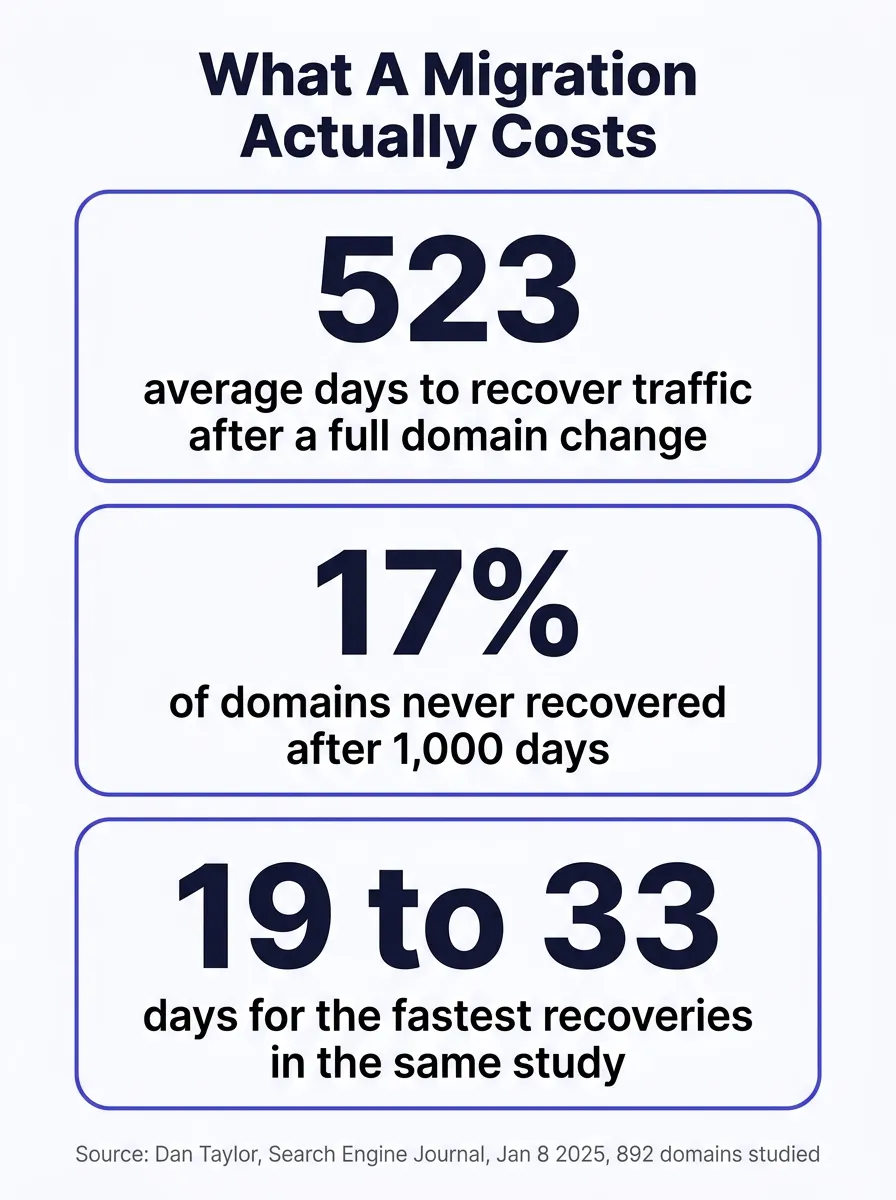
The most cited migration horror statistic comes from the first category, not the second. A study by Dan Taylor, published on Search Engine Journal, analyzed 892 real domain changes using Ahrefs data and crowdsourced submissions from SEO practitioners, collected through October 22, 2024. Its own stated methodology measured "the number of days it took Domain B, the new domain, to achieve the same estimated organic traffic volume as Domain A, the old domain"3. That is a domain-to-domain comparison, the hardest version of this problem there is, and the average across all 892 cases was 523 days3. Seventeen percent of the domains in the sample still hadn't recovered after 1,000 days3.
Almost no agency reading this guide is planning that move. You're not rebranding to a new domain. You're replacing a slow page builder with a faster build, on the domain your clients already know, the one on your business cards and your Google Business Profile. That's a platform change, and it's a meaningfully smaller problem, which is exactly why Google's guidance treats "changing your CMS" and "changing your domain" as different scenarios with different expected timelines in the first place.
Domain change
- Web address itself changes
- Years of trust signals reset to a new location
- Even flawless redirects still require rebuilding recognition
- Average full recovery: 523 days across 892 real cases3
RebuildStarting a new address's history from scratch
Platform change, same domain
- Web address stays exactly the same
- Years of trust signals stay attached to that address
- Only what serves the pages behind it changes
- Expected timeline: a few weeks for a small or medium site1
PreserveKeeping the address, replacing what's behind it
The one exception worth naming
Even a same-domain move can behave like a domain change if the new build also changes the URL structure itself, dropping trailing slashes, renaming folders, switching from .php to clean paths. If your new site's URLs don't match your old ones exactly, you still need the full redirect map in the next section. Keeping the domain buys you a lower-risk category. It doesn't buy you an exemption from doing the work.
It's worth spelling out why the domain specifically carries so much of this weight, because it isn't only about Google's crawl history. Every other business site that links to you, a chamber of commerce directory, a carrier's find-an-agent tool, a local news mention, points at your current domain. Your Google Business Profile's website field points at your current domain. Every citation service, every old guest post, every partner's resource page, all of it points at the address you've had the whole time. A domain change doesn't just ask Google to rebuild trust from zero. It asks every one of those outside references to still find you, which most of them never will unless someone manually goes back and updates each one. A platform change leaves every single one of those links pointing at exactly the right place, automatically, because the address never moved.
What a bad migration actually costs
Put the numbers next to each other and the shape of the risk gets clear. Within the same 892-domain study, the fastest recoveries took 19, 22, 23, and 33 days, essentially in line with Google's own few-weeks estimate for a well handled move3. The average across the whole sample was 523 days3. That gap, from 23 days to 523 days, inside one dataset, is not explained by luck. It's explained by whether the redirect map was complete, whether the sitemap was submitted, and whether the move happened all at once or dribbled out in a way nobody could monitor cleanly. This is the one figure in this guide with a single source rather than two independent ones; it's worth citing plainly for what it is, one large, transparent study, rather than treating it as an industry-wide constant.
523
Average days to full recovery across 892 domain changes, SEJ, 2025
17%
Of domains in the study still hadn't recovered after 1,000 days
19 to 33
Days for the fastest recoveries in the same study
Weeks
Google's own estimate for a well executed same-domain move
Run those numbers against your own traffic and the difference stops being abstract. If your current homepage and top three service pages together bring in 200 organic visits a month, a well executed platform change that lands in Google's few-weeks window means you're back to roughly that same 200 by the time your next billing cycle closes. A careless domain change with an incomplete redirect map, landing anywhere near the 523-day average, means an agency could spend the better part of two years rebuilding a traffic number it already had, while paying for ads or leads to make up the gap in the meantime. Same starting traffic, same amount of work put into the old site, a completely different outcome depending on which category the move fell into and how carefully it was executed.
There's a second cost that has nothing to do with domains or platforms and everything to do with what a careless launch leaves behind. A migration is exactly the moment a stale noindex tag from a staging environment, or an overzealous security plugin's default header, tends to survive into production unnoticed. We've written separately about how a single nosnippet or noindex directive can silently disqualify an otherwise well-ranked page from appearing in AI Overviews6 even while it still ranks normally in classic search. A migration doesn't cause that problem by nature. It's simply the moment that problem gets introduced most often, because it's the moment the most files and settings change at once.
Worth checking before you plan anything
If you want to know where your current site actually stands before you touch it, the free Audit scores your speed, your AI citation readiness, and your HIPAA safe tracking in about a minute. Run a free Audit.
What else moves besides rankings
Rankings get all the attention in this conversation because they're the easiest thing to measure, but they aren't the only thing that has to survive a launch intact. Three quieter systems break just as often, and none of them show up in a rank tracker.
Your lead forms are the first. Every quote request and contact form on your current site routes somewhere, a CRM, an email inbox, a GoHighLevel pipeline. A new site needs each of those forms wired to the same destination before launch, tested with a real submission, not assumed to work because the form itself renders correctly. A form that looks fine and silently fails to deliver a single lead for two weeks after launch is a worse outcome than a slow crawl, and it's far more common, because nobody checks a working-looking form the way they check a page that returns a 404.
Your tracking and analytics are the second, and this one carries a compliance dimension specific to health-adjacent insurance work. If your current site runs client-side tracking, a Meta Pixel or a standard Google Analytics tag firing straight from the browser, simply copying that same setup onto a new platform copies the same tracking posture, HIPAA exposure included. A migration is the natural moment to move to server-side, consent-gated tracking instead of quietly carrying an old liability onto a newer, faster site.
Your phone number and call tracking are the third. If you run call tracking numbers tied to specific pages or campaigns, confirm each one still routes correctly on the new site before cutover, not after a client calls a dead number during the exact week you're trying to make a good first impression with a faster page.
The weeks you never touch a Medicare or ACA site
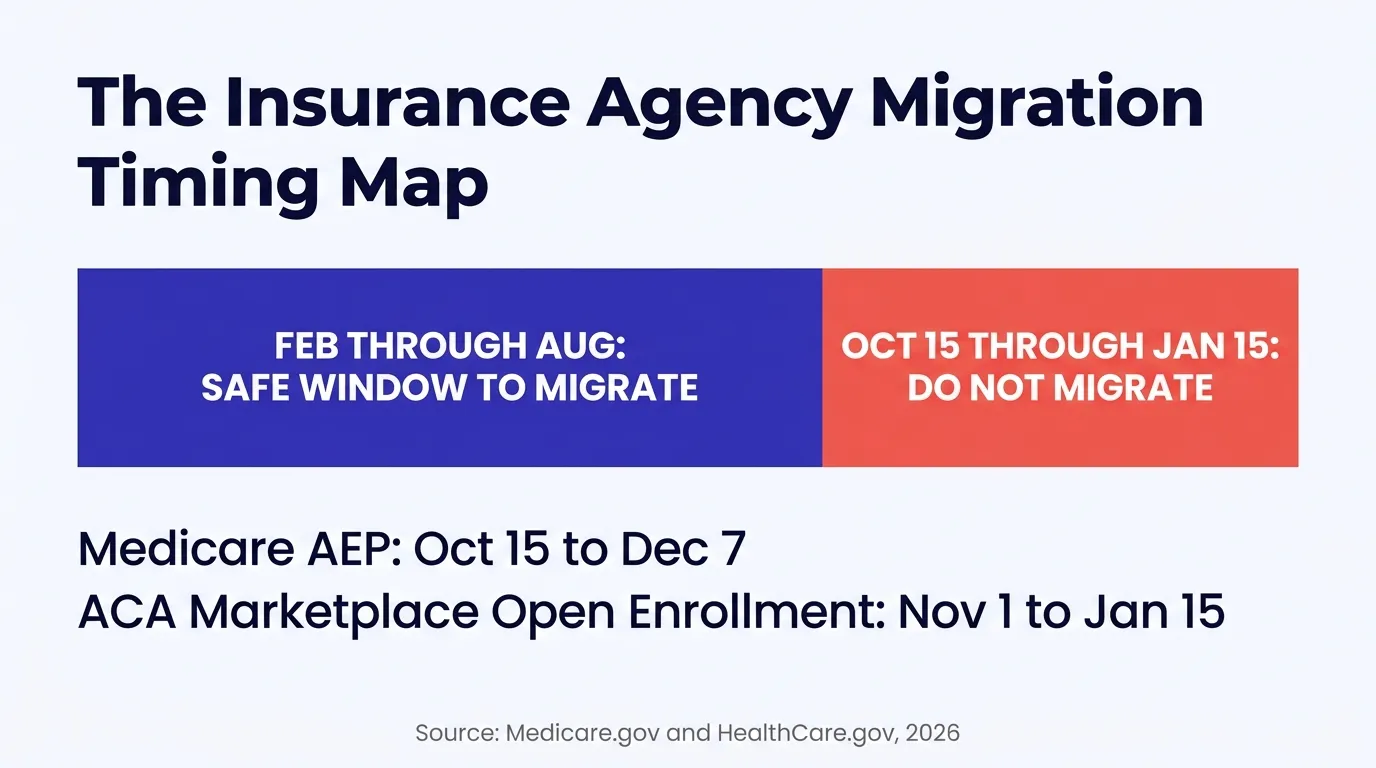
Even a textbook migration carries some expected fluctuation, Google says so directly1. That fluctuation costs almost nothing during a slow month. It costs a great deal during the weeks your entire book of business is actively shopping. Medicare's Annual Enrollment Period runs October 15 through December 7, and coverage elected during that window takes effect January 1, per Medicare.gov's own guidance4. The ACA Marketplace's Open Enrollment Period runs November 1 through January 15 in states using the federal marketplace, according to HealthCare.gov's own dates and deadlines page5. Line those two windows up and an agency serving both Medicare and ACA clients is effectively unable to afford any search visibility hiccup from roughly the start of October through the middle of January.
That's not a reason to avoid switching platforms. It's a reason to pick the calendar deliberately. Move in February through August, while your slowest search weeks are also your lowest-stakes weeks, and even a normal few-weeks recrawl window is finished long before your highest-value prospects start asking who to call. Move in October, and any rough patch lands directly on top of the exact period covered in our guide to getting a site ready before AEP.
| Window | What's happening | Migrate here? |
|---|---|---|
| Feb through Aug | No major national enrollment period active | Yes, this is the safe window |
| Oct 15 to Dec 7 | Medicare Annual Enrollment Period4 | No |
| Nov 1 to Jan 15 | ACA Marketplace Open Enrollment Period5 | No |
| Jan 1 to Mar 31 | Medicare Advantage Open Enrollment Period, a smaller plan-switch window4 | Better to wait until spring proper |
The safe migration checklist
None of the following requires a developer you don't already have, and you can run through it yourself with any vendor, including one that isn't us. This is the actual method, not a teaser for it.
- Keep your domain unless you have a real reason to change it. Staying on your existing address is what keeps this a platform change instead of a domain change, and it's the single biggest lever in this whole list.
- Export a complete list of every live URL on your current site before you touch anything, using Search Console's Page Indexing report, your existing sitemap, and a basic crawl of the site itself. You can't redirect a page you forgot existed.
- Build the new site on a private preview address first. Nothing about a rebuild requires your live domain to point at unfinished work. Review the finished site in full before any DNS record changes.
- Map every old URL to its exact new equivalent, one to one. Not a blanket rule that sends everything to the homepage. A visitor or a crawler landing on your old blog post should land on that same post's new address, not on a general landing page.
- Use 301 or 308 redirects for every mapped pair. Google states plainly that these don't cost you PageRank2. A 302 temporary redirect, or no redirect at all, does not carry the same guarantee.
- Move everything at once, not section by section, if your site is small or medium sized, which covers almost every agency site. That's Google's own recommendation, and splitting an already-small site into phases mostly just extends the confusing middle period without adding any real safety1.
- Submit the new sitemap in Search Console the same day you cut over, not a week later. Google states that submitting a sitemap helps the discovery process move faster1.
- Check the new site's meta robots tag and X-Robots-Tag header for anything left over from staging. A stray noindex or nosnippet is invisible in a browser and easy to miss without deliberately checking for it.
- Confirm llms.txt, robots.txt, and sitemap.xml all resolve on the new site the moment it goes live, and that they reflect your actual current pages, not a cached or partial version.
- Time it for February through August, outside the AEP and ACA Open Enrollment windows covered above, so any expected fluctuation lands during a slow month instead of your busiest one.
- Watch the Page Indexing report weekly for 60 to 90 days after launch, looking for the pattern Google describes: old URLs dropping out of the index while new URLs take their place1. That crossover is what a healthy migration looks like in progress.
- Keep your old hosting active for at least 30 days after cutover, in case a redirect needs a fix. Cancelling the old host the day you launch removes your only safety net if something in the map was missed.
You can run this whole checklist yourself
Every step above is something you or your current web person can execute without buying anything new. Plenty of agencies read this and decide to do exactly that. If you'd rather have someone build the destination site and hand you a tested redirect map instead of doing the build yourself, that's a different conversation, and either path is fine.
How we move a site without losing what you built
This checklist is the actual process we run, not a simplified version of something more complicated we hold back. Every site we build replaces what's running behind your domain, not the domain itself, so a client moving from a GoHighLevel funnel or a WordPress theme to a static Astro build served from Cloudflare's edge starts in the lower-risk category by default, not the 523-day one.
The new site gets built and reviewed on a preview address first, so you see the finished, working site before anything about your live domain changes. We build the full redirect map from your existing URLs before cutover, not after something 404s and someone reports it. Because sitemap.xml, robots.txt, and llms.txt regenerate themselves the moment a page publishes, the new site's crawl files are correct from the first minute it's live, which closes the exact gap covered in our guide to AI crawlers getting blocked without anyone having to remember a manual step. And because we know the calendar that matters to this industry specifically, we default to scheduling a cutover outside AEP and ACA Open Enrollment unless a client has a reason that outweighs it.
The destination matters as much as the process. A migration that trades a slow WordPress theme for a slow page-builder funnel still leaves you with a site that loads slowly on a phone, just on a new address. A static Astro build has fewer moving parts to slow it down in the first place: no plugin marketplace, no theme update pushing new bloat, no page-builder runtime booting before the content shows up. That's a separate problem from the migration risk this guide covers, and it's the reason the move is usually worth making once the risk itself is handled correctly.
See the process instead of reading about it
We build this exact redirect-and-relaunch process into every site we ship. If you'd rather see what a finished migration looks like than plan your own from scratch, Digital Foundation is the place to look.
Digital Foundation includes this migration process as part of building your site, not as a separate line item, with a 14-day free trial that lets you use the finished build before billing starts7. The point isn't the vendor. It's that the risk this guide describes is almost entirely a function of process, and a process you can specify in a contract before you sign one, whether that contract is with us or with whoever you're already talking to.
What actually changes once it's done
Nobody, including Google, can promise zero fluctuation during any migration. What changes is which category of risk you're actually taking. Keeping your domain and following the checklist above keeps you in the few-weeks range Google itself describes, not the 523-day average that belongs to a completely different kind of move. Your existing rankings, your Google Business Profile history, and the backlinks other sites have pointed at your domain for years all stay attached to the address that earned them.
What you get on top of that is the actual reason you were looking to switch in the first place: a site that loads in a couple of seconds instead of six, that doesn't run a plugin stack accumulating security patches, and that ships the crawl and citation plumbing this whole guide is really about protecting. The fear that's kept the old site alive turns out to be solvable with a checklist, not a reason to keep paying for something you don't like.
Questions agents ask
Will I lose my Google rankings if I switch my insurance agency's website platform?
Not automatically, and Google says so directly: a proper 301 or 308 redirect does not cause a loss in PageRank. What actually causes ranking loss is an unmapped URL, a redirect chain, or a missing sitemap, none of which are required by the act of switching platforms itself. The risk lives in the execution, not in the decision to move.
How long does it take to recover rankings after a website migration?
It depends heavily on what kind of move you're making. A Search Engine Journal study of 892 real domain changes found the average full recovery took 523 days, but the fastest recoveries in the same dataset took 19 to 33 days. Google's own documentation says a well executed move on a small or medium site should show new URLs taking over within a few weeks. The gap between 23 days and 523 days is almost entirely explained by whether the redirect map was complete and correct before launch.
What's the difference between changing my website's domain and just changing its platform?
A domain change means your web address itself changes, which forces every trust and authority signal Google has built up for your old address to start over at a brand new one, even with perfect redirects in place. A platform change means you keep your existing domain and simply replace what serves the pages behind it, WordPress or a page builder replaced by a static Astro build, for example. Google's site-move guidance treats these as different categories of risk, and conflating them is the single most common reason agency owners overestimate how dangerous switching platforms actually is.
Do 301 redirects really preserve my SEO value?
Google's own crawling and indexing documentation states plainly that 301 and other permanent redirects don't cause a loss in PageRank. The value transfers to the new URL. What breaks that promise isn't the redirect itself, it's an incomplete redirect map: pages that get 404s instead of a redirect, a chain of three redirects instead of one hop, or a lazy rule that sends every old URL to the new homepage instead of its actual equivalent page.
When is the worst time of year for an insurance agency to migrate its website?
Medicare's Annual Enrollment Period runs October 15 through December 7, and the ACA Marketplace's Open Enrollment Period runs November 1 through January 15, both according to their own federal sources. Google's site-move documentation also states you should expect ranking fluctuations while it recrawls and reindexes your site during any migration. Stacking that expected fluctuation on top of the highest-intent shopping weeks of the year is the riskiest possible timing. Move in the spring or summer instead, when a rough week costs you far less.
What happens to my llms.txt file and AI citations during a migration?
The same rules apply as to your sitemap: if the new site doesn't serve an updated llms.txt, sitemap.xml, and robots.txt at launch, or if a staging noindex tag survives the cutover, an AI crawler loses the same trail a search crawler does. It's a smaller, easier version of the same checklist: confirm those three files exist, resolve correctly, and reflect your current content the moment you flip to the new site, not sometime after.
Can I see the new site before my domain actually switches over?
Yes, and you should insist on it from any vendor. A new build can and should run on a preview URL you can click through in full before DNS ever points to it, so the first time your actual visitors see the new site is also the first time it's genuinely ready. If a vendor wants to build blind and cut over without a review step, that's worth asking about before you sign anything.
What if I decide my current site is fine and I just don't switch?
That's a legitimate outcome, and this guide isn't built to talk you out of it. If your current site converts, loads reasonably well, and you're not losing sleep over its speed or its look, none of the migration math above applies to you, because there's nothing to migrate. The checklist matters the moment you decide the old site isn't working for you anymore, not before.
Sources
- Google Search Central. "Site Moves and Migrations," guidance on timeline, ranking fluctuations, sitemap submission, and moving all URLs simultaneously for small and medium sites. developers.google.com.
- Google Search Central. "Redirects and Google Search," on 301 and 308 permanent redirects and PageRank. developers.google.com.
- Dan Taylor. "How Long Should an SEO Migration Take? [Study Updated]," Search Engine Journal, published January 8, 2025, analysis of 892 domain migrations using Ahrefs data collected through October 22, 2024. searchenginejournal.com.
- Medicare.gov. "Joining a Plan," Annual Enrollment Period dates (October 15 to December 7) and January 1 coverage effective date. medicare.gov.
- HealthCare.gov. "Dates & Deadlines," Marketplace Open Enrollment Period, November 1 through January 15. healthcare.gov.
- Google Search Central. "AI Features and Your Website," nosnippet, noindex, and other directives that affect AI Overviews eligibility. developers.google.com.
- Strategic AI Architects. "Digital Foundation," service pricing page. strategicaiarchitects.com.
Talk it through
Want a second pair of eyes on it?
Free 30 minutes. Bring what you found, or bring nothing and we will look together at how AI engines read your site and which fixes move first.
Get a redirect map before you switch, not after
Run the free Audit, a live AEO Audit plus a HIPAA tracking scan of your site, in under a minute.