Playbook
Can ChatGPT and Claude Even See Your Website?
GPTBot, ClaudeBot, and Google-Extended are the crawlers behind the answers ChatGPT, Claude, and Gemini give. A one-click setting or a leftover robots.txt snippet can turn all three away, and nothing on your site will ever show an error.


18 min read
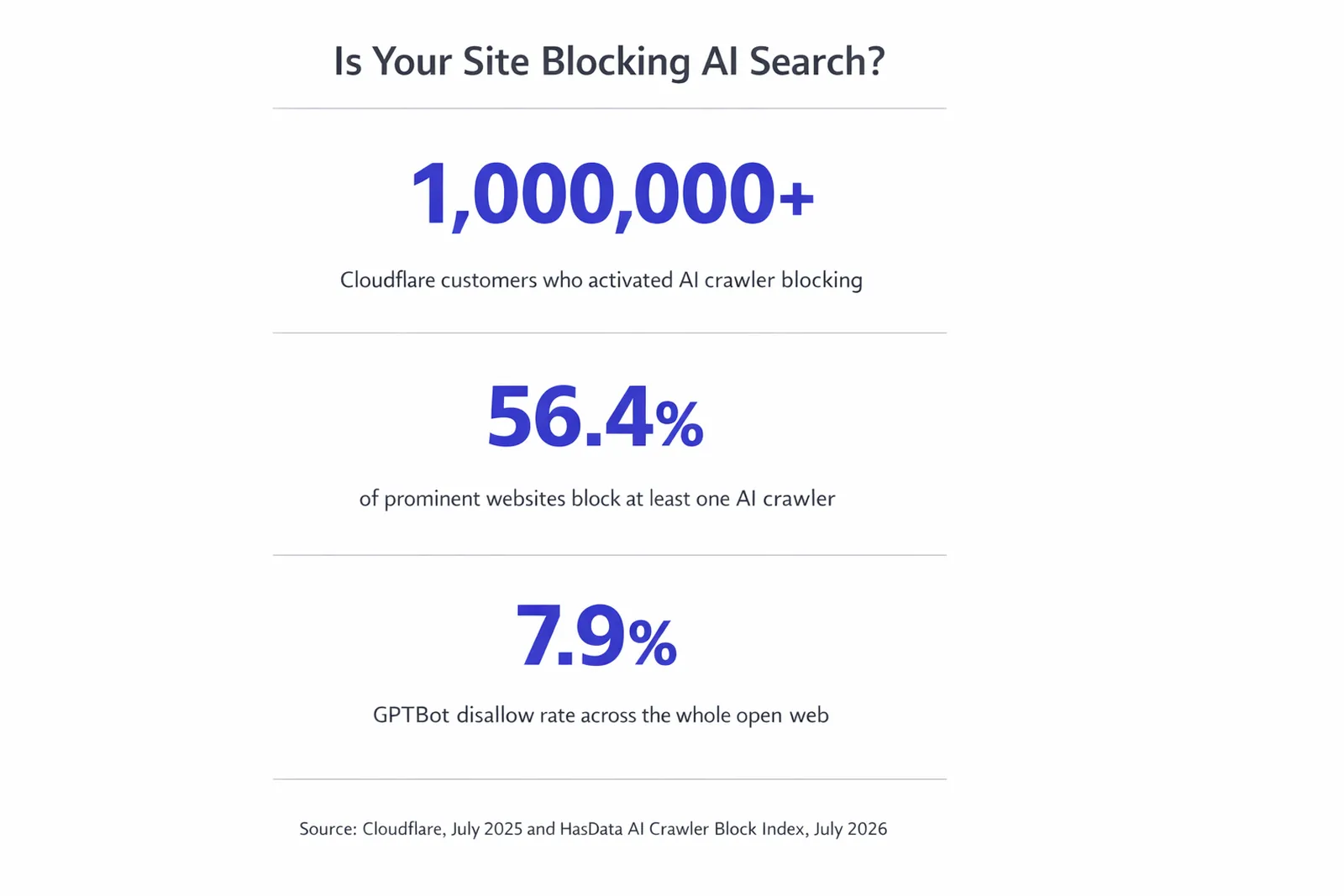
More than one million Cloudflare customers have turned on a one-click setting that blocks AI crawlers, and every new domain on Cloudflare has defaulted to asking permission before allowing them at all since July 1, 20251. Independent research published in July 2026 found that 56.4% of prominent websites block at least one AI crawler, and even on the open web the GPTBot disallow rate landed at 7.9%, almost identical to the 7.8% Cloudflare measured a year earlier2. None of it throws an error. Your site keeps working, Google still finds you, and the assistant your next prospect asks just quietly names someone else. Here is how to check whether that is happening to you, and the exact fix.
The crawlers behind the answer
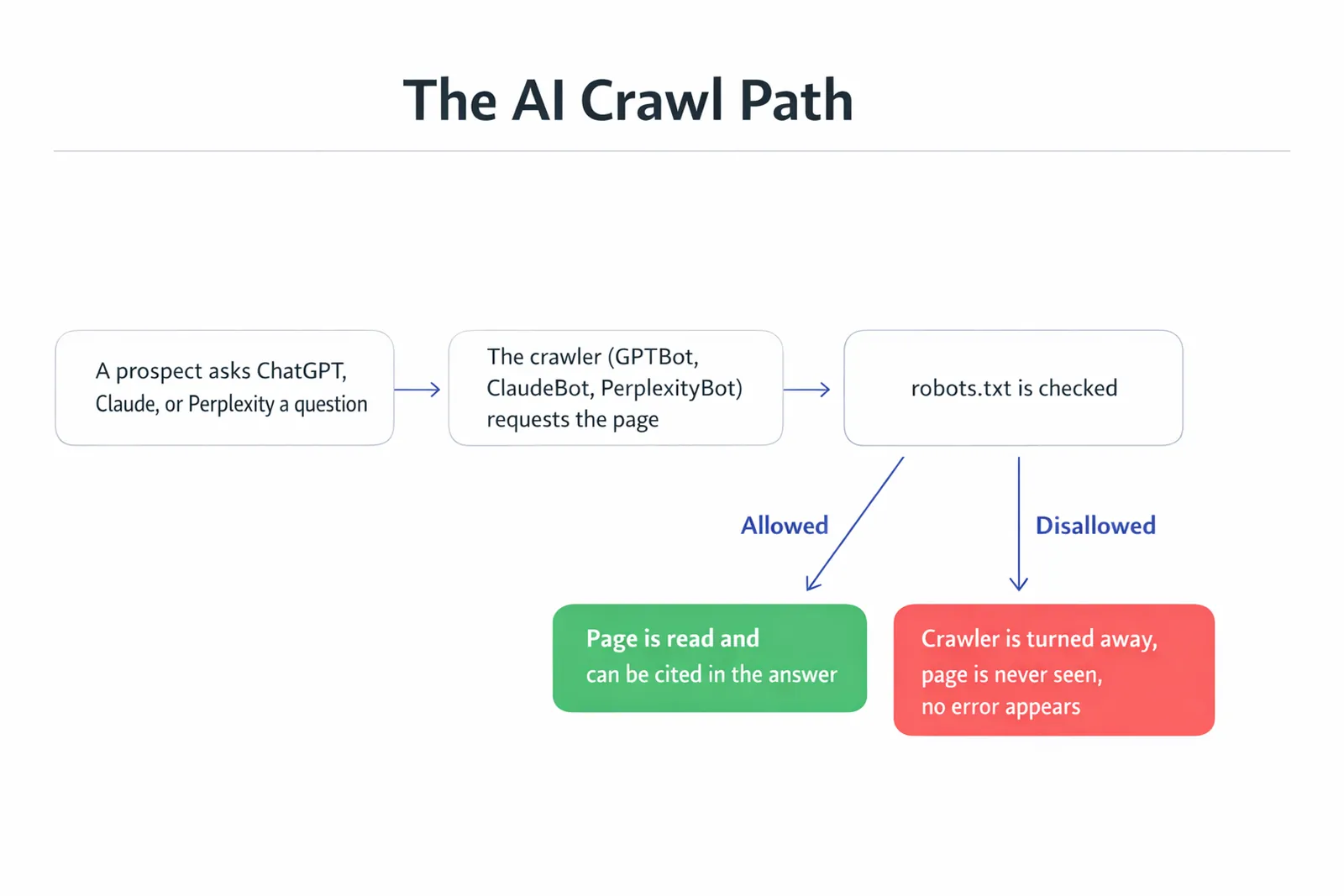
When a prospect asks ChatGPT who handles Medicare Advantage enrollment in their county, or asks Claude to compare two ACA plans, the assistant is not inventing that answer from nothing. Somewhere behind it, a crawler already visited pages like yours, read them, and decided which ones were trustworthy enough to draw from. If that crawler was never allowed to reach your site in the first place, you were never a candidate. Not a bad candidate. Not one it considered and rejected. Simply not there.
Robots.txt is the plain text file, sitting at the root of every website, that makes that decision. Google's own documentation describes it as a file containing "rules about which crawlers may access which parts of a site," placed in the top level directory so any crawler checks it before requesting anything else3. It has existed since the 1990s, built for search engines. AI companies adopted the same file rather than inventing a new one, which means the rule that keeps Googlebot out of your CRM login page is written in the exact same format as the rule that keeps GPTBot, ClaudeBot, or PerplexityBot out of your entire site.
That reuse is convenient for developers and quietly dangerous for site owners, because a single line written to solve one problem, keeping a crawler out of an admin folder, can be copied, templated, or defaulted in a way that blocks a crawler from the whole domain without anyone specifically choosing that outcome for the AI crawlers by name.
For a Medicare or ACA agency, the timing makes this worse than it would be for most small businesses. The Annual Enrollment Period and Open Enrollment run on fixed federal calendars, and a prospect researching plans during either window is often doing it under real time pressure, asking an assistant a direct question the same week they intend to act. A blocked crawler does not cost you a slow trickle of traffic you can make up later in the year. It costs you consideration during the exact weeks when the most people are actively choosing an agent, and there is no equivalent surge later to recover it in.
Voluntary, not a lock
Robots.txt is a request, not a wall. Google's documentation is direct about the limits: it "is not a mechanism for keeping a web page out of Google," and a disallowed URL can still surface in results if it is linked from elsewhere3. Reputable crawlers, the ones built by companies with a reputation to protect, honor the file anyway, because ignoring it publicly is bad business. That is why checking it still tells you something real.
How a site ends up blocking them
Nobody sits down and decides to disappear from AI search. It happens as a side effect of three separate things, usually stacked on top of each other by the time an agency notices.
The first is infrastructure defaults. Cloudflare, which by its own account handles traffic for roughly one fifth of the web, introduced a one-click "Block AI Bots" toggle in September 2024, and more than a million customers have activated it since1. Then, on July 1, 2025, Cloudflare went further: every new domain signing up now starts by being "asked if they want to allow AI crawlers, giving customers the choice upfront to explicitly allow or deny AI crawlers access," rather than defaulting to open and letting the owner opt out later1. Cloudflare's own developer documentation confirms what that default produces in practice: for a domain with no existing robots.txt file, Cloudflare "creates a new file with managed Disallow rules for known AI crawlers and serves it for you," setting a content signal of search yes, AI training no, by default4. If an agency's site sits behind Cloudflare and nobody has opened that setting since it was provisioned, silence is not neutral. Silence, on a platform that defaults to blocking, is a decision that already got made for you.
The second is inherited text. In 2023 and 2024, when AI scraping first became a public controversy, a wave of blog posts circulated a robots.txt snippet meant to block AI training bots, and it got copied wholesale into templates, starter themes, and agency boilerplate. Some of those snippets are still sitting in production robots.txt files today, disallowing crawlers by name that the person who pasted the snippet never specifically evaluated.
The third is the security layer. Several popular WordPress firewall and security plugins added AI bot blocking as a feature during that same window, and some ship it enabled by default for new installs, as a general anti-scraping measure rather than a decision about AI search specifically. That layer sits underneath your visible robots.txt file, which means a robots.txt file that looks perfectly open can still get overridden by a plugin or a host-level rule the site owner never configured directly.
There is a fourth cause worth naming separately, because it does not show up as a wrong setting at all: some page builder platforms simply do not give you a place to set it. GoHighLevel manages robots.txt at the domain level through Settings, Domains, and the three-dot manage menu, which covers a whole site. But a dedicated, native robots.txt editor scoped to individual funnels and website pages is not a shipped feature. It is an open feature request on GoHighLevel's own public ideas board, marked "under review" by a GoHighLevel representative as of October 28, 2025, with the request itself describing the current gap as forcing users to rely on "external workarounds" to control crawler access at the page level5. In the meantime, GoHighLevel's own support documentation shows the tool available for individual pages is a meta robots tag, useful for telling a page not to be indexed at all, but not a way to write a granular rule that allows Googlebot while explicitly welcoming GPTBot, ClaudeBot, and PerplexityBot by name6. If your quote funnel lives on a page builder and your marketing site lives somewhere else, you may not have a single robots.txt to check. You may have two, with two different owners, and two different answers.
The crawlers, by name
"AI crawler" is not one thing. Each major AI company runs at least two, sometimes three, separately named agents, each doing a different job, and each controlled by its own robots.txt rule. Blocking one does not block the others, and understanding the difference is what lets you write a rule that actually says what you mean instead of a blanket block that removes you from everything at once.
| Crawler | Company | What it actually does |
|---|---|---|
| GPTBot | OpenAI | Gathers content to train future foundation models7 |
| OAI-SearchBot / ChatGPT-User | OpenAI | Search indexing and live browsing when a user asks a question, separate from GPTBot7 |
| ClaudeBot | Anthropic | Collects web content to improve Claude's models8 |
| Claude-User / Claude-SearchBot | Anthropic | Fetches a page when a Claude user asks a question, or indexes for search, each with its own rule8 |
| Google-Extended | Controls training and grounding for Gemini apps and Vertex AI, separate from Search indexing9 | |
| PerplexityBot | Perplexity | Indexes your site so it can surface and link it in Perplexity's answers10 |
| Perplexity-User | Perplexity | Fetches a page live when a person asks Perplexity a direct question10 |
Notice what is missing from that list: a single "AI" user agent you could block or allow once and be done. Google is explicit that Google-Extended "doesn't have a separate HTTP request user agent string," meaning it crawls using Google's existing agent strings and is controlled purely through the robots.txt token9, and just as important, Google states plainly that "Google-Extended does not impact a site's inclusion in Google Search nor is it used as a ranking signal in Google Search"9. You can block Gemini's training crawler without touching your Google Search visibility at all, or you can leave it open specifically because you want to be considered when someone asks Gemini a question. That is a real choice, not a package deal, and most robots.txt files that block "AI" broadly never intended to make it.
Treat that table as a snapshot, not a permanent list. Anthropic added Claude-SearchBot as a distinct agent after ClaudeBot and Claude-User were already established, OpenAI has split search and training into separate crawlers as the product matured, and new AI search products keep launching their own named agents. A robots.txt file written once and never revisited will eventually miss a crawler that did not exist when it was last edited. Revisiting the file once or twice a year, the same way you would revisit a sitemap or a set of redirects, is enough to keep it current.
What a blocked crawler costs you
This is not a fringe scenario affecting a handful of sites. HasData's AI Crawler Block Index, run in July 2026 across 10,894 registrable domains split between 9,746 top open-web sites and 1,148 news publishers, found the whole-web GPTBot disallow rate at 7.9% and the whole-web rate for blocking any AI crawler at 10.3%2. Among the prominent, higher-traffic sites in the publisher sample, those numbers jump to a GPTBot block rate of 50.5% and an any-AI-crawler block rate of 56.4%2. Two independent measurements, taken a year apart by two different organizations using two different methods, landed on almost the same open-web figure: Cloudflare measured GPTBot disallowed in 7.8% of top-domain robots.txt files in June 20251, and HasData measured 7.9% in July 20262. When two unrelated studies agree that closely, the number is not noise.
1M+
Cloudflare customers who activated AI crawler blocking1
56.4%
Of prominent sites block at least one AI crawler2
7.9%
Whole-web GPTBot disallow rate, July 20262
~20%
Of the web runs through Cloudflare's network1
Put that in agency terms. If roughly one in ten sites on the open web has already turned GPTBot away, and closer to one in two among higher-traffic, higher-authority sites, then every agency that leaves its crawl path open by default is competing against a meaningful share of the field that has voluntarily removed itself from consideration. That is not a reason to relax. It is the opposite. An open, welcoming robots.txt is now a real point of difference, not table stakes everyone already has right.
Put a rough number on what that means for a single agency rather than leaving it abstract. Say a county's worth of Medicare and ACA shoppers ask an AI assistant some version of "who handles enrollment near me" a combined 400 times a month across ChatGPT, Claude, Gemini, and Perplexity, a plausible volume in a mid-sized metro given how much of that research has shifted off traditional search. If your site is one of roughly ten comparably positioned local agencies, and none of you are blocking any crawler, you are all in the pool the assistant draws its answer from, competing on the strength of your content the way you always have. Block even one crawler by accident, GPTBot say, and you have removed yourself from every one of ChatGPT's answers in that pool for the rest of the month, not because a competitor out-marketed you, but because a setting neither of you ever discussed made the decision first. That is not a projection about your specific traffic or your specific county. It is the mechanical consequence of being disallowed: zero consideration, not reduced consideration, for every question that crawler's assistant answers until the file changes.
Curious where you stand
If you want a professional read on this rather than a five minute self check, the free Audit scores your crawl access alongside your AI citation readiness and your HIPAA tracking exposure in about a minute. Run the free Audit.
Check your own site in five minutes
You do not need a tool or a login to check this. Robots.txt is a public file by design, which means you can read your own the same way any crawler does.
The 5 minute self check
- Type your domain followed by /robots.txt directly into your browser's address bar.
- Read every "User-agent" line. If you see GPTBot, ClaudeBot, Google-Extended, PerplexityBot, CCBot, or Bytespider followed by "Disallow: /", that crawler is fully blocked from your entire site.
- If the file does not exist at all, check with your host or platform directly. Some default to open, some default to closed, and "no file" does not always mean "no rule."
- If you run WordPress, open your security or firewall plugin's settings and look specifically for an AI bot or scraper blocking toggle, since that layer can override an otherwise open robots.txt file.
- If you use Cloudflare, log into the dashboard, open Bots or Security, and check whether "Block AI Bots" or a managed robots.txt rule is active.
- Check for an llms.txt file at your domain root too. It will not fix a blocked crawler, but its absence is a second, separate gap worth knowing about.
Do this on your quote or intake page's domain specifically if it differs from your main marketing site, and on any subdomain running a separate funnel tool. Each one can carry its own robots.txt file with its own rules, and agencies running a GoHighLevel funnel on one subdomain and a marketing site on another are a common case where one is open and the other quietly is not.
What you are looking for reads differently depending on the platform. On WordPress, a theme or a security plugin sometimes writes a virtual robots.txt on the fly, which means the file you see in your browser is generated at request time and will not match a copy sitting in your file manager, so always check the live URL, never a local file. On Wix and Squarespace, the platform controls robots.txt entirely, and there is no user-facing editor at all, which means your only lever if you find a problem is a support ticket, not a settings change. On a Cloudflare-fronted domain, the file a browser sees can be Cloudflare's managed version layered on top of, or in place of, whatever your origin server would have served, which is exactly why checking the dashboard setting matters as much as checking the file itself.
How to write a robots.txt that welcomes them
If you found a block, fixing it is a text edit, not a rebuild. Here is what an open, welcoming robots.txt actually looks like in practice. This is not a hypothetical example. It is what is live on our own site's root right now, fetched the same day this guide was written.
strategicaiarchitects.com/robots.txt, verified live today
"User-agent: * Allow: /" as the general rule, plus a Content-Signal line reading "search=yes, ai-input=yes, ai-train=yes," with GPTBot, ClaudeBot, PerplexityBot, and the other named AI crawlers explicitly allowed rather than left to a default11. The file also points to the sitemap and the llms.txt file, so a crawler that is let in immediately knows where the rest of the content lives.
The structure that produces a file like that is straightforward. Open with a general rule that allows everything, unless you have a specific folder, like an internal admin panel or a client portal, that genuinely should stay private. Then, rather than leaving every AI crawler to whatever your host or CDN defaults to, name the ones you actually want to allow explicitly: GPTBot, OAI-SearchBot, ChatGPT-User, ClaudeBot, Claude-User, Claude-SearchBot, Google-Extended, PerplexityBot, and Perplexity-User, each with its own "Allow: /" line. Being explicit does two things a blanket wildcard rule cannot: it survives a platform changing its default later, and it gives you a single file you can read top to bottom and know exactly what every named crawler is allowed to do, rather than trusting an inherited default you have never actually seen.
Close the file with a pointer to your sitemap and, if you have one, your llms.txt file, so a crawler that is let in does not have to guess where the rest of your content lives. None of this requires a developer or a platform migration. It is a text file. If your current site lets you edit it directly, or your host has a settings panel for it, this is genuinely a today task.
The Content-Signal line in that live example is worth a word of its own, because it is newer than robots.txt itself and most agency sites do not have one yet. Where a traditional "Disallow" rule controls whether a crawler may request a page at all, a Content-Signal preference describes what the site owner is willing to have done with the content once it is fetched, broken into three separate permissions: whether it may be used for search indexing, whether it may be used as input to answer a live question, and whether it may be used to train a model. A site can reasonably want all three set to yes, the way ours is, or want search and AI answers on while keeping training off, which is a different, narrower choice than blocking a crawler outright. Writing that line explicitly removes the ambiguity a bare "Allow: /" leaves on the table.
Robots.txt is not the only door
Fixing robots.txt closes the most common gap, not every gap. Perplexity's own documentation states that its Perplexity-User agent, the one that fetches a page the moment someone asks Perplexity a direct question, "generally ignores robots.txt rules" because a person, not an automated crawl, requested that specific fetch10. That is one more reason nothing genuinely sensitive, a client portal, a quoting tool tied to personal data, should ever rely on robots.txt as its actual security. Robots.txt controls what a well-behaved crawler chooses to read. It has never been access control.
How we build this in from day one
This is the exact problem we build agency sites to avoid rather than discover a year later. Every site we ship carries a robots.txt written to welcome every crawler, including the named AI crawlers, by default, the way ours does. It ships alongside a sitemap.xml and an llms.txt file that both regenerate themselves the moment a new page or post goes live, with the full absolute URL, so nothing has to be remembered or hand maintained after launch. We build on Astro, which sends a finished, static page to every visitor and every crawler, and every site is served from the edge on Cloudflare, configured deliberately rather than left on whatever the platform defaults to.
The schema stack matters here too, because an open crawl path only helps if what the crawler finds once it is inside is actually structured to be trusted: Organization, Service, Article, FAQPage, and BreadcrumbList markup that match what is really on the page. If you want the fuller picture of what makes a page citable once a crawler can actually reach it, we wrote about that separately in what changed in how agencies get cited this year, and if you want the ongoing side of this, checking whether you are still being named after the crawl path is open, see the citation monitoring guide.
We build this into every site we ship
If you would rather see it than audit it yourself, look at Digital Foundation, our done-for-you agency website tier. See Digital Foundation.
Digital Foundation starts at $247 a month for a complete, compliant website already optimized for AI citations, with Google Business Profile management and an AI chat widget included. The Pro tier, $497 a month, adds a weekly blog post, a weekly location page, and a 24/7 AI receptionist. The Scale tier, $997 a month, moves the publishing cadence to one new blog post every business day, twenty to twenty-two a month, plus two new location pages a week. All three tiers include a fourteen-day free trial and month to month billing with no long term contract12.
| Tier | Price | What it adds |
|---|---|---|
| Starter | $247/mo | Complete AEO-optimized site, GBP management, AI chat widget, open crawl path by default |
| Pro | $497/mo | Plus weekly blog post, weekly location page, 24/7 AI receptionist |
| Scale | $997/mo | Plus daily blog cadence, 2 new location pages weekly |
What an open crawl path gets you
None of this guarantees a citation. What it does is remove the one failure mode that happens silently, with no error message, no drop in your Google ranking to alert you, and no way to notice it from inside your own browser, since you are never the one making the blocked request. A crawler that is allowed in still has to find a real answer once it arrives, sourced, structured, and current. But a crawler that is turned away at the door never gets the chance to find anything at all, no matter how good the page behind that door actually is.
Put the two guides together and the order of operations is clear. This one gets the door open. What changed in AI search this year, linked above, is about making what is behind that door worth citing once the crawler is through it. Neither one works without the other, and checking your robots.txt file costs five minutes, which makes it the cheapest fix on this entire list to go verify today.
It is also the rare fix in this line of work that does not require a tradeoff. Opening your crawl path to GPTBot, ClaudeBot, Google-Extended, and PerplexityBot does not slow your site down, does not cost anything, and does not require you to publish anything you were not already going to publish. The only agencies with a real reason to block one of these crawlers on purpose are the ones with a specific, considered objection to their content training a model, and that is a legitimate choice to make deliberately. It is a very different thing from a setting nobody chose quietly making that decision on your behalf.
Questions agencies ask
Is GPTBot the same thing as ChatGPT?
No. GPTBot is the crawler OpenAI uses to gather training data, and disallowing it means your content should not be used to train future models. When someone asks ChatGPT a live question and it browses the web for an answer, that request comes from a different, separately named agent, OAI-SearchBot or ChatGPT-User, and each one is controlled by its own robots.txt rule. Blocking one does not block the others.
If I use Cloudflare, is my site blocking AI crawlers right now?
It might be, and the only way to know is to check. Cloudflare has offered a one-click AI Scrapers and Crawlers toggle since September 2024, more than a million customers have turned it on, and since July 1, 2025 every new domain onboarded to Cloudflare is asked upfront whether to allow AI crawlers at all. If a developer or a past agency answered that prompt, or flipped that toggle, years ago, it is still in effect today whether anyone remembers it or not.
Does blocking AI crawlers hurt my Google ranking?
Not directly, and it is worth being precise here. Google's own documentation states that Google-Extended, the token that controls AI training and grounding for Gemini, does not affect a site's inclusion in Google Search and is not used as a Search ranking signal. Blocking GPTBot, ClaudeBot, or PerplexityBot has nothing to do with your Google ranking either, since those are entirely separate companies. What blocking any of them does is remove you from consideration the next time someone asks that specific assistant a question your page could have answered.
What is llms.txt, and is it the same as robots.txt?
No, they do different jobs. robots.txt is the access-control file, the one that tells a crawler which parts of your site it may request at all. llms.txt is a separate, voluntary file that sits at your site root and gives an AI system a short, structured summary of what your business does and which pages matter most, similar in spirit to a sitemap written for a reader instead of a machine parser. You can have a perfect llms.txt and still be invisible if your robots.txt turns the crawler away before it ever gets there. Access comes first.
Does Perplexity actually ignore robots.txt?
For one of its two crawlers, yes, by its own admission. Perplexity's documentation distinguishes PerplexityBot, which indexes your site for search results and does honor robots.txt, from Perplexity-User, the agent that fetches a page in the moment a person asks Perplexity a direct question. Perplexity's own docs state that because a user requested that fetch, the agent generally ignores robots.txt rules. That does not mean robots.txt is pointless. It means it is not an absolute technical wall, on any platform, and treating it as your only line of defense for anything truly sensitive would be a mistake.
Will fixing my robots.txt guarantee I get cited by AI answers?
No, and be wary of anyone who tells you otherwise. An open crawl path is a precondition, not a guarantee. A crawler that is allowed in still has to find content worth citing: sourced data, a clear answer to the actual question, structured markup, and a named author. Fixing robots.txt removes a wall you may not have known was there. It does not replace the writing on the other side of it.
Do WordPress security plugins block AI crawlers too?
Some do, and it is often a default setting rather than a choice the site owner made. Several popular WordPress security and firewall plugins added AI-bot blocking rules during 2023 and 2024, when AI scraping first became a public concern, and some ship that protection turned on by default for new installs. If your site runs WordPress with a security plugin, check that plugin's settings specifically, in addition to your robots.txt file, since the block can happen at that layer instead of, or in addition to, the file itself.
How often should I recheck this once I fix it?
Once or twice a year is enough for most agencies, plus one extra check any time you switch hosts, add a security plugin, move behind a new CDN, or launch a new funnel subdomain, since each of those is a point where a new default can get applied without you deciding it. The list of named AI crawlers is also still growing as new AI search products launch, so a robots.txt file that was complete last year may simply be missing a crawler that did not exist yet.
Sources
- Cloudflare. "Cloudflare Just Changed How AI Crawlers Scrape the Internet at Large," press release, July 1, 2025. cloudflare.com.
- HasData. "The AI Crawler Block Index," 10,894 registrable domains sampled, July 2026. hasdata.com.
- Google Search Central. "Robots.txt Introduction and Guide." developers.google.com.
- Cloudflare Developer Docs. "Managed robots.txt." developers.cloudflare.com.
- GoHighLevel Ideas. "Native ROBOTS.TXT Editor in GoHighLevel," status updated to under review, October 28, 2025. ideas.gohighlevel.com.
- HighLevel Support Portal. "Disabling Search Engines From Indexing Your Website/Funnel Page Using Custom Tag." help.gohighlevel.com.
- OpenAI Developers. "Bots and Crawlers." developers.openai.com.
- Claude Help Center. "Does Anthropic Crawl Data From the Web, and How Can Site Owners Block the Crawler?" support.claude.com.
- Google Search Central. "Google's Common Crawlers," Google-Extended section. developers.google.com.
- Perplexity. "Perplexity Crawlers." docs.perplexity.ai.
- Strategic AI Architects. "robots.txt," fetched live on 2026-08-01. strategicaiarchitects.com.
- Strategic AI Architects. "Digital Foundation," pricing verified live on 2026-08-01. strategicaiarchitects.com.
Talk it through
Want a second pair of eyes on it?
Free 30 minutes. Bring what you found, or bring nothing and we will look together at how AI engines read your site and which fixes move first.
Find out if AI can actually reach your site
Run the free Audit, a live AEO Audit plus a HIPAA tracking scan of your site, in under a minute.