Playbook
Why Your Insurance Website Doesn't Show Up in AI Overviews
Ranking and getting cited are two different gates. Google just added a one-click way to fail the second one without touching the first.

20 min read

Ranking and AI citation are gated separately. Google's own documentation says a page must be indexed and snippet eligible to appear in AI Overviews or AI Mode, and a single nosnippet or max-snippet directive silently disqualifies an otherwise well-ranked page1. On June 3, 2026, Google also added a one-click opt-out toggle in Search Console that blocks a whole site from AI features without touching its normal rankings3. Neither one shows up in a standard rank check. Here's how to find out if either applies to you.
Ranking fine and still never named
You check your Medicare or ACA landing page in Google, and it's there, page one, sometimes the top three. You've done the work: the page loads fast, the content answers the question, the reviews are decent. Then a client mentions they asked ChatGPT which agent to call in your county, or you type your own core question into Google and watch an AI Overview appear above your own listing, quoting three other agencies and never quoting you.
Nothing about your ranking explains that. Search Console still shows impressions. Your position tracker still shows a green number. Every tool an agent normally checks says the page is fine, because every one of those tools measures classic ranking, and classic ranking is not the same gate as AI eligibility.
The instinct at that point is usually to blame the content. Maybe the page needs more depth, a better FAQ, a named author, more current numbers. All of that is worth doing regardless, and we'll get to it later in this guide, but it's worth ruling out the simpler explanation first: a page that fails a purely technical eligibility check never gets a chance to compete on content quality at all. You can rewrite the best answer on the internet and it still won't appear in an AI Overview if a single header on your server tells Google not to quote it.
That's the part almost nobody explains plainly, including most of the agencies selling AEO services right now: appearing in an AI Overview or an AI Mode answer requires clearing a second, separate technical gate on top of ranking, and that gate can be closed by something you'd never spot by reading your own page in a browser. It's closed by a single line, either in your page's HTML or in a response header your browser never shows you, and it's closed the same way whether your content is excellent or thin. The content quality question and the eligibility question are two different questions, and most sites that go looking for the problem only check the first one.
We build the sites and audit the ones we don't build, and this is one of the more common findings on legacy WordPress builds, page-builder funnels, and sites that migrated hosts or SEO plugins at some point without anyone auditing what came along for the ride. It's also, as of this summer, a setting Google now lets any site owner flip on purpose, which means the number of ways a page ends up ineligible just went up by one. If you've already worked through what changed in AI citation this year or you're still relying on rankings to tell you whether your AI search traffic exists at all, this is the layer underneath both: the gate that decides whether a page is even in consideration before content quality gets a vote.
The eligibility gate nobody explains
Google's own AI features documentation states the requirement in one sentence: to be eligible to be shown in generative AI features on Search, a page must be indexed and eligible to be shown in Google Search with a snippet, meeting the same technical requirements as classic search1. Read that again slowly, because the operative word is snippet, not ranking. A page can be indexed, ranked, and still fail the snippet test, and failing the snippet test fails the AI eligibility test right along with it.
Four controls determine whether a page clears that bar, and Google names all four in the same documentation: nosnippet, data-nosnippet, max-snippet, and noindex1. The first three live in a robots meta tag in the page's head, or in an HTTP response header called X-Robots-Tag that never shows up when you view a page's source in a browser, only when you inspect the actual server response. Noindex removes a page from the index outright, which removes it from consideration everywhere at once, AI features included.
Why this hides so well
A meta tag in the head is at least visible if you know to look for it. An X-Robots-Tag header is not. It's set by the server, a CDN rule, a caching plugin, or a security header module, and it never appears anywhere in the rendered page. Two sites can look identical in a browser and have completely different AI eligibility, and the only way to tell them apart is to read the actual HTTP response, not the page.
| Directive | Where it lives | What it does |
|---|---|---|
| nosnippet | Robots meta tag or X-Robots-Tag header | Blocks any snippet in classic search and disqualifies the page from AI features entirely |
| max-snippet:0 (or a low value) | Robots meta tag or X-Robots-Tag header | Caps how much text Google can quote; a value of zero behaves like nosnippet for AI purposes |
| data-nosnippet | Wraps a specific HTML element on the page | Excludes just that passage, so the rest of the page stays eligible but that block can't be quoted |
| noindex | Robots meta tag or X-Robots-Tag header | Removes the page from the index entirely, which removes it from AI features by definition |
| AI features opt-out toggle | A Search Console setting, not present anywhere in the page's code | Blocks the whole property from AI Overviews, AI Mode, and AI-powered Discover; invisible from outside Search Console |
Google is explicit that none of this requires anything extra to fix. There are no additional requirements to appear in AI Overviews or AI Mode beyond ordinary indexing and snippet eligibility1. That's a relief and a warning at the same time. A relief, because you don't need some exotic new schema type nobody's heard of. A warning, because it means the entire problem, when it exists, usually traces back to one of the five rows in that table, not to a content gap you'd have to rebuild the page to fix.
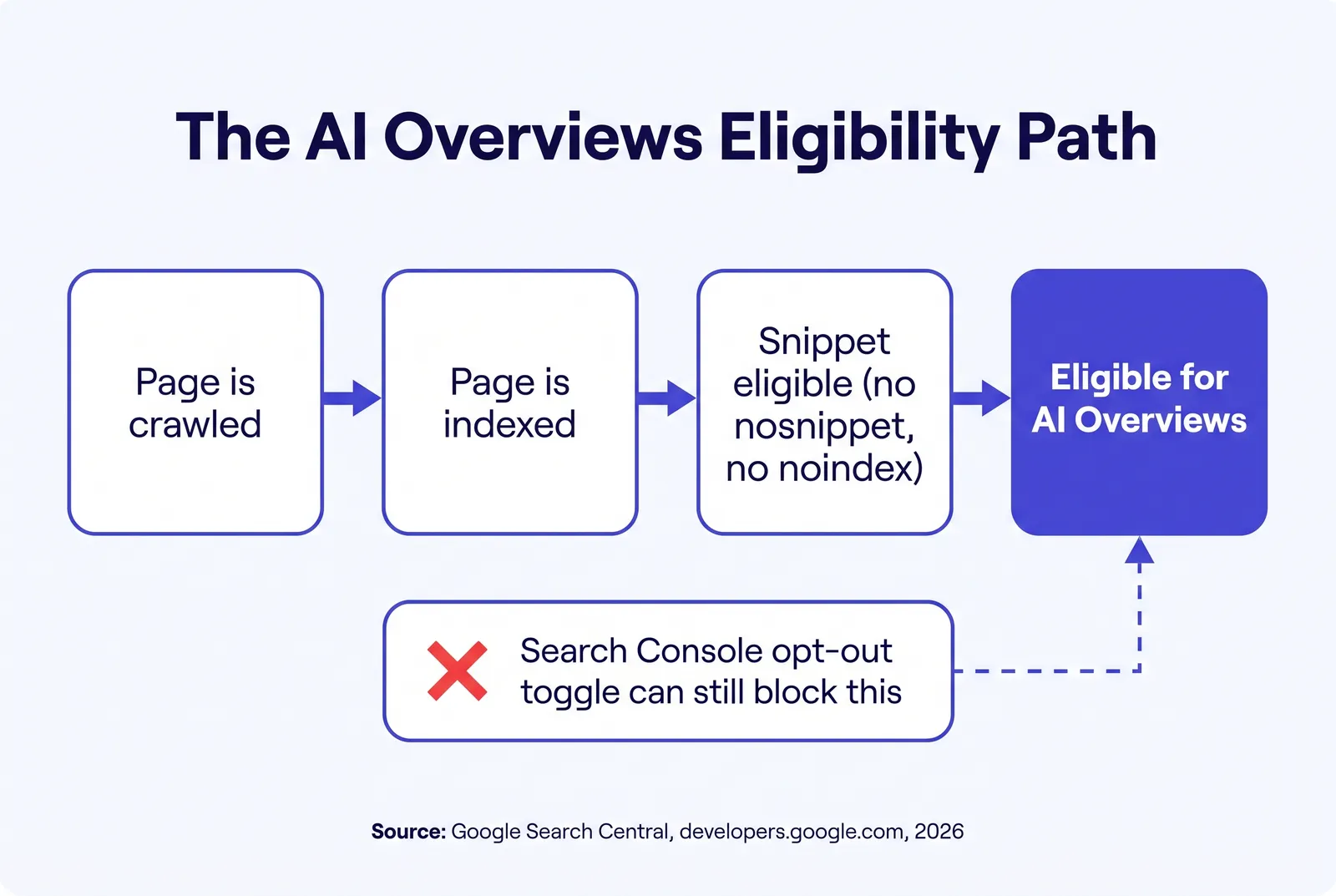
Google just added a manual switch for this
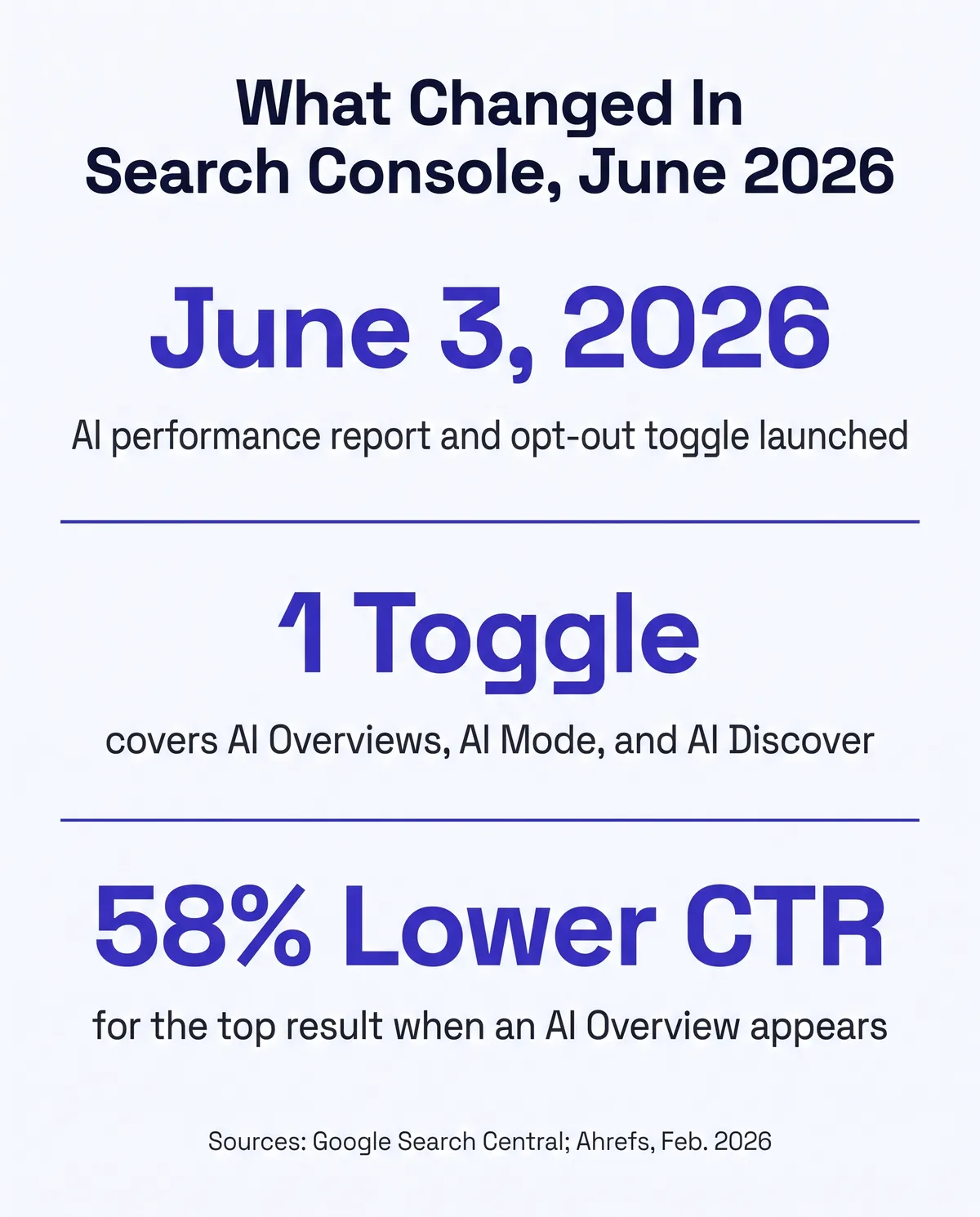
Until this year, the only way a page failed the AI eligibility gate was by accident: a stale noindex tag, a plugin default, a migration nobody audited. On June 3, 2026, Google added a second, deliberate way. A new toggle inside Search Console lets a site owner block their entire property from AI Overviews, AI Mode, and AI-powered Discover in one click, and Google shipped it alongside a new Search Generative AI performance report showing, for the first time, how often a site's pages appear inside those generative features3.
The performance report shows impressions, which pages appeared, which countries, and which devices. As of the announcement, it does not show clicks, click-through rate, or the actual queries that triggered an appearance, and Google has said more metrics may come later without committing to a date34. The opt-out toggle is a single switch covering all three generative surfaces at once. Google has not split it into separate controls per feature3.
Two things about the toggle matter more than the toggle itself. First, Google states plainly that opting out is not used as a ranking signal for results outside of generative AI features, meaning it doesn't touch your position in classic search34. Second, as of this announcement, both the performance report and the opt-out toggle are rolling out to a subset of website owners in the United Kingdom first, with Google saying only that it plans to expand access to more site owners over time, without a confirmed global date34. If you're a U.S. agency and you don't see either feature in your own Search Console yet, that's expected. It doesn't mean the setting can't reach your account later, and it doesn't mean the underlying snippet-eligibility requirements in the section above have anything to do with the rollout timeline. Those apply to every site, everywhere, already.
| Feature | What it shows or does | Rollout status |
|---|---|---|
| Search Generative AI performance report | Impressions, pages, countries, devices; no clicks, CTR, or query data yet | Subset of UK site owners since June 3, 2026; no confirmed global date |
| AI features opt-out toggle | One switch blocking AI Overviews, AI Mode, and AI-powered Discover | Same limited rollout as the performance report |
| Standard Search performance report | Clicks, impressions, CTR, and query data for classic search | Already live for every verified property |
Who else has their hands on that switch
A toggle that lives inside Search Console is only as safe as the list of people who can log into Search Console. Most agencies have never audited that list, and most agencies would be surprised by who's still on it: a web developer from two rebuilds ago, a marketing contractor who set up Google Business Profile and got Search Console access along the way, a VA who needed it once to submit a sitemap and kept the login. None of them are malicious. All of them are a person who could flip a setting they don't fully understand, during an unrelated cleanup, troubleshooting session, or handoff, and never mention it because they didn't realize it mattered.
This isn't a hypothetical about the opt-out toggle specifically, either. It's the same access-hygiene problem that already causes noindex tags to survive past a site migration and max-snippet values to get set by a caching plugin nobody reviewed. The common thread across every row in the eligibility table above is that the person who could fix it, and the person who could accidentally cause it, are rarely the agency owner. They're whoever last had their hands on the account.
A realistic version of this: an agency switches website vendors, the old vendor's staging site is taken down, but the old vendor's team member is never removed from Search Console because nobody on the agency side knew the access existed to begin with. Eighteen months later that person leaves their job, their account gets swept up in an unrelated offboarding process at their old company, or they simply never think about your Search Console property again, and none of it matters, until a setting in that account changes something on your site and nobody currently at your agency has the context to know it happened. The failure mode isn't malice. It's that access outlives the relationship that justified it, on almost every agency account we've reviewed.
A five-minute check worth doing today
Open Search Console, go to Settings, then Users and Permissions, and read the full list out loud. Anyone who shouldn't still be there gets removed. It costs nothing, it takes less time than reading this section did, and it closes the access side of this problem regardless of whether the opt-out toggle has reached your account yet.
What it actually costs to be invisible
The classic-search cost of a snippet-blocking directive is direct: no snippet, a worse-looking listing, fewer clicks even at the same ranking position. The AI cost compounds it, because Ahrefs' most recent analysis found that the presence of an AI Overview now correlates with a 58 percent lower average click-through rate for the page ranking first in classic organic results, based on a study of 300,000 keywords comparing December 2023 to December 2025 Search Console data, published February 4, 20262. In plain terms: when an AI Overview appears above the results for a question your prospect asked, the page that used to earn most of the clicks earns far fewer of them, whether or not that page was the one the AI Overview actually quoted.
Layer in what's actually happening on the buyer's side and the number stops being an abstract SEO statistic. J.D. Power's AI Insurance Experience Study, fielded June through July 2026, found that nearly one in three auto and home insurance customers, 29 percent, are already using AI tools to research coverage, service an account, or shop for a new policy5. Among customers who used AI to research products or coverage, 37 percent changed their policy based on what the AI told them, and among those who used AI specifically to shop for a new policy, 42 percent went on to purchase one5. Those aren't browsing statistics. They're people whose next carrier or agent gets decided, in part, by whichever source the AI names, and a page that's technically ineligible for AI features can never be that source, no matter how good the content on it is.
58%
Lower average CTR for the top result when an AI Overview appears, Ahrefs, Feb. 2026
29%
Of auto and home insurance customers already use AI tools to research or shop, J.D. Power, 2026
42%
Of AI-assisted shoppers went on to purchase a policy, J.D. Power, 2026
5
Distinct directives that can silently block AI eligibility, per Google's own docs
Run that 58 percent figure against a number you can pull from your own analytics: your current monthly organic clicks on the page that answers your single most-asked question, the one a prospect types into Google or asks an assistant during AEP or open enrollment. If that page currently earns 40 clicks a month and an AI Overview starts appearing above it for that exact question, Ahrefs' data says the realistic new number is closer to 17, not because your ranking dropped, but because the click itself became less likely once an AI answer sat above the listing2. That's the cost of doing nothing even when you're eligible. The cost of being ineligible is worse: you don't get a reduced share of that traffic, you get zero shot at being the source the AI Overview names in the first place, on every question it answers for your market, indefinitely, until someone finds and removes the directive.
Put the two studies together and the shape of the risk is plain. More of your prospects are consulting an AI system before they consult you, the click that used to go to the top classic result is worth noticeably less when an AI Overview shows up first, and a technical directive that took someone thirty seconds to add, on purpose or by accident, can remove you from that AI surface entirely while leaving your ranking untouched. None of that shows up when you check "am I ranking." It only shows up when you check "am I eligible."
How to check your own site right now
You don't need a paid tool for this. Every check below runs from a terminal or a browser, takes a few minutes, and tells you definitively whether any of the five directives from the table above are present on your own pages.
- Check the HTTP response headers. Run
curl -I https://yoursite.com/your-page/from a terminal, or use any free header-checking tool, and read the output for a line starting withX-Robots-Tag. If it containsnosnippet,noindex, or a lowmax-snippetvalue, that page is blocked from AI features regardless of anything else on it. A clean response looks like this, with no robots directive line at all:HTTP/2 200content-type: text/html; charset=utf-8
cache-control: public, max-age=0, must-revalidate. If you instead see something likex-robots-tag: noindex, nosnippet, you've found the block, and you've found it in about the same amount of time it took to read this bullet. - Check the page's meta robots tag. View the page source (not the rendered page,
the actual HTML) and search for
<meta name="robots". Read the content attribute for the same directives. A page can carry the block here even with a clean X-Robots-Tag header, and vice versa, so check both. - Check your Search Console user list. Settings, then Users and Permissions. Remove anyone who no longer needs access, before an opt-out toggle or any other setting reaches your account and gives that access more to do.
- Check whether the report or toggle has reached your property yet. Look for a new item under Search Console's left navigation referencing AI features or Search Generative AI performance. If you don't see it, nothing to fix there yet, and no action needed until it appears.
- Repeat the header and meta-tag check on your most important pages specifically. Your homepage, your top service pages, and any page you'd want an AI system to name. A site-wide plugin default can affect every page identically, or a single page can carry a stray tag nothing else on the site has.
You can do this whole check yourself
Nothing above requires a developer or a paid audit. If you want a second pass anyway, or you want it checked against your schema, your crawlability, and your AI-citation readiness at the same time, the free Audit runs the broader version of this in about a minute. Run a free Audit.
What Google says actually earns citation
Clearing the eligibility gate gets you into consideration. It doesn't get you named, and Google is specific about what does the rest of that work. Its own optimization guide, last updated July 10, 2026, states outright that structured data isn't required for generative AI search and there's no special schema.org markup built specifically for it4. Schema still earns its keep elsewhere, which is why every build we ship carries it, but it isn't the lever that turns AI Overviews on or off, and treating it as one is a common, understandable mistake.
What the guide asks for instead is content built around what a reader would find genuinely useful, described as "non-commodity content," rather than a rehash of what every other agency site already says4. It also warns specifically against a tactic that sounds clever but backfires: fragmenting a page into tiny pieces sized for how the guide assumes an AI system reads, rather than writing at the length the topic and the reader actually need4. Google's language for this concept is query fan-out, a set of concurrent, related sub-queries the model generates to pull in more supporting information before it answers4. The practical implication for an agency site: a thorough page that actually answers the adjacent questions a prospect would ask next has more surface area to get pulled into that fan-out than ten thin pages built around ten narrow keyword variants, and Google explicitly flags the ten-thin-pages approach as a spam-policy risk, not a growth hack4.
Translate that into an actual Medicare or ACA question and the fan-out concept stops being abstract. A prospect asks an assistant something like "what happens if I miss my Medicare enrollment window." The model doesn't just look for a page matching that exact phrase. It generates related sub-queries behind the scenes, covering the late-enrollment penalty, the specific enrollment periods that might still apply, and how the penalty is calculated, then pulls from whichever eligible pages answer each piece4. A single page that already covers all three, in plain language, with the current plan-year figures sourced inline, has a shot at getting pulled into several parts of that answer. Ten separate thin pages, each targeting one narrow keyword variant of the same question, mostly just compete with each other for the same fan-out slot, and Google says as much directly.
How we build this in from day one
This is the exact gap Digital Foundation closes at the build level instead of the audit level. Every site we ship is static HTML rendered on Astro and served from Cloudflare's edge, with no page builder plugin, legacy theme, or bolted-on caching layer that could quietly add a noindex, a max-snippet cap, or an X-Robots-Tag header nobody chose on purpose. We checked our own build against the same test in this guide before publishing it: no X-Robots-Tag header, no robots meta directive capping the snippet, nothing standing between an eligible page and the eligibility gate Google describes.
Digital Foundation Starter, verified live on the pricing page at 247 dollars a month, includes the complete compliant website, AI citation optimization across every page, Google Business Profile management with review harvesting, and an AI chat widget, with a 14-day free trial and setup free on a limited basis6. Because the eligibility side of this is handled at the architecture level, the work on every page becomes the part that actually earns a citation once you're eligible: answering the question fully, sourcing the numbers, and naming a real author, which is the same non-commodity standard Google's own guide describes4.
We also watch the access side of this for the accounts we manage, the same Search Console user list check this guide walks you through yourself, so a departed contractor or an old login doesn't sit there as a standing risk nobody's looking at. It pairs with the crawler side of the same problem, which we cover separately in our guide to AI crawlers getting blocked outright: one guide covers whether the bot can reach the page at all, this one covers whether the page qualifies once it's there.
None of this is exotic engineering. A static Astro build simply has fewer moving parts that can silently inject a header: no plugin marketplace, no theme update that ships a new default, no caching layer bolted on after the fact to compensate for a slow platform. The eligibility gate stays closed the way you'd want it closed, open, unless someone with real access to your account deliberately changes that, and that's a much shorter list of people to keep track of than a typical multi-plugin WordPress stack accumulates over a few years.
If your site is already fast and still invisible to AI
Speed and eligibility are different problems with the same symptom: a page that looks fine and performs worse than it should. We cover the speed half in our 1,080-site Core Web Vitals study. This guide is the eligibility half. Worth checking both before assuming either one is fine.
What actually changes
Not a promised spot in an AI Overview. No one, including Google, can promise that, since it depends on the query, the competing content, and a moving target Google itself keeps adjusting. What changes is that the technical door stops being closed by accident, which is the part entirely within your control today.
Your pages stop losing a citation shot to a stray header nobody chose on purpose. Your Search Console user list stops being a standing risk you've never actually looked at. And when Google's AI features report and opt-out toggle do reach your account, whenever that turns out to be, you'll already know what the switch does instead of finding it for the first time while wondering who touched it.
Questions agents ask
What's the difference between ranking in Google and appearing in an AI Overview?
Ranking measures whether your page matches a search query well enough to earn a spot in the ten blue links. AI Overviews and AI Mode pull from the same index, but only from pages that are indexed and snippet eligible, meaning nothing on the page blocks Google from quoting it. A page can rank on page one and still be permanently ineligible for AI features if a snippet-blocking directive is present.
What is a nosnippet or max-snippet tag, and how would I know if my site has one?
They're robots directives, set either in a meta tag in the page's head or in an HTTP response header called X-Robots-Tag, that tell Google how much of a page it can show as a snippet. Nosnippet blocks any snippet outright. Max-snippet caps the character count, and a value of zero has the same effect as nosnippet. You can check by viewing a page's source for a robots meta tag or by running curl -I against the URL and reading the response headers.
What is Google's new AI features opt-out toggle in Search Console?
Announced June 3, 2026, it's a single switch in Search Console that lets a site owner block their content from AI Overviews, AI Mode, and AI-powered Discover without touching their normal search rankings. It shipped alongside a new Search Generative AI performance report showing impressions, pages, countries, and devices. Both features started with a subset of UK site owners, with global rollout unscheduled as of this writing.
Does a client-side SEO plugin or funnel builder usually add these directives by accident?
It happens most often through a staging environment that never got its noindex removed at launch, a caching or security plugin that ships an aggressive default robots header, or a page builder template that sets max-snippet as part of a generic SEO module nobody reviewed line by line. None of it shows up in a normal Google ranking check, because the page can still rank while carrying a directive that blocks the AI-specific eligibility gate.
Does blocking AI Overviews hurt my regular Google ranking?
Google states plainly that the opt-out control is not used as a ranking signal for results outside of generative AI search features. A snippet-blocking directive is different: since AI Overviews and AI Mode require a page to be snippet eligible in classic search too, nosnippet or a max-snippet value of zero also removes your snippet from ordinary search results, which does affect how your listing looks and how many people click it.
If my site never shows up in an AI Overview, does that mean I did something wrong technically?
Not necessarily. Google's own guidance states there are no additional technical requirements to appear in AI Overviews or AI Mode beyond being indexed and snippet eligible. Whether a specific query even triggers an AI Overview, and which sources it names, depends on the query and the available content, not on a special AI schema or markup you're missing.
Do I need special schema markup just for AI Overviews?
No. Google's AI optimization guide states structured data isn't required for generative AI search and there's no special schema.org markup built for it. Schema still helps overall SEO and helps other AI systems parse your page, which is why we ship it on every build, but it isn't the lever that turns AI Overviews eligibility on or off.
How often should an agency recheck its own pages for these directives?
Any time you change hosts, themes, SEO plugins, or web vendors, since those are the moments a stray noindex or max-snippet value tends to get introduced. Beyond that, a quarterly check of your top pages and your Search Console user list takes a few minutes and catches drift before it costs you a full AEP or open enrollment cycle.
Sources
- Google Search Central. "AI Features and Your Website," preview controls (nosnippet, data-nosnippet, max-snippet, noindex) and eligibility requirements for generative AI features. developers.google.com.
- Ahrefs. "AI Overviews Reduce Clicks," updated analysis of 300,000 keywords comparing December 2023 to December 2025 Search Console click-through data, published February 4, 2026. ahrefs.com.
- Search Engine Land. "Google Search Console AI performance reports and controls to block your content in AI responses," reporting Google's June 3, 2026 announcement. searchengineland.com. Original announcement: developers.google.com.
- Google Search Central. "Google's Guide to Optimizing for Generative AI Features on Google Search," last updated July 10, 2026. developers.google.com.
- J.D. Power. 2026 AI Insurance Experience Study, fielded June through July 2026, as reported by Insurance Journal, August 28, 2026. insurancejournal.com.
- Strategic AI Architects. "Digital Foundation," service pricing page. strategicaiarchitects.com.
Talk it through
Want a second pair of eyes on it?
Free 30 minutes. Bring what you found, or bring nothing and we will look together at how AI engines read your site and which fixes move first.
Find out if your own site clears the eligibility gate
Run the free Audit, a live AEO Audit plus a HIPAA tracking scan of your site, in under a minute.