Playbook

Search Console Will Show You Your AI Overviews Impressions. It Still Won't Show You the Clicks.
A new number showed up in your Search Console account this year. It answers a smaller question than you think.

19 min read
Google's new Generative AI performance report is now live in every Search Console property worldwide, as of August 31, 2026, per Google's own help documentation1. It shows five things: impressions, pages, countries, devices, and dates2. It does not show clicks, click-through rate, or queries. Meanwhile Ahrefs found the top-ranking page's click-through rate is now 58% lower when an AI Overview appears3, and SparkToro's analysis of Datos clickstream data found 68.01% of all Google searches end with no click at all4. The report tells you that you showed up. It still can't tell you whether it mattered.
You finally have a number. It's the wrong one.
You log into Search Console because somebody in a Facebook group for agency owners mentioned Google finally added an AI report. You find it under a new menu item, click in, and there it is: a graph, climbing, labeled Impressions. Your site showed up inside an AI Overview or an AI Mode answer some number of times last month. For the first time since ChatGPT and Google's AI features started eating into search, you have a number that isn't zero, isn't a guess, and isn't something a third-party tool is charging you $79 a month to estimate.
Then you go looking for the number that actually tells you whether any of that mattered, and it isn't there. No clicks. No click-through rate. No list of the questions people were actually asking when your page got pulled in. You appeared. Google will confirm that much, in writing, inside your own account. What it will not confirm is whether a single person who saw your agency's name in an AI answer ever visited your site, called your office, or filled out a form. That gap is the entire subject of this guide.
Quick gut check
Open Search Console right now, click Performance in the left nav, and look for a Generative AI item
underneath it, or add /ai to your existing performance report URL. If your property has
been verified for a while and you still see nothing, it likely means your site hasn't earned enough
impressions inside AI features yet, not that the report hasn't reached you. If you want a second read
on why that might be, the free Audit checks whether your site is even built to be citable in about a
minute. strategicaiarchitects.com/audit
What the new report actually shows
Google announced the Generative AI performance report on its Search Central Blog on Wednesday, June 3, 2026, describing it as a dedicated view, separate from the standard Performance report, of a site's visibility inside generative AI features on both Search and Discover1. It launched to a subset of properties first, so Google could test it and gather feedback before opening it up more broadly1. A note added to that same post later reads plainly: "As of August 31, 2026, we've rolled out these insights to all websites worldwide"1. If you have a verified Search Console property today, you have access to this report, whether or not it currently shows any data.
Google's own announcement lists exactly what the report covers, in these words: "Impressions: How often URLs from your site appeared in generative AI features in Search and Discover. Pages: Check which URLs appeared within AI features. Countries: Understand your visibility on a country basis. Devices: Identify the devices people are using when seeing your website. Dates: Monitor your performance over time with hourly, daily, weekly, and monthly granularity"1. That is the entire feature set. Five dimensions, all describing visibility, none describing outcome.
Impressions
How often a URL from your site appeared inside an AI Overview, AI Mode, or a Discover AI feature.
Pages
Which specific URLs on your site are the ones actually getting pulled into AI answers.
Countries
Where in the world those impressions are happening, useful if you write for more than one state.
Devices
Whether the surfaced impression happened on mobile or desktop, for Search results specifically.
Dates
Hourly, daily, weekly, or monthly trend lines, so you can see the shape of the visibility over time.
Search vs. Discover
Two separate dedicated reports: one for generative AI features in Search, one for Discover.
The report also inherits the same mechanics as the standard Performance report: Google's help documentation confirms "the usual data limitations (1,000 row limitation, time period, etc) for the Search performance report also apply to this report"2. So the ceiling, the export limits, and the general shape of the interface will feel immediately familiar if you already check your standard Search performance numbers. What's different is entirely about what's missing from the columns, not how the table behaves.
What it still won't show you
Compare the list above against what the ordinary Performance report has shown for years: impressions, clicks, click-through rate, average position, and the actual queries people typed. The Generative AI performance report keeps impressions, pages, countries, devices, and dates. It drops clicks. It drops click-through rate. It drops queries entirely. Google's help center is explicit that this report pulls from "the Web search type in the Performance report (Search results)"2 for its impression counting, but the click-side columns simply aren't part of what gets surfaced here.
| Metric | Standard Performance report | Generative AI performance report |
|---|---|---|
| Impressions | Yes | Yes |
| Pages | Yes | Yes |
| Countries / Devices | Yes | Yes |
| Clicks | Yes | Not included |
| Click-through rate | Yes | Not included |
| Queries | Yes | Not included |
| Average position | Yes | Not applicable, AI features aren't ranked positions |
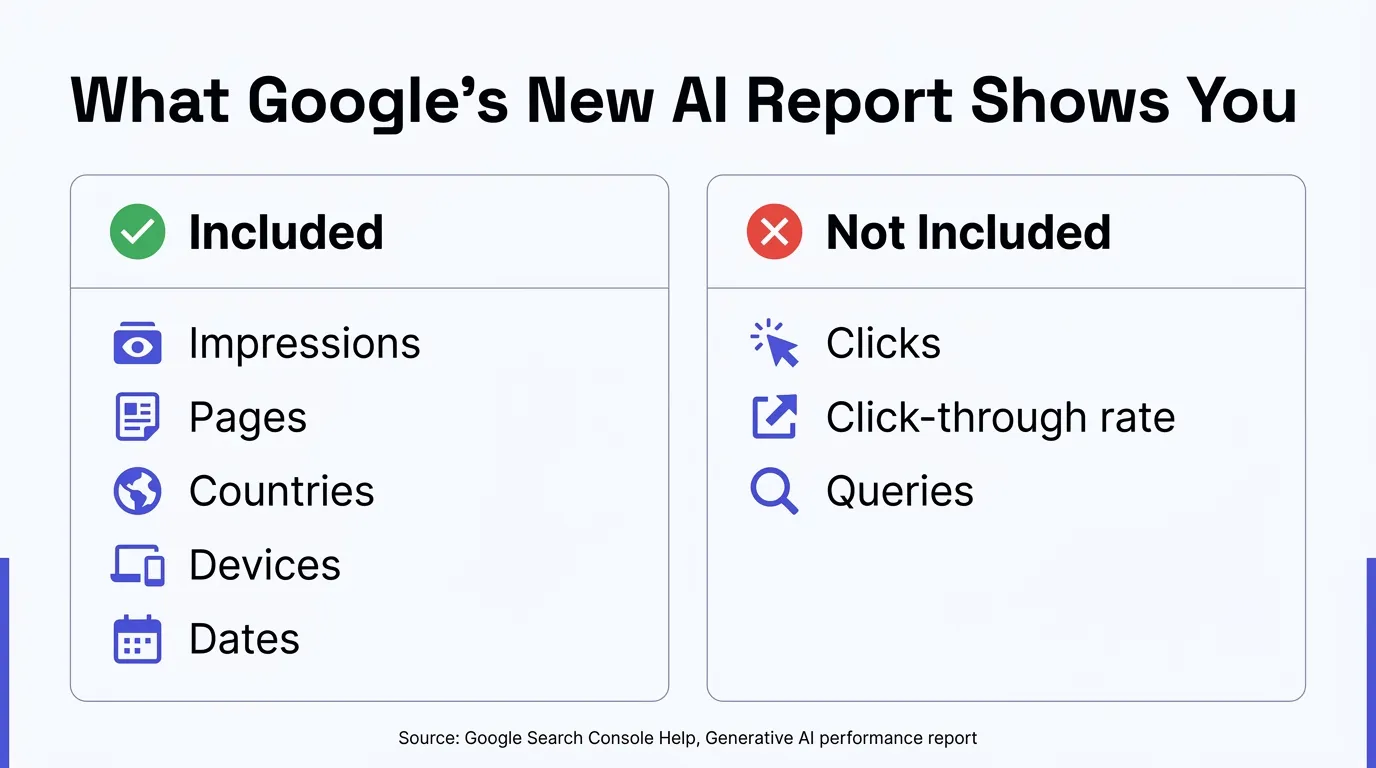
For an insurance agency, that missing middle column is the whole ballgame. Knowing your Medicare Advantage comparison page showed up 400 times inside AI Overviews last month is interesting. Knowing whether any of those 400 impressions led to a visit, and whether that visit led to a call, is the actual business question, and it's the one Google still leaves you to answer on your own.
Why Google left clicks out
Google hasn't published a stated reason for excluding click and query data from this specific report, and we're not going to pretend we've seen an internal memo we haven't. What we can say plainly, from Google's own product description, is that the report was deliberately scoped as an impressions and visibility view, launched narrower on purpose so the team could "thoroughly test them and receive feedback before making them widely available"1, with an open invitation for site owners to request "additional metrics over time" through the feedback form inside the report1. Read plainly, that's Google's own language for "this is version one, and clicks might come later, but they aren't here now."
There's also a structural reason click data is a genuinely harder problem here than it is for classic blue links. An AI Overview or an AI Mode answer can synthesize language from several sources into one paragraph without a user ever clicking through to any single one of them, and the same impression can show multiple cited sources at once. Attributing a single, cleanly countable "click" to one URL out of several cited in one generated answer is a different engineering problem than counting a click on a single blue link in a ranked list of ten. That doesn't make the missing data less frustrating. It's a reasonable guess at why it's a harder metric to ship first.
None of this is unprecedented, even if it's frustrating in the moment. When Google encrypted organic search referrers years ago, the keyword-level data that used to show up in analytics platforms disappeared almost overnight, and marketers spent years building imperfect workarounds rather than getting it back in its original form. AI visibility reporting may follow a similar shape: the signal that something happened arrives well before the data explaining what it was worth does, and there's no guarantee the second half ever ships in the form site owners actually want. Building your own proxy measurements now, rather than waiting on Google to close the gap, is the more reliable bet either way.
What a click you can't count actually costs
The reason the missing click data stings is that the click itself has been getting harder to earn even before this report existed. Ahrefs, the SEO research firm, ran its first study on this in April 2025: analyzing 300,000 keywords, split evenly between keywords with an AI Overview present and informational keywords without one, using aggregated Search Console data, Ahrefs found the position-one page's click-through rate fell from 7.3% in March 2024, before the AI Overview rollout in the US, to 2.6% in March 2025, after it, a 34.5% average decline3.
Ahrefs ran the same methodology again on more recent data and published an update on February 4, 2026. Using the same 300,000-keyword structure and comparing December 2023 to December 2025, the researchers, Ryan Law and Xibeijia Guan, found the gap had widened: "the presence of an AI Overview now correlates with a 58% lower average clickthrough rate for the top-ranking page"3. The trend isn't flattening out. It's getting worse for the page that used to own that click.
That's one page's CTR against itself, over time. SparkToro's June 9, 2026 analysis, built on Datos clickstream panel data covering desktop and mobile US searches from January through April 2026, looked at the broader picture: "68.01% of Google searches ended without a click" during that window4. Put differently, roughly two out of every three searches a prospect runs today, on any topic, end with them reading an answer on the results page itself and never visiting a single website, yours or a competitor's.
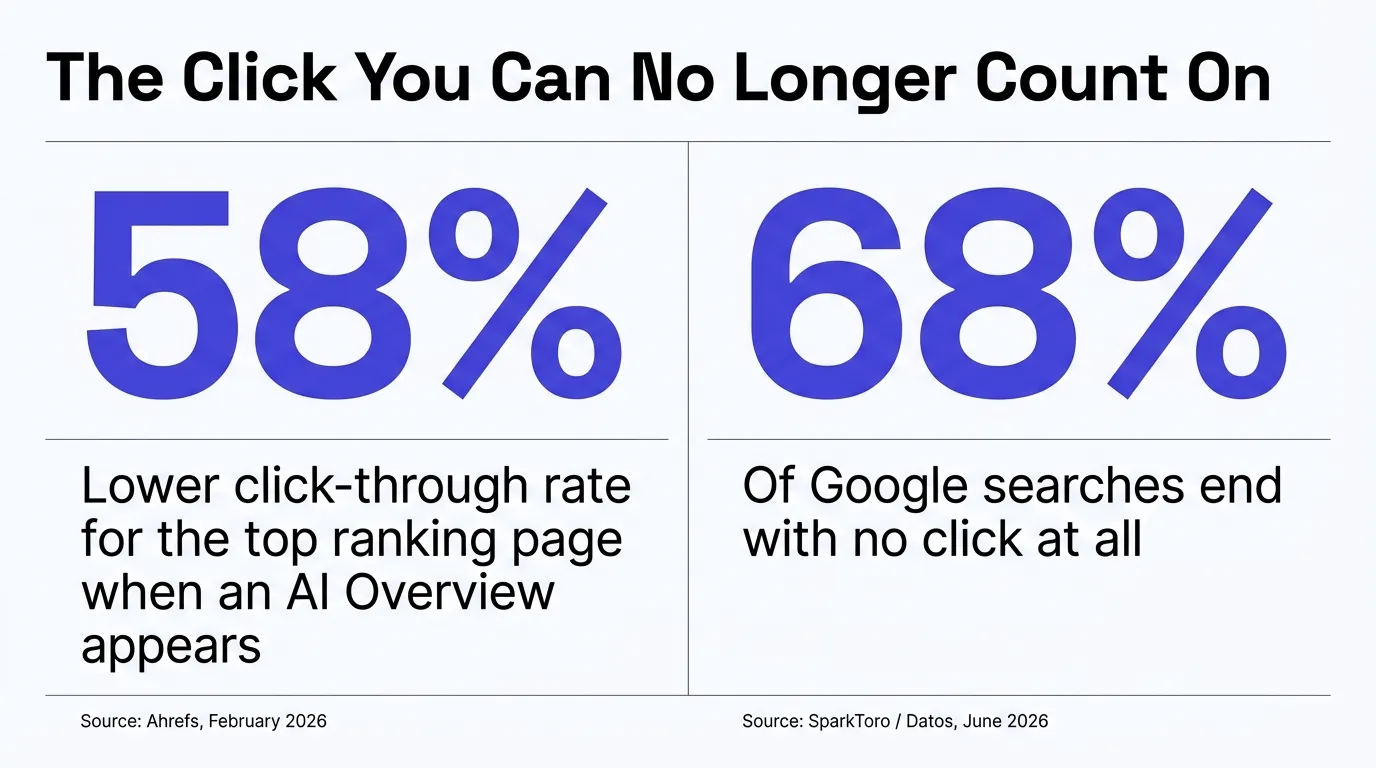
Put the two data points together and you get the actual shape of the problem. Fewer searches result in a click at all, and of the ones that do, the top page is keeping less than half of what it used to when an AI feature is present. Your new Search Console report can show you that your page appeared inside one of those AI answers. It cannot tell you which side of that math your agency landed on: the shrinking slice that still clicked through, or the growing majority that read the answer and moved on.
58%
Lower CTR for the top page when an AI Overview shows, Ahrefs, Feb. 2026
68%
Of Google searches end with zero clicks anywhere, SparkToro/Datos, June 2026
5
Dimensions in the new report: impressions, pages, countries, devices, dates
0
Of those dimensions are clicks, CTR, or queries
A worked example: what 1,000 impressions actually turns into
Numbers this size are easier to feel with an example built entirely from the cited figures above, not invented ones. Ahrefs' original study measured the top-ranking page's click-through rate at 7.3% in March 2024, before AI Overviews rolled out broadly in the US, and 2.6% in March 2025, after3. Apply those two rates to the same hypothetical 1,000 searches for a term your agency ranks first for. Before an AI Overview shows up on that query, roughly 73 of those searches would be expected to click through to your page. After an AI Overview appears, roughly 26 would. That is 47 visits that simply stop happening for the exact same ranking position, on the exact same query volume, for no reason your team did anything wrong. Your Search Console Generative AI report can now confirm the query still generated an impression for your page. It was never going to be able to confirm the other 47 people, and it still can't.
How to turn it on and read it correctly
There's nothing to install. If you already have a verified Search Console property for your domain, which most agencies set up years ago for ordinary search performance, the Generative AI performance report sits inside the same account. Two things determine whether you'll actually see data in it: whether the rollout has reached you, which per Google's own note it has, worldwide, as of August 31, 20261, and whether your site has earned enough impressions inside AI features to populate rows. Google's help documentation states directly that a property won't appear in the report until it has "enough impressions in generative AI features on Google Search," separate from the rollout status2. A small local agency with thin content can be fully rolled out and still see an empty report, simply because nothing on the site has been pulled into an AI answer yet.
| Step | Where | What it does |
|---|---|---|
| 1 | Performance in the left nav, then the Generative AI item, or add /ai to your existing performance report URL | Opens the dedicated report for Search and the separate one for Discover |
| 2 | The Pages tab inside that report | Shows which specific URLs are the ones actually getting pulled into AI answers, so you know what's working |
| 3 | Settings, then Search generative AI | Controls whether your site is eligible to appear in AI features at all, with Include as the default for every property |
| 4 | The Submit feedback link inside the new report | Google's own stated channel for requesting metrics like clicks be added in a future version |
Step three deserves its own note, because most agency owners don't know it exists. Search Console's Search generative AI control, a separate setting from the performance report itself, gives you three options for your property. Include, the default, means "your site's content can appear in Search generative AI features, including showing up as links and helping to ground AI responses in these features"5. Exclude means the opposite: your content is prevented from being linked to or used to help generate an AI answer5. A property with a parent can also inherit that parent's setting automatically5. Nobody should flip this to Exclude without a very specific reason, but knowing the switch exists, and that Include is already the default, is worth confirming rather than assuming.
The mistake we see most
An agency owner opens the new report, sees a flat line or an empty table, and concludes AI search simply doesn't apply to them. Before you conclude that, check whether your site is even eligible to be cited in the first place: crawlable, schema in place, no accidental block on the AI crawlers named in your robots.txt. A report with nothing in it because nothing has been pulled in yet looks identical to a report with nothing in it because you turned it off by accident. They are very different problems.
What "enough impressions" means in practice
Google's own documentation is deliberately vague on the exact bar: a property needs "enough impressions in generative AI features on Google Search" to appear in the report, without publishing a specific number2. For a multi-line agency selling Medicare, ACA, and life products across several location pages, that means the report can look empty overall while one specific page, say a single county's Medicare Advantage comparison guide, is quietly clearing that bar on its own. Check the Pages tab before you check the top-line total. A single strong page can carry the entire account's visibility while ten thin ones contribute nothing, and the aggregate number alone won't tell you that's what's happening.
How to fill the gap yourself
Impressions without clicks is half a picture, and there are real, unglamorous ways to build the other half without waiting on Google to ship it. None of these require a developer, and none of them cost anything beyond your own time to set up once.
First, run a fixed set of the questions your prospects actually ask, by hand, against ChatGPT, Perplexity, and Google's AI Mode, on a regular cadence, and log whether your agency gets named and which page gets cited. It's manual, it's not glamorous, and it's the closest thing that exists to ground truth about whether you're actually being recommended, not just technically appearing. We walked through building this exact daily question test, along with a Bing Webmaster Tools citation report and a consent-safe visitor counter for health pages, in an earlier guide, Why You Can't See Your AI Search Traffic. That guide existed before this Search Console feature reached full rollout, and the two are meant to be read together: Google's report tells you how often you showed up, the daily question test and the other two tools tell you whether it actually sent anyone your way.
Second, if your analytics setup allows it, build a referral segment for the AI engine domains you can actually detect in a referrer string, so traffic that does arrive from an AI surface doesn't get buried in a generic "referral" bucket next to random backlinks. This only catches engines that pass a referrer at all, and plenty don't, but it's a free improvement to a dashboard most agencies already have open every week.
Third, pay attention to which pages show up in the Pages tab of the new report and cross-reference them against your own sense of which topics you'd expect to get cited on. A page you didn't expect to see there is a signal worth investigating, since it tells you something about how an AI system is actually reading your site's coverage of a topic, which is often different from how you'd guess it reads.
If this is more than you want to run yourself
Curious what your own site scores on citability before you spend an afternoon on any of this? The free Audit reads your live site the way ChatGPT, Perplexity, and Google's AI Overviews do, and scores what they can actually cite, in about a minute for an initial read. strategicaiarchitects.com/audit
How we build sites that earn the impressions in the first place
All of the above assumes you already have impressions worth tracking. A lot of agency sites don't, and no amount of reading the right report changes that. Every site we build runs on Astro, which ships zero JavaScript to the browser by default and renders pages to finished static HTML at build time, rather than asking a visitor's phone, or a crawling AI system, to download and boot a page-builder runtime before the content even appears. Our builds score 90 or higher on Lighthouse performance for both mobile and desktop, and a number of pages score 100.
Every site we ship also carries the specific plumbing this guide has been describing the absence of on
most agency sites: a schema stack matched to what's actually on the page, an llms.txt and a
sitemap that update themselves the moment a new page or post goes live, complete with the full absolute
URL, and a robots.txt written to welcome the named AI crawlers rather than accidentally
blocking them. None of that guarantees an AI Overview cites you tomorrow. What it does is remove every
purely technical reason it wouldn't, so the content itself is what stands or falls on its own merit,
instead of losing before it's even read.
What most agency sites show in the new report
- An empty table, because the site was never technically eligible to be cited
- No schema matched to the actual content on the page
- A hand-maintained sitemap that's missing the newest pages
- No way to know whether AI crawlers are even allowed in
Report statusNothing to read, because nothing shows up
What a site built for this looks like
- A schema stack, an llms.txt, and a sitemap that all match the live content and update themselves
- Answer-first pages with sourced, dated figures an AI system can actually lift
- robots.txt confirmed open to the AI crawlers by name
- A real baseline of impressions to read the new report against
Report statusSomething worth checking every week
This is exactly the work Digital Foundation, our done-for-you site and content tier, is built around, on top of the free Audit that tells you where your own site currently stands. If your Search Console account is empty, that's the first thing worth fixing. If it already shows impressions and you want the click and business-outcome side of the picture too, that's the part covered in the previous section.
There's a further layer past schema and structure that's worth naming, because it's where the next real shift is happening. AI systems aren't only reading pages anymore, some are starting to call tools directly: a quoting widget, a subsidy calculator, a plan lookup. A site that only offers prose for an AI system to summarize is easier to cite but harder to transact through. A site that exposes a real, callable tool alongside the prose gives an AI agent something to actually use on a prospect's behalf, not just something to paraphrase. That agentic layer is still early for the industry broadly, which is exactly why it's worth building into a new site now rather than retrofitting it in a year once every competitor has caught up.
What changes once you can see this
None of this turns into a guaranteed lift in calls or enrollments. We won't promise that, and anyone who does is selling you something they can't back up. What changes is more modest and more useful: you stop operating completely blind on one specific question, which is whether your content is technically eligible to be cited by the systems your prospects are increasingly asking instead of Googling. That's a real shift from where most agencies sat as recently as this spring, when the honest answer to "are we showing up in AI search" was "we have no idea and no way to find out."
Picture a two-producer Medicare and ACA agency in a mid-size metro, checking the new report for the first time in October. The Pages tab shows their plan comparison guide got 340 impressions inside AI Overviews last month, almost all on mobile, concentrated in two counties they actually serve. That's a real, useful fact they didn't have access to in September. What it doesn't tell them is whether any of those 340 impressions led to a visit, so the sensible next move isn't to declare victory, it's to start the daily question test described above for the specific plan questions that page targets, and watch whether the citation shows up consistently across a few weeks, not just once. The Search Console number gives you a place to start looking. It was never going to be the whole answer, and now you know exactly which part of the answer it is.
It also changes how you talk to carriers, principals, and anyone else who asks what you're doing about AI search. "We don't know" was an honest answer as recently as this spring. "Our plan comparison guide showed up 340 times in AI Overviews last month, concentrated in the two counties we serve, and we're now tracking whether that citation holds across a fixed set of the questions our prospects actually ask" is a specific, checkable claim you can back up by screen-sharing your own Search Console account. That difference matters more than it sounds like it should, especially in a compliance-heavy industry where vague marketing claims get more scrutiny than most.
For more on the difference between the two AI search surfaces Google runs, and why a citation in one doesn't mean a citation in the other, see our earlier guide, Why AI Mode May Never Cite the Same Page AI Overviews Do. If you're trying to understand why your site might not be eligible for these features at all, see Why Your Insurance Website Doesn't Show Up in AI Overviews.
Questions agents ask
What is the Generative AI performance report in Search Console?
It's a dedicated report, separate from the standard Performance report, that shows how often URLs from your site appeared inside Google's generative AI features on Search and Discover. Google announced it on June 3, 2026 and confirmed on August 31, 2026 that it had rolled the reports out to every website worldwide.
Does the new report show clicks or click-through rate?
No. Google's own help documentation lists exactly five dimensions the report includes: impressions, pages, countries, devices, and dates. Clicks, click-through rate, and query-level data are not among them, and Google has not published a metric that combines the two reports.
Why doesn't my property show any data in the report yet?
Google's help documentation states a property needs enough impressions inside generative AI features before the report populates, separate from whether the rollout has reached your account. A low-traffic local agency site can be fully rolled out and still show an empty report if AI features simply haven't surfaced its pages yet.
Can I opt my site out of appearing in AI Overviews and AI Mode?
Yes. Search Console has a separate control, under Settings, called Search generative AI, with three options: include, which is the default for every property, exclude, and inherit from a parent property. Excluding a property removes it from being linked to or used to ground AI answers in Search generative AI features.
How much does an AI Overview actually cost a page in traffic?
Ahrefs, analyzing 300,000 keywords against Google's own Search Console data, found the top-ranking page's click-through rate was 34.5% lower when an AI Overview appeared in April 2025, and 58% lower in its February 2026 update using more recent data. SparkToro's June 2026 analysis of Datos clickstream data found 68.01% of all Google searches ended with no click anywhere.
Is this the same thing as the free Audit you run?
No, and they're complementary. Search Console's report tells you how often you already appeared in an AI feature. Our free Audit checks whether your site is technically built to appear at all, meaning schema, crawlability, AI crawler access, and answer-first content, before you have any impressions to look at.
Do I need a developer to turn this report on?
No. It requires no code changes. You need a verified Search Console property, which most agencies already have for standard search performance, and the report appears automatically once your property has qualifying impressions. The separate Search generative AI control is a settings toggle, not a build.
- Google Search Central Blog, "Introducing Search Generative AI performance reports in Search Console," developers.google.com/search/blog, published June 3, 2026, note added as of August 31, 2026.
- Google Search Console Help, "Generative AI performance report (Search)," support.google.com/webmasters, accessed September 18, 2026.
- Ahrefs, "AI Overviews Reduce Clicks" and its update, Ryan Law and Xibeijia Guan, ahrefs.com/blog, originally published April 17, 2025, updated February 4, 2026.
- SparkToro, "In 2026, Less than One Third of Google Searches Still Send a Click," sparktoro.com/blog, published June 9, 2026, based on Datos clickstream panel data.
- Google Search Console Help, "Search generative AI control," support.google.com/webmasters, accessed September 18, 2026.
Talk it through
Want a second pair of eyes on it?
Free 30 minutes. Bring what you found, or bring nothing and we will look together at how AI engines read your site and which fixes move first.
See whether your site is even eligible to show up in that report
Run the free Audit, a live AEO Audit plus a HIPAA tracking scan of your site, in under a minute.