Playbook
Insurance Agency Website Design: Pages That Sell Policies
A home page, an about page, and a contact form is not a website. It is a business card wearing a URL.


20 min read
Insurance agency website design is a page-architecture problem before it is a visual one. Most agency sites are a single home page doing the job of eight or ten pages: selling every line of business, answering every question, and carrying every legal disclaimer at once. Split correctly, each page can be fast enough to clear Google's own Core Web Vitals thresholds1 and specific enough to actually convert the one buyer it was built for. Two of those pages also have their content partly dictated by law already, one by a state insurance code3 and one by a federal rule on reviews.4
What a "website" usually turns out to be
Insurance agency website design is not the colors, the logo, or the stock photo of a family on a porch. It is the decision of what pages exist, what each one is for, and what happens when someone lands on the wrong one. Get that decision wrong and no amount of visual polish fixes it. Get it right and a plain, unglamorous page starts closing business on its own.
Here is what we see when we pull up a new client's current site for the first time. There is a home page. There is an About page with a headshot from several years ago. There is a Contact page with a form that emails a shared inbox nobody checks daily. And there is, usually, one more page, called "Services" or "What We Offer," that lists Medicare, ACA, life, and final expense in a bulleted list on a single page, sometimes with a dropdown menu that makes it look like four pages from the navigation bar when it is really one.
Click through the nav and you land back on the same page four different ways. Every link in the menu is a costume change for one piece of HTML. The agent calls it a website because it has a domain and five nav items. What it actually is, functionally, is a single-page business card that happens to load from a URL instead of sitting in a wallet.
That single page then has to do an impossible job: convince a Medicare shopper, an ACA shopper, a life insurance shopper, and a final expense shopper, each with a different question and a different urgency, that this is the right agent for them, using the same handful of paragraphs. It cannot specifically answer any of their questions, because specificity for one buyer means irrelevance to the other three.
Why agency sites end up this way
This is not a sign of a lazy agent. It is what the tools hand you by default. A WordPress theme, a GoHighLevel funnel template, a Wix or Squarespace starter kit, all ship with the same fixed page set built for a generic local business: Home, About, Services, Contact, maybe a Blog nobody has posted to since launch. That page set was designed for a plumber or a dentist, a business that sells one thing to one kind of buyer. It was never designed for an agency selling four or five legally distinct products, each with its own buyer, its own questions, and in Medicare's case, its own required disclaimer language that has no business appearing on an ACA page.
The second reason is a mix-up in what "website design" even means. An agent hires a designer, or picks a template, gets a result that looks clean and modern, and reasonably assumes the job is done. Nobody at any point asked the harder question: does this set of pages actually match the set of questions a prospect searching for this agency types into Google? Visual design and page architecture are two different jobs, and most of what gets sold as "website design" in this industry is only the first one.
Check your own site in two minutes
Open your site's navigation menu and count how many of those links land on a URL that is genuinely different content, not the same page reached through a different label. If three or four of your nav items all funnel back to one page's content, you have a one-page site wearing a navigation bar's clothing, whatever the page count in your sitemap says.
There is a third, quieter reason, and it is budget rather than tooling. Building a real page for every line of business and every county takes either hours of your own time or a monthly bill, and a lot of agents look at the launch cost of a five-page site versus a thirty-page one and pick the cheaper number without weighing what each extra page is actually for. That math usually runs backward. A page built around a question nobody is asking is a waste of money at any price. A page built around a question your actual prospects type every week is close to the cheapest marketing an agency can buy, because it keeps answering that question for as long as the site stays up, with no repeat ad spend required.
The page architecture that actually sells policies
A converting agency site is not one page doing five jobs. It is a set of pages, each one built around a single job, that together cover every line you write, every area you serve, and every question a real prospect actually types. Below is the architecture we build into every site, with the job each page is actually there to do.
| Page | Its one job | What breaks if it's missing or combined |
|---|---|---|
| Home | Route the visitor to the right line-of-business page in one click, not sell | Visitors scroll a wall of text trying to find themselves in it, and leave first |
| About / producer bio | Show a real license, a real photo, real carriers, and real years in the business | Nothing backs up the trust the home page is asking for |
| One page per line of business | Answer the specific question a Medicare, ACA, life, or final expense shopper types | Every buyer gets a generic answer built for someone else's question too |
| Quote page | Return an actual number from live rating data, not just collect a phone number | Visitors who wanted a number leave the moment the "quote" turns out to be a lead form |
| Carrier / network page | Name the carriers and networks you actually represent | A shopper checking if their current doctor is in network has no page to check it against |
| Location page, per county or city | Answer "is there an agent near me in this specific county" with a specific page | One page tries to cover a whole region and loses to a competitor's page built for one county |
| Reviews page | Show real client feedback, honestly sourced and labeled | A hand-picked testimonial quote reads as curated, and curated reads as unverifiable |
| Blog | Publish on a real cadence so the site keeps looking actively maintained | A dead blog signals an abandoned site to both a visitor and a crawler |
| Compliance pages | Carry the license, disclaimer, privacy, and HIPAA language the law requires | The agency is exposed exactly where it has no good excuse to be |
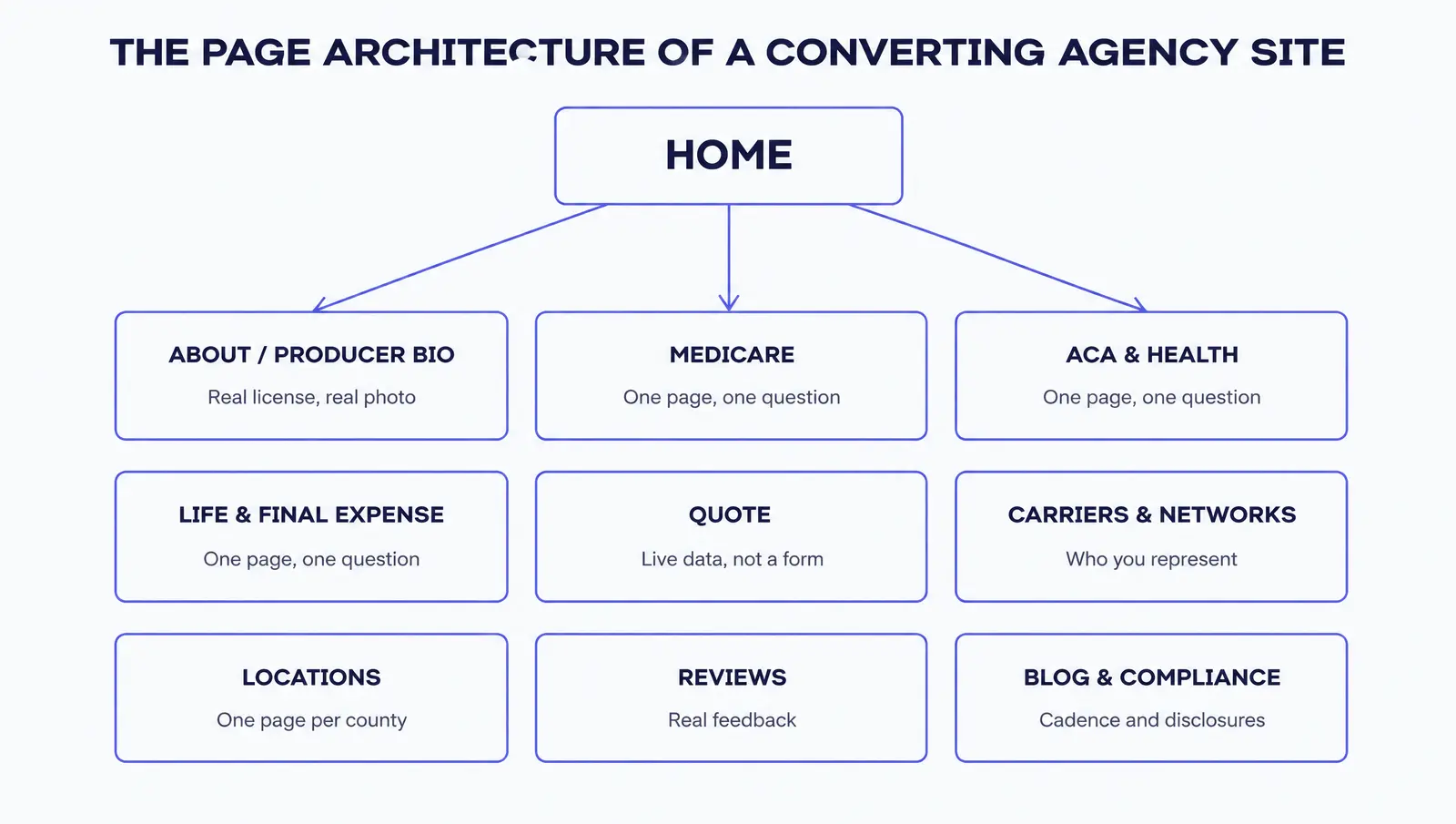
Notice what is doing the heaviest lifting in that table: the row that says "one page per line of business." Most agencies that fix only one thing after reading a guide like this fix that row first, because it is the single highest-leverage change available. A Medicare shopper and an ACA shopper are not mildly different. They are asking entirely different questions, on entirely different timelines, under entirely different rules, and a page trying to serve both ends up specific enough for neither.
We have built and audited line-specific pages across every major line an independent agency writes. The pattern holds every time: a dedicated page that answers one line's actual question, with that line's actual disclaimer language, outperforms a combined page that tries to be four things at once. If you want to see what a properly separated line looks like in practice, we cover the question-and-answer structure for each one in our line-specific AEO guides for Medicare and health, life, final expense, and annuities.
The carrier and network page earns its place for a reason that has nothing to do with search engines. A prospect comparing agents, especially for ACA or Medicare Advantage, often has one real question before anything else: is my current doctor still in network if I switch carriers through this agent. A page that plainly lists the carriers you represent, and links out to each carrier's own provider lookup tool, answers that question before the prospect has to ask it out loud, which is exactly the kind of friction removal that turns a browse into a call.
Location pages earn their place on math, not sentiment. A single regional page competes against every other agency's regional page for the same broad, crowded search. A page built around one specific county, naming that county, is competing in a far smaller field, and it gives a prospect searching "medicare agent in [county]" a page that matches what they typed instead of a page that merely mentions their state in passing. An agency writing business in six counties and maintaining one page for all six is leaving five pages' worth of that specific, lower-competition search traffic on the table.
The quote page deserves its own read
A quote page that collects a name and a phone number and calls itself a "quoter" is its own, separate problem, common enough that we wrote a full guide on it. The short version: a real quoter takes a ZIP code, an age, and a household size and calls live federal rating data to return an actual number, before the visitor hands over contact information. We go through exactly what that takes to build in why your quote form doesn't actually quote anything.
Two pages where the law already wrote the content
Two of the pages in the table above are not purely a design choice. Part of their content is already written for you, by a regulator, and getting it wrong is not a conversion problem, it is a compliance one.
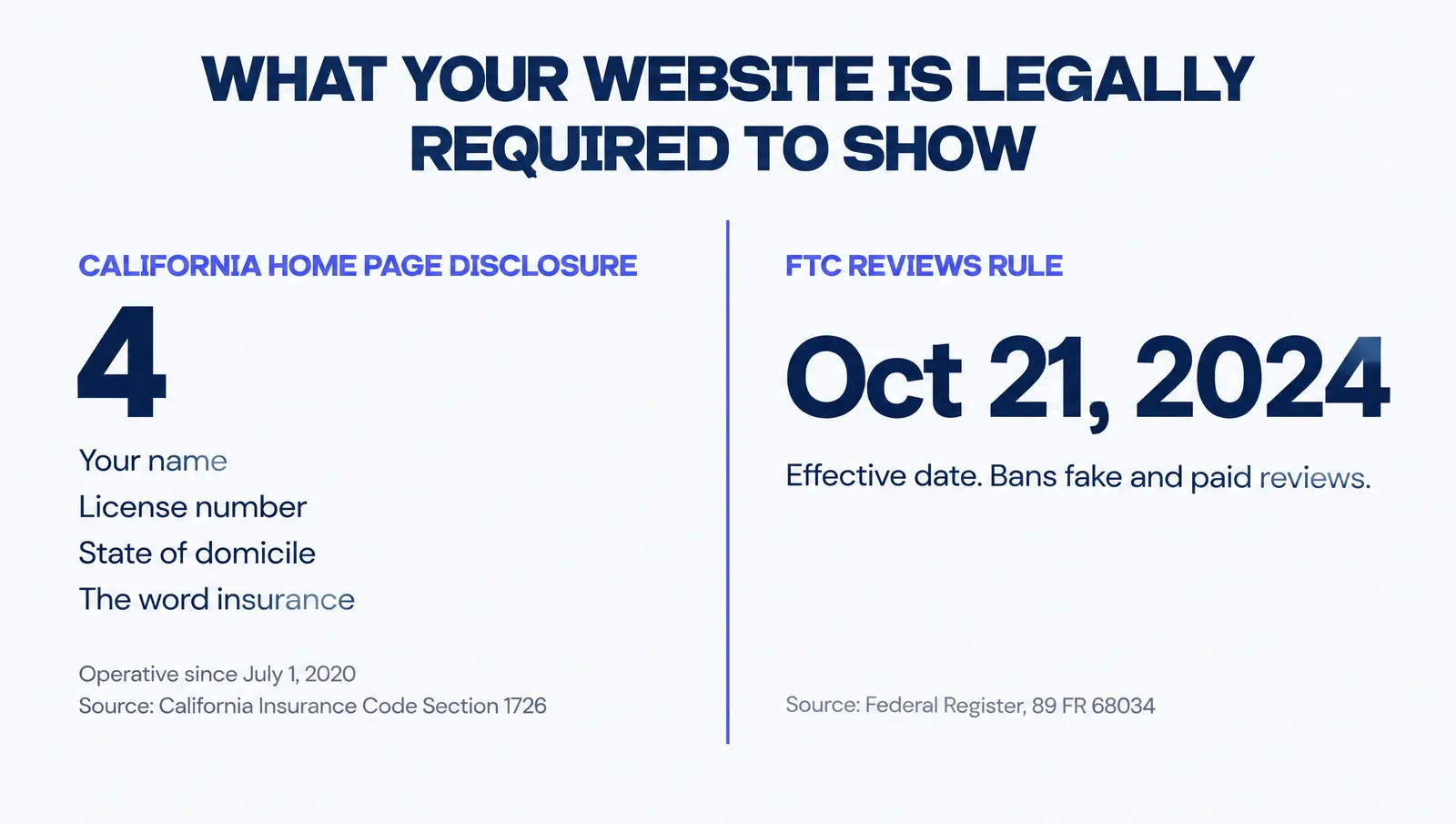
If you are a licensed California producer who advertises insurance online and transacts business with California residents, California Insurance Code Section 1726 requires your home page, or a page prominently linked from it, to display four specific items, all in the same size type: your name as filed with the commissioner, your state of domicile and principal place of business, your California insurance license number, and the word "insurance."3 That section has been operative since July 1, 2020, and the requirement travels with you even if someone else builds or maintains the site on your behalf.3 We found this requirement in California's own code; a search for an equivalent rule in every other state's advertising statute turned up no single national standard, so if you are licensed outside California, check your own state's department of insurance rather than assuming this exact rule applies to you.
The second page is the reviews page, and the governing document there is federal. The FTC's Rule on the Use of Consumer Reviews and Testimonials, formally 16 CFR Part 465, was published in the Federal Register on August 22, 2024, and became effective October 21, 2024.4 It bans reviews attributed to people who do not exist or never had a real experience with the business, reviews a business paid for or incentivized toward a particular sentiment, undisclosed reviews written by a business's own officers or employees, and a business presenting its own controlled page as an independent review site.4 None of that bans testimonials. It bans fake ones. A reviews page built from real client feedback, honestly labeled as coming from your own agency rather than dressed up as independent, is exactly what the rule leaves alone.
Medicare marketing carries its own separate disclaimer requirement under CMS's rules, which we cover in full, including what changed for plan year 2027, in your Medicare website's TPMO disclaimer changed for 2027. The reason that disclaimer belongs on its own Medicare-specific page, and nowhere near your ACA or life content, is the same architectural point from the section above: a disclaimer written for one line of business does not belong bleeding into a page meant for a different one. And if your agency routes happy customers to a public review and unhappy ones to a private form, that is a related but separate FTC and Google policy question we answer fully in why your review funnel could get fined.
Not sure where your own site stands
The free Audit checks your site for exactly this kind of thing, speed, AI citation readiness, and HIPAA safe tracking, against your actual pages in about a minute. Run it at strategicaiarchitects.com/audit.
What the missing pages cost you
There are two separate costs here, and agencies usually only notice the first one.
The first is speed, and it is directly tied to page architecture because of how most one-page sites get built: every line of business, every carrier logo, every testimonial, and a hero carousel all get stacked onto a single page to compensate for there being nowhere else to put them. That page gets heavy. Google's own Core Web Vitals, the three metrics it names as aligning with what its core ranking systems reward, measure exactly this kind of weight.12 Largest Contentful Paint should land within 2.5 seconds, Interaction to Next Paint should stay under 200 milliseconds, and Cumulative Layout Shift should stay under 0.1, each measured at the 75th percentile of real visits, not your best test run.2 A single page carrying the weight of five pages' worth of images and sections is working directly against every one of those thresholds.
| Metric | Good | Needs improvement | Poor |
|---|---|---|---|
| LCP, Largest Contentful Paint | 2.5 seconds or less | 2.5 to 4 seconds | Over 4 seconds |
| INP, Interaction to Next Paint | 200 milliseconds or less | 200 to 500 milliseconds | Over 500 milliseconds |
| CLS, Cumulative Layout Shift | 0.1 or less | 0.1 to 0.25 | Over 0.25 |
The second cost is harder to put a single number on but easier to feel: a visitor who typed "medicare agent" and landed on a page built to also sell life insurance and final expense has to do extra work to confirm this agent even does Medicare at all. Some of them do that work. Most do not. They leave and try the next result, which is very often a competitor whose site gave them a page built for exactly their question. We are not aware of a single sourced industry figure for how many visitors that costs a typical agency, and we would rather tell you that than invent a number to fill the gap. What we can say plainly, from building and auditing these sites directly, is that it is the single most common reason a site gets real traffic and few calls.
Scale this across more than one producer and the shape of the problem changes rather than just the size of it. A single agent with a one-page site is one slower-growing book of business. An FMO or IMO whose downline of producer sites was all set up from the same generic one-page template, each one by whoever onboarded that particular agent, is running the same mistake dozens or hundreds of times over, usually invisible from the top of the organization until someone asks why digital-sourced production across the whole network is flat despite steady recruiting. The fix at that scale is not asking every producer to rebuild their own site by hand. It is building the page architecture above into the template every new producer starts from, so the floor is already correct before anyone has to think about it.
How to build it yourself, in order
None of this requires hiring anyone to start. It requires a notepad, your own site, and about an hour.
First, write down every line of business you actually write policies in. Not what you are licensed for in theory. What you actually sell. Each one gets its own page in the plan below, no exceptions, even if that page starts short.
Second, write down every county or city you actually write business in, the same way. A single regional page is fine for now if you are just getting started; it becomes a liability once you have real volume in more than one specific area and a competitor has a page built for that exact county.
Third, open your current site and check which of your nav links actually land on different content, using the two-minute check earlier in this guide. Anything that turns out to be a costume change for the same page gets split into its own real page.
Fourth, if you are licensed in California and sell to California residents online, check your home page against the four items Section 1726 requires before you do anything else on this list. It is a compliance requirement, not a nice-to-have, and it is the fastest item on this list to fix.
Fifth, build or fix your quote page. If you do not have access to live rating data, a simple, honest lead form that does not call itself a "quote" is a legitimate choice for now. Calling a lead form a quoter when it is not one is the part that costs you trust, not the form itself.
Sixth, build your reviews page from real feedback, sourced honestly. Pull actual Google reviews through an API or widget rather than hand-selecting quotes, and never route unhappy customers away from the same public channel happy ones use.
Seventh, keep adding pages on a real schedule rather than publishing everything on this list once and letting the site go quiet. A site that stops growing reads, to both a visitor and a search crawler, as a site that stopped being maintained.
You can do all of this yourself
A lot of agents read a list like this and decide, reasonably, that they would rather spend the hours selling than building pages. Either outcome is fine. The point of writing it out in full is so that if you do hand it off, you know exactly what you are paying for and why each page exists.
How we build this into every site
We re-fetched our own Digital Foundation pricing page live while writing this section, the same standard this guide holds every other claim to.5 A standalone website, with no ongoing management, runs $84 a month billed annually and ships with 30 pages live on launch day, including the full line-of-business, location, and compliance architecture covered above, built to a 95+ mobile PageSpeed score and a 60-point SEO and AEO checklist.5 Starter, at $247 a month, adds seven new pages a month and Google Business Profile management.5 Pro, at $497 a month, adds up to 18 new pages a month, review harvesting, and a 24/7 AI voice receptionist.5 Scale, at $997 a month, scales content to up to 71 new pages a month.5
| Tier | Price | What it covers |
|---|---|---|
| Website | $84/mo (billed annually) | 30 pages live on launch day, 95+ mobile PageSpeed, 60-point checklist5 |
| Starter | $247/mo | Everything in Website, plus 7 new pages a month, Google Business Profile management5 |
| Pro | $497/mo | Up to 18 new pages a month, review harvesting, 24/7 AI voice receptionist5 |
| Scale | $997/mo | Up to 71 new pages a month, daily publishing cadence5 |
We build on Astro, which ships zero JavaScript to the browser by default, so every one of those pages arrives as finished HTML instead of a runtime a visitor's phone has to download and boot before anything loads. Our builds score 90+ on Lighthouse performance on both mobile and desktop, and some score 100. Every page type in the architecture above, line of business, location, quote, reviews, and compliance, carries its own matching schema stack, and the whole set of pages is listed in a sitemap and an `llms.txt` file that update themselves the moment a new page publishes, with the full absolute URL, so nothing goes stale because someone forgot to update it by hand.
Most one-page agency sites were never a mistake anyone made on purpose. They are what the template handed you, left unquestioned for years, while the agency grew past the one job that single page was ever built to do.
What changes for your agency
None of this promises a ranking position, a traffic number, or a specific lead count, because none of those can be honestly promised by anyone. What a correctly built page architecture changes is more concrete than that.
A page built for every real question
Each line of business and each service area gets its own page, answering the specific question that brought the visitor there.
Compliance handled where it actually belongs
License disclosures and disclaimer language live on the pages the law expects them on, not buried or missing.
Pages fast enough to pass Core Web Vitals
Splitting the architecture removes the pressure that stacks everything onto one heavy page in the first place.
A reviews page that holds up under the FTC's rule
Real feedback, honestly sourced, instead of hand-picked quotes that read as curated.
The underlying point is not really about any one page in the list above. It is that "insurance agency website design" was never a question of which template looks the cleanest. It is a question of whether your pages match the actual shape of your business, line by line and county by county, closely enough that a stranger can find themselves in one of them within a few seconds of arriving.
Questions agents ask
What pages does an insurance agency website actually need?
At minimum: a home page that routes rather than sells, an about or producer bio page, a dedicated page for each line of business you actually write (Medicare, ACA and health, life, final expense, and so on, never combined into one generic services page), a real quote page, a carrier or network page, at least one page per county or city you serve, a reviews page pulling real feedback, a blog, and the compliance pages: privacy policy, terms, a license or disclaimer page, and if you handle health data, a HIPAA and BAA page. That is roughly ten to fifteen pages for a single-line agent and considerably more for a multi-line agency or one covering several counties.
Does having one combined "services" page really hurt me if I sell multiple lines?
Yes, in two separate ways. A Medicare shopper and an ACA shopper are asking different questions and, in Medicare's case, your page is legally required to carry a specific marketing disclaimer that has no reason to appear on an ACA page. Combining both into one page means the page has to be generic enough to apply to neither disclaimer correctly, and specific enough to satisfy neither buyer's actual question. Splitting the lines into their own pages fixes both problems at once.
Do I legally have to put my license number on my website?
If you are a licensed California producer who advertises insurance online and transacts business with California residents, yes. California Insurance Code Section 1726 requires your name as filed with the commissioner, your state of domicile and principal place of business, your California license number, and the word "insurance," all in the same size type, on your home page or a page prominently linked from it. Other states set their own advertising rules through their departments of insurance, and the requirements are not uniform nationally, so check your own state's rule rather than assuming California's applies to you if you are not licensed there.
Can I still put testimonials on my website under the new FTC rule?
Yes, real ones. The FTC's Rule on the Use of Consumer Reviews and Testimonials, effective October 21, 2024, does not ban testimonials. It bans fake ones: reviews from people who do not exist or never used your agency, reviews you paid for a specific sentiment, undisclosed reviews from your own staff, and a company-controlled page that pretends to be an independent review site. A reviews page built from real client feedback, honestly labeled, is exactly what the rule is written to protect. We cover the related rule on selectively routing only positive feedback to your public profile in a separate guide on review gating.
How many pages should an insurance agency website have?
There is no single right number, because it depends on how many lines you write and how many counties or cities you actually serve. What matters more than the count is whether every page maps to a real question a prospect types or a real requirement the law imposes. A single-line agent in one county might legitimately need ten pages. A multi-line agency covering a dozen counties will need dozens. Padding the count with thin pages that do not answer anything is worse than having fewer, real ones.
Is a one-page website ever actually fine for an agency?
It can work for a brand-new solo agent with one line of business, one county, and no marketing budget yet, as a placeholder while you get licensed and build a book. It stops being fine the moment you write a second line, serve a second county, or start spending money on ads or content, because at that point a single page is actively working against you: it cannot answer two different buyer questions as specifically as two separate pages can, and it gives Google and any AI engine reading it nothing to distinguish one service from another.
How much does it cost to build a site with this kind of page architecture?
We re-fetched our own Digital Foundation pricing page the same day we wrote this guide, the standard we hold every claim in it to. A standalone site with no ongoing management runs $84 a month, billed annually, and ships with 30 pages live on launch day, built to a 95+ mobile PageSpeed score and a 60-point SEO and AEO checklist. Starter, at $247 a month, adds seven new pages a month and Google Business Profile management. Pro, at $497 a month, adds up to 18 new pages a month plus review harvesting and a 24/7 AI voice receptionist. Scale, at $997 a month, scales content to up to 71 new pages a month. What a web designer, freelancer, or another agency charges for a comparable build is their own pricing to state, not something we can quote on their behalf.
Can I build this page architecture myself, or do I need to hire it out?
The planning part, listing every real question your prospects ask and mapping each one to its own page, is work you can do yourself with a notepad and an afternoon, and a lot of agents are perfectly capable of it. Where it gets harder to DIY is building compliant pages that correctly carry the right disclaimer for the right line of business, wiring a quote page to live data instead of a static form, and keeping the page count growing on an actual schedule instead of launching twenty pages once and letting the site go quiet for a year. If you read this guide and decide the planning is worth doing yourself and the build is not, that is a completely reasonable split.
Sources
- Google. "Understand and measure Core Web Vitals," Search Central Documentation: "This, along with other page experience aspects, aligns with what our core ranking systems seek to reward," and thresholds to "strive to have LCP occur within the first 2.5 seconds," "an INP of less than 200 milliseconds," and "a CLS score of less than 0.1." Fetched live October 23, 2026. developers.google.com/search/docs/appearance/core-web-vitals.
- web.dev (Google). Core Web Vitals overview and defined thresholds, measured at the 75th percentile of page visits: LCP good is 2,500ms or less, poor is over 4,000ms; INP good is 200ms or less, poor is over 500ms; CLS good is 0.1 or less, poor is over 0.25. Fetched live October 23, 2026. web.dev/articles/vitals.
- California Insurance Code Section 1726, full text as reproduced by California Public Law: four required home-page disclosure items (name as filed with the commissioner, state of domicile and principal place of business, California license number, and the word "insurance"), all "in the same size type"; operative July 1, 2020. Fetched live October 23, 2026. Only one accessible source was found for this specific state statute's text; verify against your own state's department of insurance for any state other than California. california.public.law/codes/ca_ins_code_section_1726.
- Federal Trade Commission, Trade Regulation Rule on the Use of Consumer Reviews and Testimonials, 16 CFR Part 465, as published in the Federal Register: "This rule is effective October 21, 2024," published August 22, 2024, 89 FR 68034. Bans fake and paid reviews, undisclosed insider reviews, and company-controlled review sites that misrepresent independence. Fetched live October 23, 2026. govinfo.gov/content/pkg/FR-2024-08-22/html/2024-18519.htm. Corroborated the same effective date via the FTC's own announcement, fetched live October 23, 2026: ftc.gov, Federal Trade Commission Announces Final Rule Banning Fake Reviews and Testimonials.
- Strategic AI Architects. Digital Foundation service page: Website $84/mo billed annually (30 pages live on launch day, 95+ mobile PageSpeed, 60-point SEO/AEO checklist); Starter $247/mo (7 new pages/mo, Google Business Profile management); Pro $497/mo (up to 18 new pages/mo, review harvesting, 24/7 AI voice receptionist); Scale $997/mo (up to 71 new pages/mo). Fetched live October 23, 2026. strategicaiarchitects.com/digital-foundation.
Talk it through
Want a second pair of eyes on it?
Free 30 minutes. Bring what you found, or bring nothing and we will look together at how AI engines read your site and which fixes move first.
See how your own site's pages actually stack up
Run a free Audit and see how your site scores on speed, AI citation readiness, and HIPAA safe tracking, in about a minute.
Related reading: Why your quote form doesn't actually quote anything · Why your insurance website only ranks in one county · Your Medicare website's TPMO disclaimer changed for 2027