Playbook
Why Your Insurance Website Only Ranks in One County
Google ranks locations one at a time. If your site has one address and you sell in five counties, four of them are somebody else's territory.


19 min read
Your website only ranks locally for the one address on your Google Business Profile. Google's own local ranking guidance names relevance, distance, and prominence as the three factors that decide who shows up1, and distance is measured from the searcher to your listed address. A homepage built once and left alone cannot be close to a buyer in a county forty minutes away. Texas alone has 254 counties, and CMS's own county-level data shows 44 of them carry more than 20,000 Medicare beneficiaries each3, most with no agency site speaking to that county by name. The fix is not a page for every county. It is a page for the ones that matter, built with real local data instead of a swapped city name.
The problem with having one address
Most independent agency sites have exactly one address on them. It sits in the footer, it sits in the Google Business Profile, and it is the only signal Google has for where the agency actually is. That is fine if every client drives to that office. It is a quiet problem the moment an agency starts writing business in the next county over, or the one after that, because the website never said anything changed.
Here is what that looks like in practice. An agent based in Longview, in Gregg County, Texas, writes ACA and Medicare business across Gregg, Smith, and Harrison counties, three counties that sit next to each other in East Texas. The agency's website has one homepage, optimized, reasonably fast, with a Gregg County address in the footer. A prospective client forty minutes away in Tyler, the seat of Smith County, searches for a Medicare agent near them. Google has no reason to surface a Longview-based homepage for a Tyler-based search, because nothing on the site says the agency serves Smith County at all. The agency is not doing anything wrong. It simply never told Google it exists there.
This is not a niche problem. It is the default state of almost every independent agency site, because building a single strong homepage is already a real project, and building a second page that is not just a copy of the first with a different city name feels like busywork nobody has time for. The result is a site that is invisible for every market except the one its office happens to sit in, no matter how many counties the agency is actually licensed and active in.
It is worth being specific about who this applies to. If every client you write drives to your office anyway, a single strong homepage is the right amount of website, and nothing in this guide changes that. This is written for an agency writing real business in more than one county or city, checking a Google Business Profile that only reflects one of them, and never having built a second page that speaks to the others by name.
The distinction this guide is built on
A homepage answers the question "what does this agency do." A location page answers a different question: "does this agency serve my county." Google treats those as separate questions, and a site that only answers the first one is invisible for the second, no matter how good the homepage is.
How Google actually decides who shows up locally
It helps to see this in Google's own words rather than guess at it. Google's Business Profile Help documentation names three factors that determine local ranking: relevance, distance, and prominence. Google defines relevance as "how well a Business Profile matches what someone is searching for," distance as "how far each business is from the customer who's searching," and prominence as "how well-known a business is1." The same page states plainly that "local results are mainly based on relevance, distance, and popularity1."
| Factor | What Google says it measures |
|---|---|
| Relevance | How well a Business Profile matches what someone is searching for1 |
| Distance | How far each business is from the customer who is searching1 |
| Prominence | How well known a business is, based on links, articles, and directories1 |
Read that middle row again. Distance is not a soft signal buried under a dozen others. It is one of three named factors, and it works against you by default in every county that is not the one your office sits in. A search in Tyler is, structurally, closer to a Tyler business than a Longview one, all else equal. No amount of general SEO work on your homepage changes that distance number, because distance is not a content problem. It is a where-does-this-page-say-it-serves problem, and a homepage with one address can only ever answer that question once.
A location page is how an agency answers it more than once, honestly. It is a page that names a specific county or city, speaks to that market with real content, and gives Google a second, legitimate reason to consider the agency relevant and close for a search happening there. Done right, it does not fight the distance factor. It works with it, by giving Google another true answer to place on the map.
The third factor, prominence, deserves its own note, because it is easy to assume it only means reviews. Reviews are part of it, but so are links, citations, and articles that mention the business in connection with a place1. A genuine location page that other local sites, a county chamber of commerce, or a community publication might actually reference builds prominence for that specific county over time. A swapped-name template gives nobody a reason to link to it, which is one more way a real page and a doorway page diverge long after either one is published.
The doorway page trap
Here is why most agencies who try this get nervous and stop, or never start. The obvious way to build ten county pages fast is to take the homepage, duplicate it ten times, and swap the city name in a few places. It is fast, it is cheap, and it is exactly the pattern Google has a specific policy against.
Google's spam policies define doorway abuse as pages "created to rank for specific, similar search queries," including the specific example of "having multiple domain names or pages targeted at specific regions or cities that funnel users to one page2." The policy also flags "creating substantially similar pages that are closer to search results than a clearly defined, browseable hierarchy2," which describes a swapped-city-name page set almost exactly. Google states that sites found to violate its spam policies can be demoted or removed from Search results entirely, not just the offending pages2.
Why this scares agencies off entirely
Agents hear "doorway pages get penalized" and conclude location pages themselves are risky, so they build one homepage and stop. That is the wrong lesson. The policy targets pages with no real difference between them, not the practice of having more than one page for more than one place. A page built around real local data is not a doorway page. A page that only changes a city name is.
This is the actual fork in the road. Doing location pages badly, at scale, is a documented way to get an entire site demoted. Doing zero location pages leaves an agency invisible everywhere except its own county. The way through is not avoiding location pages. It is building fewer of them, each one substantively different, each one worth existing on its own.
What it costs, worked in Texas counties
To make the size of this invisible market concrete, look at Texas. CMS's own county-level Medicare enrollment data, pulled directly from the Medicare Monthly Enrollment dataset for January 20263, covers all 254 Texas counties. Summed across every county, Texas carried 4,980,688 total Medicare beneficiaries in January 2026, of whom 2,715,487, or 54.5%, were enrolled in a Medicare Advantage or other Medicare health plan rather than Original Medicare3. Every one of those people is a potential client searching for a Medicare agent somewhere specific, not searching for an agent "in Texas" generally.
| County | Total Medicare beneficiaries | In Medicare Advantage | MA share |
|---|---|---|---|
| Harris (Houston) | 658,970 | 399,375 | 60.6% |
| Dallas | 364,513 | 198,398 | 54.4% |
| Bexar (San Antonio) | 339,700 | 198,547 | 58.4% |
| Gregg (Longview) | 28,735 | 15,293 | 53.2% |
| Loving (smallest county) | 16 | <11, suppressed | — |
Source: CMS Medicare Monthly Enrollment, county level, January 20263. CMS suppresses counts below 11 beneficiaries to protect individual privacy.
The range in that table is the whole point. Harris County alone carries more Medicare beneficiaries than 240 of the other 253 Texas counties combined. Gregg County, a real, sizeable East Texas market most agencies would happily serve, carries 28,735, a market larger than most single agencies could ever fully work, and still nowhere near Harris County's scale. Loving County carries 16 total. Treating those three counties as equally worth a dedicated page would be a mistake in either direction: ignoring Gregg because it is not Harris, or building a page for Loving because a page is a page.
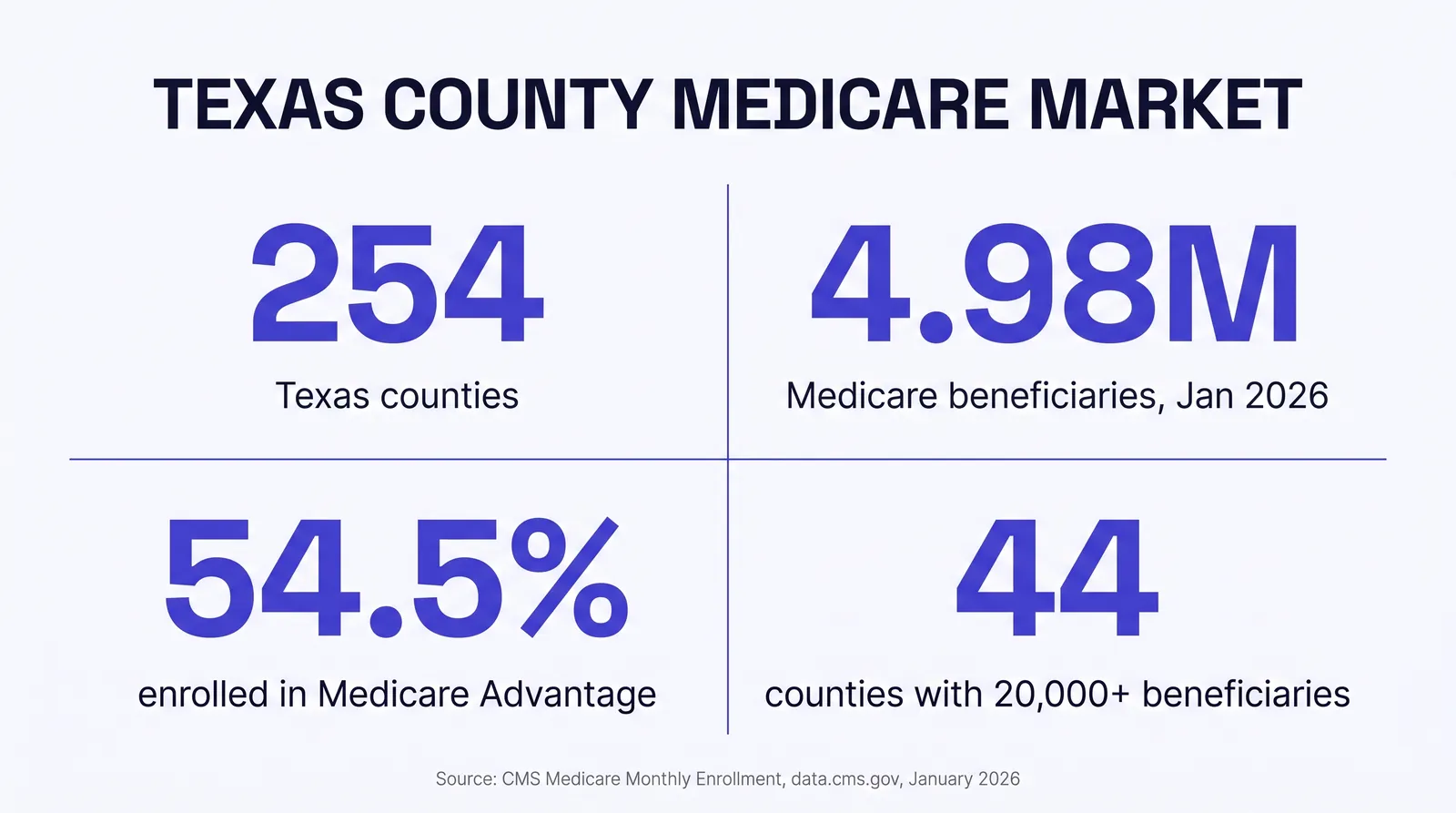
The cost of not building location pages is not a single number the way a lead cost or an ad spend is. It is the size of the market a one-address site cannot reach. In Texas, 44 counties carry 20,000 or more Medicare beneficiaries each3, real markets by any measure, most served today by an agency site that says nothing about them at all.
How many location pages you actually need
Not every county. That is worth saying plainly, because the instinct once an agency sees numbers like these is to build a page for every county on the license, and that instinct is how doorway pages happen. Use the size of the market, not the size of the license, to decide.
Start where you already write business
The counties producing real premium today are the ones worth a page first, before any county you are only theoretically licensed to serve.
Check the county's real size
CMS county-level enrollment data, or Census population data for non-Medicare lines, tells you whether a county is a Harris or a Loving before you spend an afternoon writing for it.
Prioritize adjacency
A county touching your home county, like Smith and Harrison touching Gregg, is a more credible next page than a county three hours away you have never actually visited.
Confirm you have something real to say
If you cannot name a local carrier presence, a real client story, or a specific plan detail for that county, the page will read thin no matter how it is structured.
Build in order, not all at once
A handful of substantive pages published over weeks reads as growth to Google. Forty pages published on the same day reads as a template.
Retire what does not perform
A location page that never earns a visit after months live is not helping anyone. Revisit it, strengthen it, or fold it into a regional page instead.
Applied to the Gregg County example above, a defensible build order looks like Gregg first, since it is home, then Smith and Harrison as adjacent counties with real market size, then a pause to see whether those three are producing before adding a fourth. That is a handful of pages, each justified by a real number, not fifty pages justified by a license.
What a real location page needs that a doorway page does not
This is the part worth giving away in full, because the method is not secret, it is just work most agencies do not have the hours for. A location page earns its place when it contains information a visitor from that specific county could not get from your homepage.
The templated county page
- Homepage copy with the city name swapped in a few places
- No county-specific data anywhere on the page
- Same stock imagery as every other page on the site
- No local carrier, plan, or enrollment detail named
- Published in a batch of a dozen or more on the same day
What it signalsA page built to rank, not to serve
The genuine county page
- The county's own Medicare or ACA enrollment numbers, sourced and dated
- Named carriers or plans with a real presence in that county
- A specific local detail: the county seat, a nearby hospital system, a real service note
- Its own schema, its own meta description, its own internal links
- Published on its own timeline, as one page in an ongoing cadence
What it signalsA page built to answer a real, local question
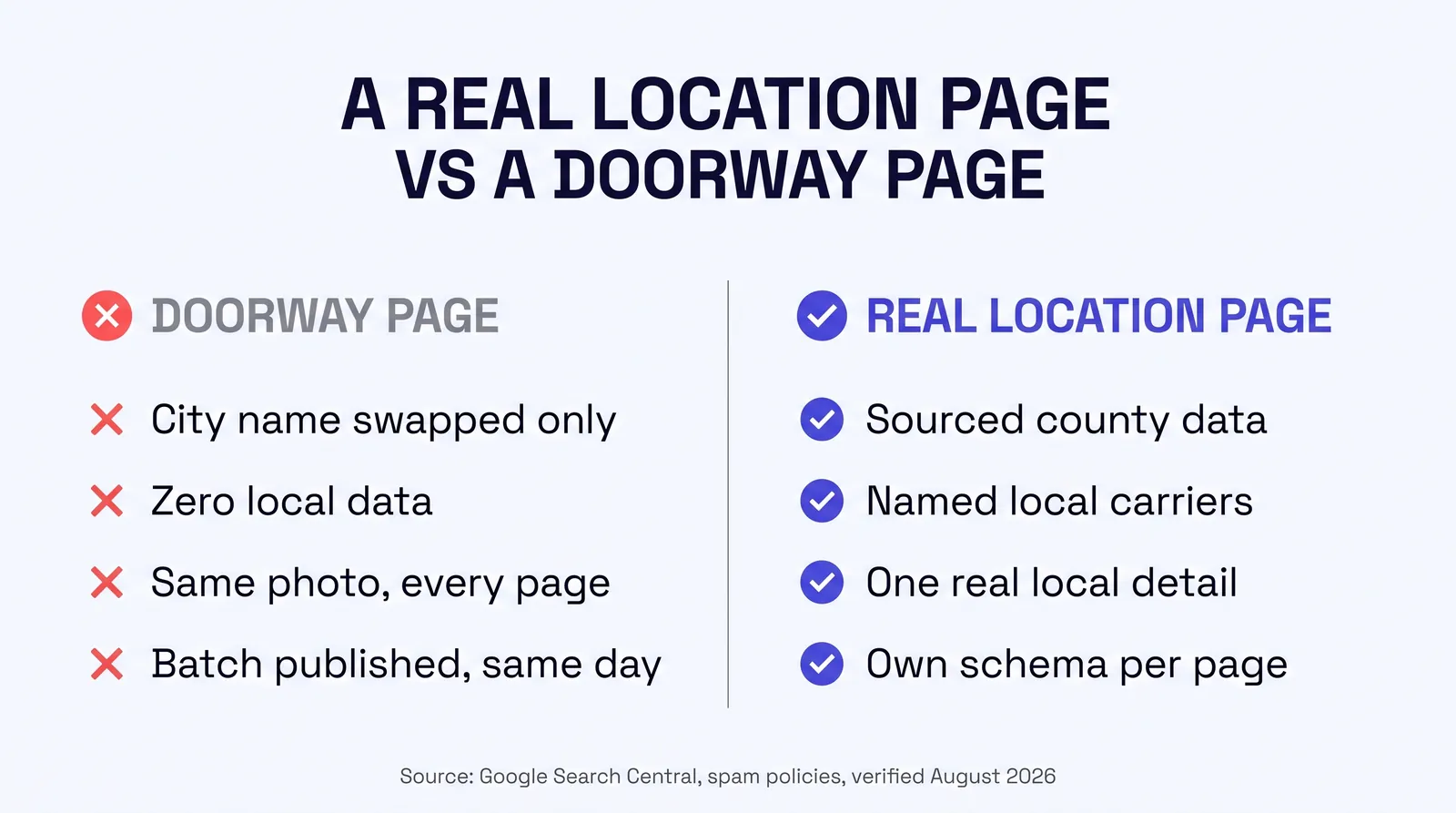
None of those five items on the right require a design team or a developer. They require pulling a real number, from a real source, for that specific county, and writing honestly about what you actually know about that market. What makes it hard at scale is not the concept. It is doing that research and writing, county by county, on a schedule, without it becoming the swapped-template shortcut every tired version of this eventually turns into.
A quick gut check on your own site
If you have any location pages already, open two of them side by side. If the only difference you can find in thirty seconds is the city name, a crawler will find the same thing. That is the test worth running before writing a third page.
Where to actually find the local data
The step most agencies skip is not the writing. It is finding a real, current, county-level number to write about. Here is exactly where that number lives, and it does not require a paid data subscription.
CMS's own Medicare Monthly Enrollment dataset
Available through the public data API at data.cms.gov, this dataset breaks Medicare enrollment down to the county level, month by month, split between Original Medicare and Medicare Advantage, with fields for age, dual eligibility, and prescription drug coverage. It is the exact source behind every Texas figure in this guide, and it covers every state and county in the country, not just Texas.
The Health Insurance Exchange enrollment data, for ACA-focused agents
CMS separately publishes Health Insurance Exchange effectuated enrollment data, also through data.cms.gov, covering the ACA marketplace rather than Medicare. An agent whose book is mostly ACA business should pull from this dataset instead, using the same county-by-county logic: prioritize counties with real marketplace enrollment before writing a page for one with almost none.
Census Bureau county population data, for life and annuity lines
For product lines that are not tied to a federal enrollment program, county population and age distribution from the Census Bureau's QuickFacts and American Community Survey data serve the same purpose: a real, sourced, dated number that tells you whether a county is worth a dedicated page before you write one.
Your own book of business
The single best local data point on any location page is not a federal statistic at all. It is how long you have written business in that county and roughly how many clients you serve there. A federal number establishes the market size. Your own numbers establish that you are actually in it.
This part you can genuinely do yourself
Pulling a county's Medicare or Census numbers takes a few minutes once you know which dataset to use, and writing one honest, specific page around that number is real, learnable work. Where this becomes a full-time job is doing it every week, across every county worth covering, and keeping every page current as new enrollment periods and plan years land.
A worked example: one real county page
Using Gregg County, Texas from the numbers above, here is what a genuinely differentiated location page actually contains, laid out as a build spec rather than an abstraction.
| Section | What goes there |
|---|---|
| Opening | Names Gregg County and Longview directly, states who the agency serves there and since when |
| Local data block | 28,735 total Medicare beneficiaries, 15,293 in Medicare Advantage, sourced to CMS and dated3 |
| Plan and carrier context | Which Medicare Advantage or ACA carriers actively write business in the county, named specifically |
| Local specifics | A real service note: nearby hospital systems, a community detail, a plan-year change that affects this county |
| Schema and metadata | Its own title, description, LocalBusiness or Service schema referencing the county by name |
| Internal links | Links to the agency's other real Gregg-area content, and to adjacent county pages once they exist |
Every row in that table is something a visitor from Gregg County would find genuinely useful, and every row is something Google can point to as evidence the page is not a copy of the homepage. That is the actual bar. It is higher than swapping a city name and lower than most agencies expect once they have the local data already pulled.
Mistakes that get location pages filtered instead of ranked
A few patterns show up again and again in agency sites that tried location pages and either saw nothing move or watched their whole site lose visibility.
Publishing a batch on one day
Twelve near-identical pages appearing at once is the clearest possible doorway-page signal, regardless of content quality.
Reusing the same stock photo everywhere
Identical imagery across every location page reinforces that nothing about the page is actually local.
Skipping counties with no data behind them
A page with an opinion but no sourced local number reads as filler, even when the writing is good.
Letting pages go stale
An enrollment figure or plan-year detail from two years ago on a page with no update signals a page nobody maintains.
Building for licensing, not for demand
A page for a county with 200 total Medicare beneficiaries competes with a page for a county with 60,000 for the same limited attention and crawl budget.
No internal linking structure
Location pages that do not link to each other or to the homepage read as orphaned, disconnected pages rather than a coherent local presence.
How we build location pages instead
This is the one section built to describe what we do, so it stays narrow and sticks to what is on our own live pricing page. Digital Foundation's Pro tier publishes one new location page every week alongside one new blog post, and Scale publishes two new location pages every week alongside a daily blog cadence, verified live on the Digital Foundation pricing page this session4.
| Tier | Price | What it adds |
|---|---|---|
| Starter | $247/mo | Complete, compliant site with AEO optimization, GBP management, AI chat widget4 |
| Pro | $497/mo | Plus 1 new blog post and 1 new location page every week, 24/7 AI receptionist4 |
| Scale | $997/mo | Plus daily blog cadence (20 to 22 posts a month) and 2 new location pages every week4 |
The reason this avoids the doorway-page trap is not a promise, it is the mechanism. Each location page we publish pulls current county or city-level data from live federal sources the same way this guide's own numbers were pulled this session, rather than starting from a template and changing a name. A page for Gregg County and a page for Smith County read differently because the underlying data is different, which is the actual, structural reason they do not read as the same page twice.
The sites carrying that content are also built on Astro, which ships zero JavaScript to the browser by default, so a new location page arrives as finished HTML rather than something a runtime assembles after load, the same architecture and pricing verified live on the Digital Foundation page this session4. Our builds score 90 or higher on Lighthouse performance for both mobile and desktop, and some pages score 100, which matters here for the same reason it matters everywhere else on the site: a slow page a crawler struggles to render is a page that has a harder time earning the ranking the content underneath it deserves.
See where your own site stands
The free Audit checks whether your current site has any location coverage beyond your home county, and scores your AEO and HIPAA compliant tracking status at the same time, in about a minute. Run a free Audit.
Every tier is month to month with a 14 day free trial and no setup fee for a limited time. If your agency's location-page needs go beyond the published tiers, several offices under one FMO, or a need to prioritize dozens of counties at once, that work is scoped on a call under AI Expert or Enterprise instead of sold as a fixed monthly line.
What changes once every county has a real page
The outcome this guide is describing is narrow and specific. It is not a promise of a top ranking or a set number of new leads, which nobody can honestly promise you. What changes is more basic than that: your site starts telling Google, and by extension a buyer's AI assistant, that you exist in more than one place. A search happening in Tyler finally has a page that speaks to Tyler, instead of a Longview homepage with no reason to surface there at all.
There is a compounding piece worth naming. Every real location page is also a citable source for an AI answer engine, since each one carries a dated, sourced local figure a model can quote and attribute, the same structural property that makes any page on this site citable. Building location pages for local search visibility and building pages an AI assistant can cite by name are not two separate projects. A page built around a real, sourced county-level number does both at once.
None of this shows up overnight. A location page published this week is not going to outrank an established local competitor next week. What changes immediately, the moment the page goes live, is that a county your site previously said nothing about now has a page with a real, sourced answer on it. Ranking follows from there, on its own timeline, but the page cannot rank for a question it never answered in the first place, and that is the gap this guide is really about closing.
What changes if you run more than one office
Everything above compounds for an FMO or IMO running downline agents across several offices, each with their own county or set of counties. A single-office agency deciding between Gregg, Smith, and Harrison is choosing among three pages. An FMO with agents spread across a dozen Texas markets is making that same decision a dozen times over, and doing it with the same templated-page shortcut multiplies the doorway-page risk across every office at once instead of containing it to one site.
The upside scales the same way the risk does. A coordinated build, where each office's location pages are genuinely distinct and tied to that office's real county-level data, gives an entire network local coverage no single competing agency can match county by county, while every page still meets the bar of being worth a visit on its own.
Put a number on it using the same Texas data. If an FMO has five downline offices spread across Harris, Dallas, Bexar, Tarrant, and Gregg counties, the combined market those five counties represent is 1,715,052 Medicare beneficiaries, more than a third of the entire state's Medicare population, sitting behind five separate homepages that most likely say nothing about the counties next to each of them3. A coordinated location-page build across that network is not five small projects. It is one real shot at covering a market worth more than a third of Texas, done once, correctly, instead of five times, thinly.
Worth a real conversation at this scale
Coordinating genuinely distinct location pages across multiple offices, each keeping its own brand and its own real local data, is exactly the kind of work we handle for agencies running more than one site. Book a call.
It is fair to ask whether any of this is worth doing if your agency operates comfortably out of one office and has no plans to expand. For that agency, a strong homepage and an accurate Google Business Profile may be a reasonable stopping point, and there is no rule that says every agency needs a location page strategy. This guide matters most for an agency already writing business across more than one county, where the website has simply never caught up to where the business actually is.
Questions agencies ask
How many location pages does my insurance agency actually need?
Fewer than you think, and more than one. Start with the counties where CMS enrollment or Census population data shows a real, current book of business worth serving, not every county you are technically licensed in. In Texas, CMS's own county-level Medicare enrollment data shows 44 of the state's 254 counties carry 20,000 or more Medicare beneficiaries each, while 136 counties carry fewer than 5,000. Build for the first group before the second, and skip the counties too small to justify a page at all, like Loving County, Texas, which CMS records at 16 total Medicare beneficiaries in January 2026.
What's the real difference between a location page and a doorway page?
A doorway page is one of a set of near-identical pages built to rank for different places or phrases, with a swapped city name and no real difference in the content underneath. Google's own spam policies describe doorway abuse as pages created to rank for specific, similar search queries and funnel visitors toward a single destination rather than serving them directly. A real location page carries local data, local specifics, and a reason to exist that a swapped city name cannot fake.
Do I need a licensed office in a county to build a page for it?
No. Google's local ranking factors are relevance, distance, and prominence, not a legal requirement to hold a physical address in every county you serve. What you do need is a genuine reason for the page to exist: you write business there, you can name the plans and carriers active in that market, and the content reflects that county specifically rather than reading like your homepage with the name changed.
How much unique content does one location page need?
There is no official minimum word count, but the content has to be substantively different from your other pages, not templated. A page built around a county's actual enrollment numbers, plan availability, and locally relevant details reads differently to both a person and a crawler than a page that only changes the city name in a few sentences. Aim for real information a visitor from that county could not get from your homepage.
What happens if Google flags my location pages as doorway pages?
Google's spam policies state that sites found to violate its spam policies, including doorway abuse, can be demoted or removed from Google Search results entirely. That is not a penalty on the offending pages alone. A pattern of thin, swapped-name location pages can suppress the visibility of a site's other pages too, which is the opposite of what an agency building location pages is trying to accomplish.
Should I write pages for every county I'm licensed in, or only where I actively market?
Only where you actively market, or where you can credibly say you serve the market with real local knowledge. A license lets you write business in a county. It does not give you anything true and specific to say about that county's plans, carriers, or community, which is what a real location page requires. Licensing without local substance is exactly how agencies end up with the templated pages that read as doorway pages.
Can I build these myself instead of paying someone?
Yes, for a handful of counties. Pulling your own county-level CMS enrollment data, writing genuinely different content for each page, and keeping the schema and internal linking consistent is real, learnable work, and a single-office agency covering three or four counties can do it in a weekend. Where DIY breaks down is at scale, sustained weekly, across a dozen or more counties, and kept current as enrollment periods and plan years change.
How does Strategic AI Architects build location pages differently?
Digital Foundation's Pro and Scale tiers publish one or two new location pages a week, each built from live CMS and Census data rather than a template with the city name swapped, verified on the Digital Foundation pricing page. The county-level enrollment figures, plan counts, and local specifics on each page come from the same live federal data sources cited throughout this guide, so the page has an actual reason to exist beyond ranking for a phrase.
Sources
- Google Business Profile Help. "Tips to improve your local ranking on Google," relevance, distance, and prominence ranking factors, verified live 2026-08-08. support.google.com.
- Google Search Central. "Spam policies for Google web search," doorway abuse definition and enforcement statement, page last updated 2026-05-15, verified live 2026-08-08. developers.google.com.
- Centers for Medicare & Medicaid Services. "Medicare Monthly Enrollment," county-level data, all 254 Texas counties, January 2026, queried live 2026-08-08 via the CMS data API. data.cms.gov.
- Strategic AI Architects. "Digital Foundation," pricing, tiers, and location page cadence, verified live 2026-08-08. strategicaiarchitects.com.
Talk it through
Want a second pair of eyes on it?
Free 30 minutes. Bring what you found, or bring nothing and we will look together at how AI engines read your site and which fixes move first.
See how many counties your site is actually invisible in
Run the free Audit, a live AEO Audit plus a HIPAA tracking scan of your site, in under a minute.
Related reading: why a quiet blog stops getting cited by AI · why insurance websites fail Google's speed test