Playbook
Why Your Insurance Agency's Reviews Show No Stars in Google
Your homepage schema can say whatever you want about your reviews. Google's own policy still decides whether a single star shows up next to your name.


19 min read
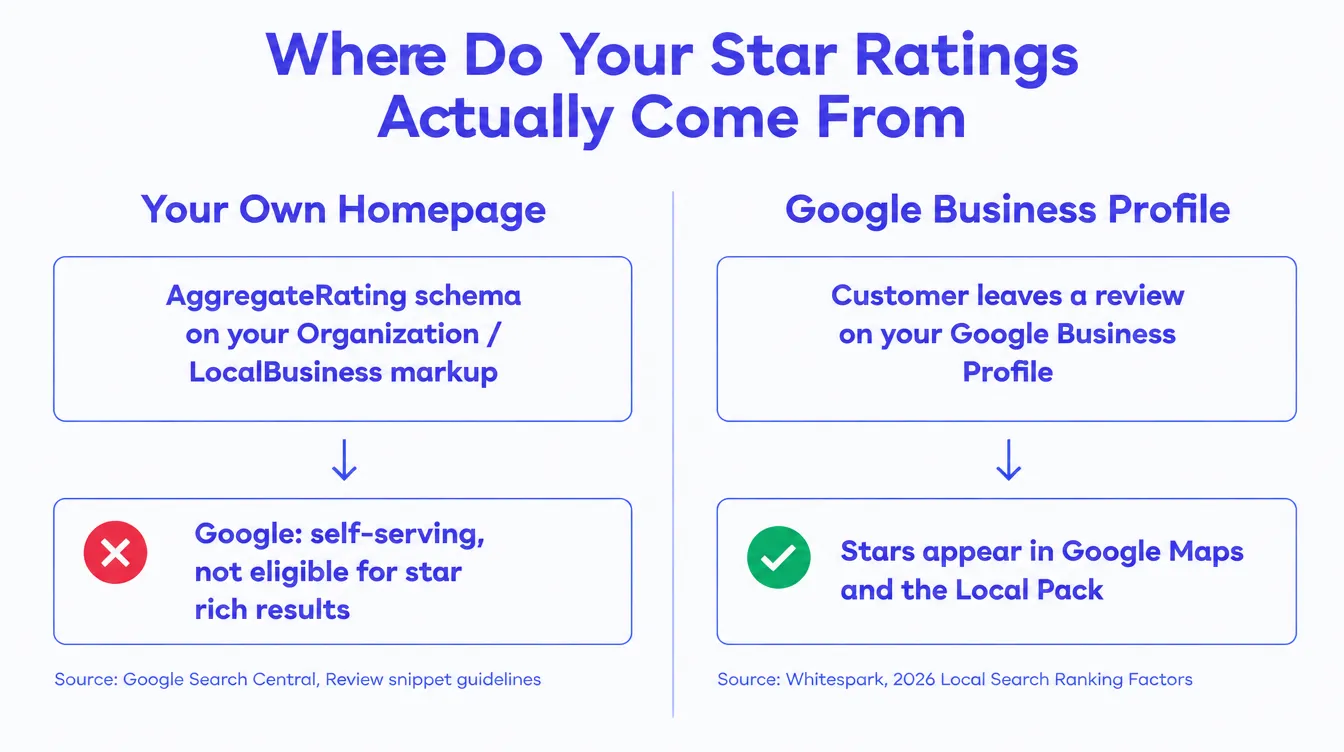
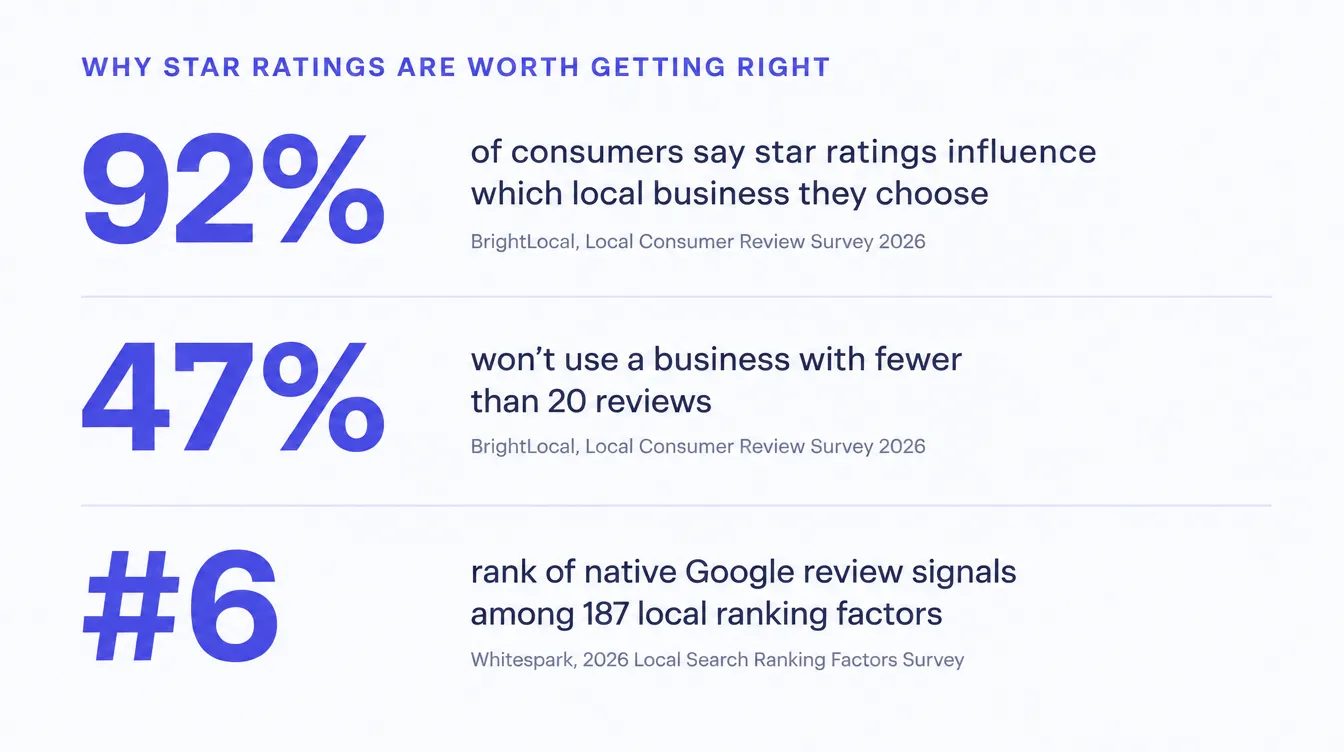
Star ratings next to your agency's name in Google do not come from schema you write about yourself. Google's own structured data guidelines say a page is ineligible for the review rich result when the entity being reviewed controls the reviews about itself, and that restriction names LocalBusiness and Organization markup specifically1. InsuranceAgency, the schema type built for agencies, inherits directly from that same LocalBusiness branch3, so it inherits the restriction too. The stars you actually see on a competitor's listing come from their Google Business Profile, aggregated by Google itself, not from anything in their page source5. 92 percent of consumers say star ratings influence which local business they pick, and 47 percent will not use one with fewer than 20 reviews4, so this is not a cosmetic detail to leave broken.
You added the schema. The stars never came.
Somewhere in the last year, somebody, maybe a web developer, maybe a plugin, maybe a CRM's built-in reputation widget, added review markup to your agency's homepage. It probably looked like a small win. Five stars, a review count, the kind of thing you have seen next to a recipe or a hotel listing when you search for one. You assumed the same thing would happen for your agency: search your name, see the stars, look more trustworthy than the agency two links down that does not have any.
It never showed up. You checked the code, and the markup looks fine. You checked again after a redesign, same result. Meanwhile a competitor's listing does show stars, and you cannot tell what they did differently, because their page source does not look meaningfully different from yours.
Here is the part almost nobody tells agency owners: your markup was probably never going to work, regardless of how correctly you wrote it. Not because of a technical mistake. Because of a policy. Google decided, in writing, that a business is not allowed to vouch for its own star rating on its own website, and it does not matter how clean your JSON-LD is if the thing you are asking Google to display is a claim about yourself, made by yourself, on a page you control.
Before you keep reading
If you want to know whether your own site is carrying this exact problem, along with everything else an AI answer engine or a rich results test would flag, the free Audit checks it in about a minute. strategicaiarchitects.com/audit
Why Google won't show stars on your own markup
Google publishes the exact rule, and it is worth reading in its own words rather than a paraphrase.
Google's structured data documentation for the review snippet feature states that if the entity being
reviewed controls the reviews about itself, pages using LocalBusiness or any other type of
Organization structured data are ineligible for the star review feature1.
The guideline is explicit that this covers a review "placed on the website of entity A" about "entity A,"
whether that markup is written directly into the page's structured data or delivered through an
embedded third-party review widget1. That second clause matters, because it
closes the obvious workaround. Swapping your own hand-written JSON-LD for a plugin that generates the
same JSON-LD does not change who is being reviewed or who controls the page.
The list of page types Google does consider eligible for a review rich result is specific: Book, Course, Event, Local Business, Movie, Product, Recipe, Software App, along with a handful of creative work types like a TV season or episode1. Local Business and Organization are on that list, which is where the confusion usually starts. Agencies read "Local Business is eligible" and stop reading. The eligibility for those two types comes with the specific condition attached: the review has to come from someone other than the business itself. A directory site reviewing your agency, or an independent review platform aggregating verified customer feedback about you, can carry eligible LocalBusiness review markup on its own pages. Your own homepage, describing reviews of your own agency, cannot.
Why InsuranceAgency does not get a pass
Schema.org's own type hierarchy places InsuranceAgency under
FinancialService, which sits directly under LocalBusiness3.
It is a more precise, more useful type than a generic LocalBusiness label for describing what your
agency is. It is still, structurally, the exact branch Google's self-serving restriction names. A
more specific business type does not create an exception to a policy written at the LocalBusiness
and Organization level.
There is a second, separate reason this markup can hurt more than it helps, beyond simple ineligibility. Google's general structured data guidelines require that any rating markup reflect "genuine star ratings" and warn that reviews or ratings not from actual users may result in a manual action2. The same guidelines prohibit marking up content that is not visible to readers of the page, and prohibit using structured data to mislead users about your ownership or the nature of your content2. A structured data manual action does not touch your organic ranking directly, Google is explicit about that distinction, but it does strip every rich result eligibility your site might otherwise have earned, on every page type, until you fix the violation and request a review2. Most agencies running self-reviewed schema never get that formal manual action. Their markup is simply ignored by the star feature, silently, forever, which is a quieter failure but the same practical result: no stars, ever, from that code.
Where an agency's stars actually come from
If homepage schema cannot do it, the obvious question is what actually puts a star rating next to an insurance agency's name. The answer is almost always the same place: the agency's Google Business Profile, not its website at all.
A Google Business Profile collects reviews inside Google's own system, calculates the aggregate rating itself, and displays that number in Google Maps, in the Local Pack that appears above organic results for a local search, and in the Knowledge Panel that shows up when someone searches your agency's name directly. Every part of that calculation happens on Google's side, from reviews Google itself hosts and moderates. Your website's code has no part in it, and cannot override it, because there is nothing on your homepage for Google to reconcile against a number it already owns.
This is also why review signals carry real weight in how local search ranks you, separate from whether a star icon renders. Whitespark's 2026 Local Search Ranking Factors survey, which asked 47 local search experts to score 187 individual ranking factors, found "High Numerical Google Ratings" ranked sixth overall and "Quantity of Native Google Reviews (with text)" ranked ninth, with the survey's own writeup noting review signals grew in importance for the 2026 edition specifically5. The same survey scored third-party review quantity, meaning reviews collected on a platform other than Google itself, at 119th, far lower5. Native Google reviews are not just the only reviews that produce a visible star rating in most search contexts. They are also weighted far more heavily by Google's own local ranking systems than reviews collected anywhere else.
| Channel | Where the stars show up | Who controls it |
|---|---|---|
| Google Business Profile reviews | Google Maps, the Local Pack, your Knowledge Panel | Google, from reviews it hosts directly |
| Independent review platform covering you | That platform's own pages, in Google's results for that platform | The platform, since it is reviewing a third party |
| Your homepage's AggregateRating or Review schema | Nowhere. Ineligible under Google's self-serving policy | You, which is exactly the problem |
What a missing star rating actually costs
It is tempting to file this under cosmetic and move on, especially once you understand it is a policy issue and not a bug you can code your way out of. The consumer research says otherwise. BrightLocal's 2026 Local Consumer Review Survey found that 92 percent of consumers say star ratings influence which local business they choose, and that share has been climbing, not falling, as AI-assisted search makes it easier to compare options quickly4. The same survey found 31 percent of consumers will only use a business with a rating of 4.5 stars or higher, up from 17 percent the year before, and 68 percent require at least 4 stars, up from 55 percent4. Review count carries its own threshold: 47 percent of consumers will not use a business with fewer than 20 reviews, and only 9 percent are willing to use one with 5 or fewer4.
Put those numbers next to each other and the shape of the cost becomes clear. Nearly one in three shoppers comparing you against another agency will not even consider you below 4.5 stars, and almost half will skip you outright if you look thin on reviews, whether or not your actual service is any different from the agency next to you. None of that threshold depends on whether Google renders a star icon in the search result. A shopper who clicks through to your Google Business Profile, or types your name into a search bar and lands on your Knowledge Panel, sees the real number either way. What a missing rich result costs you specifically is the earlier moment, the plain organic search result or the AI-generated answer, where a star icon next to a competitor's name and nothing next to yours reads as a quiet signal that they are the safer click, before either of you has said a word.
Check what your own site is doing right now
You do not need to guess which side of this your agency is on. Run your homepage through Google's own
Rich Results Test, a free tool at search.google.com/test/rich-results, and look at what it
reports for any review or rating markup it finds. Three outcomes are common, and each one tells you
something different.
If the tool reports the review or aggregate rating item as detected but not eligible, with a note about the entity being self-reviewed, that confirms exactly the mechanism described above. The markup is not broken. It is disqualified by policy. If the tool flags a missing required field, commonly a missing rating count or review count alongside a rating value, that is a separate technical defect on top of the eligibility problem, usually the result of a widget that was configured incompletely. And if the tool finds no review markup at all, you are not currently making the self-serving mistake, but you also are not doing anything to earn the eligible kind of coverage described in the next section.
A pattern worth checking for specifically
Review widgets embedded from a CRM's built-in reputation tool, or from a third-party review aggregator plugin, commonly generate exactly this kind of homepage-level AggregateRating markup automatically, without an agency ever writing a line of JSON-LD by hand. If you did not add review schema yourself, check whether a widget you installed did it for you. The self-serving restriction applies the same way either way, since Google's own guidance names an embedded third-party widget specifically as one of the two ways this violation happens1.
If you already have a formal structured data manual action in Search Console, the fix is a two step process, not a resubmission of the same markup. First remove or correct the violating code so the page actually meets the guidelines. Then open the Manual Actions report in Search Console and select Request Review, describing what you changed. Google's own guidance sets expectations plainly: "most reconsideration reviews can take several days or weeks," reviewers notify you by email both when the request arrives and again when it concludes, and resubmitting before that final decision arrives does not speed anything up7. Most agencies reading this article will find no manual action at all in that report, because their markup was simply never eligible rather than formally penalized, which means there is nothing to request review on. Removing the self-serving markup is still worth doing, since it removes the standing risk without waiting on a review cycle either way.
The one legitimate exception, and why it doesn't fit
There is exactly one Google-sanctioned path that does let a business show its own star rating, and it is worth naming so you do not confuse it with the schema you were told to add. Google's Store ratings program lets an eligible business's own star rating appear next to its text ads and in Shopping results, but the rating itself is not calculated from anything on the merchant's own site. Google aggregates it from Google Customer Reviews, from more than 30 approved third-party review partners such as Trustpilot, Yotpo, and Feefo, or from Google's own research, and a business generally needs at least 100 eligible reviews within a trailing 24 month window and a minimum 3.5 star average to qualify for the version shown on text ads8.
Two things keep this from being the fix an insurance agency is looking for. It is built for Shopping and paid text ads, not for the organic search result or the AI-generated answer this article is actually about. And the underlying logic is identical to everything else in this piece: the rating still has to be aggregated by Google or an approved independent partner. An agency cannot self-certify its way into Store ratings any more than it can self-certify its way into an organic review rich result. The path is different. The rule underneath it, that Google decides whose measurement of your rating counts, is the same rule this entire article is about.
The schema that's actually allowed to help you
None of this means schema markup is a wasted exercise for an insurance agency site. It means the review and rating properties specifically are the one place self-description backfires. Everything else in a proper schema stack is exactly as useful as it always was, for organic search, for your Local Pack presence, and for getting named correctly by an AI answer engine.
InsuranceAgency, not a generic LocalBusiness. Use the specific type. It costs nothing extra to write and gives Google, and every AI system reading your structured data, a precise answer to "what kind of business is this," rather than a generic label that could describe a plumber or a coffee shop just as easily.
Service schema for each line you write. Medicare, ACA, life, final expense, and annuities are different services with different buyer questions. Marking each one up separately, rather than folding everything into one paragraph, gives an answer engine a cleaner unit to cite when someone asks a question specific to one of those lines.
FAQPage schema on pages that actually answer questions in that format. This is the part of the schema stack doing the heaviest lifting for AI citation specifically, because it hands an answer engine a pre-packaged question and answer pair it can lift directly, rather than asking it to extract one from a paragraph.
Article and Organization author schema on your blog. A named, credentialed author with a linked profile page is a trust signal search engines and answer engines both weigh, separate from anything about star ratings.
BreadcrumbList on every page. Cheap to implement, and it gives Google a clean hierarchy to render in the search result itself.
Dataset schema wherever you publish a real figure. If your site cites a Medicare enrollment number, a premium figure, or a coverage statistic pulled from a government source, wrapping that figure in Dataset schema with the source named is the single strongest E-E-A-T signal a page can carry, and it has nothing to do with the review restriction at all.
Leave AggregateRating and Review off your own homepage's Organization and
LocalBusiness markup entirely. There is no configuration of that property that earns you a rich result
when the reviews are of yourself, on your own site. Writing it anyway is pure cost: engineering time
spent on markup that cannot legally render, plus a standing risk of a manual action if the ratings ever
look inflated or unverifiable to Google's own review process2.
How to earn the stars you actually want
Since the visible star rating comes from your Google Business Profile and nowhere else, the fix is an operations problem, not a code problem. It is also one most agencies can start this week without buying anything.
Claim and fully complete your Google Business Profile if you have not already, with your correct category (Insurance Agency, not a broader financial category), your service area, hours, and phone number matching exactly what appears on your website. Mismatched name, address, or phone details between your site and your profile is a separate, common reason a profile underperforms or gets suspended.
Build a simple, consistent ask into your workflow. The agents who accumulate reviews steadily are the ones who ask at a specific, repeatable moment, such as right after a policy is issued or a claim is resolved cleanly, not the ones who send one mass email blast a year. A text with a direct link to your Google review form, sent within a day or two of a positive interaction, converts far better than an email sent a month later.
Respond to every review, positive and negative. Google's own guidance treats an actively managed profile as a healthier one, and a thoughtful public response to a negative review often does more to reassure a prospective client than a wall of five-star reviews with no owner engagement at all.
Never route customers away from leaving a negative review, and never gate the ask by star rating first. Beyond being a trust problem, that exact practice, funneling only satisfied customers toward a public review site while diverting unhappy ones elsewhere, is the kind of review manipulation Google's policies and federal regulators both treat as a violation in its own right, entirely separate from the schema question this article covers.
Track review count against the thresholds that actually move a shopper. With 47 percent of consumers unwilling to use a business under 20 reviews4, and Whitespark's experts weighting native review quantity as a top-ten local ranking factor5, 20 reviews is a reasonable near-term target if you are starting from single digits, not a finish line.
You can do all of this yourself
None of the steps above require a developer or a paid tool. A disciplined solo agent with a text template and a habit of sending it can build a real review base over a few months. Where agencies usually stall is consistency, not capability, which is exactly the kind of thing automation is good for and a person, honestly, is not always great at keeping up alone.
How we build this correctly
Every site we build carries the schema stack described above, InsuranceAgency, Service, FAQPage, Article with a named Organization author, BreadcrumbList, and Dataset where we publish a figure, with the review and rating properties deliberately left off the homepage's own Organization and LocalBusiness markup, because that markup cannot legally render a star and only adds risk. That is a correctness decision, not a missing feature.
Digital Foundation's Starter tier, our entry level done-for-you build, includes Google Business Profile management and review harvesting as a standard part of the package, alongside the compliant site itself and AI citation optimization6. That pairing is deliberate. A perfectly built schema stack on a site with an empty or poorly managed Google Business Profile still shows no stars, because the stack was never the bottleneck. The profile is. Handling both together, rather than treating the website and the Business Profile as two separate projects run by two different vendors, is how the actual mechanism described in this article gets fixed instead of just documented.
Pro and Scale add a weekly or daily blog cadence and location pages on top of that same foundation, each one carrying the same correct schema stack automatically rather than requiring a developer to remember the rule on every new page6. Every figure your site publishes in that content, the kind of thing this article does with BrightLocal and Whitespark's own numbers, gets sourced and dated the same way, which is the actual E-E-A-T signal Google and AI answer engines are increasingly built to reward.
What you get
Concretely, an agency that fixes both halves of this gets a Google Business Profile with a real, growing review count that actually clears the thresholds a shopper is silently applying, a homepage schema stack that helps every rich result it is actually eligible for instead of wasting effort on one it never will be, and one less reason for a prospect comparing three agencies to skip past you before you get a chance to talk to them. It also gets you out from under the standing risk a self-serving rating markup carries if Google's review process ever flags it as inflated or unverifiable. None of that is a promise about a specific ranking position or a guaranteed lead count, and we are not going to pretend it is. It is a correctly built foundation instead of a broken one, plus an operational habit that actually produces the number shoppers are checking.
When this isn't your biggest problem
If your Google Business Profile already carries a strong review count and a rating above 4.5, this specific mechanism is not costing you much, whatever your homepage's schema looks like underneath it. Removing self-serving review markup you already have is still worth doing, mainly to eliminate the standing manual action risk, but it will not visibly change anything a shopper sees, because your real stars are already showing where they actually come from. And if your agency runs on referrals almost entirely, with very little cold organic search traffic landing on your site at all, the gap this article describes matters less to you than it would to an agency competing for search visibility in a crowded local market. The mechanism is universal. How much it costs you specifically depends on how much of your business actually starts with someone comparing agencies in a search result first.
Questions agents ask
Why don't star ratings show up when I search for my insurance agency?
Almost always because the review schema on your homepage is self-serving. Google's structured data guidelines say plainly that a page using LocalBusiness or Organization markup is ineligible for the star review rich result when the entity being reviewed controls the reviews about itself, whether that markup is coded directly or comes through an embedded third-party widget. Adding more of that same markup does not fix it. The policy is the block, not a bug in your code.
Can I add review schema to my own homepage to get stars in Google search?
You can add it, and Google will still not show a star rating for it if the review is of your own business, placed on your own site. Google's review snippet documentation names this the self-serving reviews restriction. It applies to Organization and LocalBusiness types specifically, which covers InsuranceAgency, since InsuranceAgency inherits from LocalBusiness through FinancialService. Eligible categories are things like Product, Recipe, Course, Software App, and Local Business or Organization pages where the review comes from an independent third party, not the entity itself.
What's the difference between a Google Business Profile star rating and homepage review schema?
A Google Business Profile rating is calculated and displayed by Google, from reviews collected inside Google's own system, and it shows in Google Maps, the Local Pack, and your Knowledge Panel. Homepage review schema is code you write yourself, describing reviews you say happened, and Google explicitly discounts it as a self-serving claim. One is Google vouching for a number it calculated. The other is you vouching for yourself. Only the first one earns a visible star.
Does InsuranceAgency schema help with star ratings at all?
InsuranceAgency schema is genuinely useful, just not for stars. It tells Google and every AI answer engine precisely what kind of business you are, using a type built for financial services rather than a generic LocalBusiness label. That precision helps your Organization identity, your local business listing, and your AEO citability. It does nothing for star eligibility, because the restriction on self-serving reviews applies to the review or rating properties specifically, not to the base business type.
Will fixing my schema get a manual action removed?
If Google has already issued a manual action for structured data, removing the offending markup and requesting a review is the correct process, and Google's own guidance is explicit that a structured data manual action affects your rich result eligibility, not your organic ranking. Most agencies in this situation never received a manual action at all. Their markup was simply ignored for the star feature, silently, which is a more common and less dramatic outcome than a penalty.
How many Google reviews does my agency actually need?
There is no official minimum, but consumer behavior sets a practical one. In BrightLocal's 2026 Local Consumer Review Survey, 47 percent of consumers say they will not use a business with fewer than 20 reviews, and only 9 percent are willing to use one with 5 or fewer. Whitespark's 2026 Local Search Ranking Factors survey separately found that the quantity of native Google reviews with text is one of the higher-weighted signals local search experts scored across 187 total ranking factors. Twenty is a reasonable floor to aim past, not a hard rule Google publishes.
Do third-party review widgets like Trustpilot or Facebook reviews help me get stars in Google search?
They can help trust on your own page, and they can occasionally earn a rich result on the third party's own domain, but embedding a widget on your homepage does not change the self-serving analysis. Google's own review snippet guidance states the restriction applies whether the review appears in your structured data directly or through an embedded third-party widget, because the entity being reviewed is still you, on your own site, either way.
Does this affect AI answer engines like ChatGPT or Perplexity too?
The specific star-rating rich result rule is Google's own search feature and does not directly govern how another company's model treats your page. What does carry over is the underlying logic: a claim you make about yourself, on your own site, is weaker evidence than a claim an independent, verifiable source makes about you. Reviews visible on your Google Business Profile, or covered in a named third-party source, are exactly the kind of externally corroborated signal that makes a page more trustworthy to quote, for a search engine or an AI system.
Sources
- Google Search Central. "Review snippet (Review, AggregateRating) structured data," last updated 2026-09-08: eligible page types for the star review rich result, and the self-serving reviews restriction stating that pages using LocalBusiness or Organization structured data are ineligible when the entity being reviewed controls the reviews about itself, whether coded directly or delivered through an embedded third-party widget. Verified live 2026-09-14. developers.google.com.
- Google Search Central. "Structured data general guidelines," last updated 2026-07-10: structured data manual actions remove rich result eligibility without affecting organic ranking; ratings must reflect genuine user activity; content must be visible on the page; structured data must not mislead users about ownership or affiliation. Verified live 2026-09-14. developers.google.com.
- Schema.org. "InsuranceAgency" type definition: inherits from Thing through Organization and Place into LocalBusiness, then FinancialService, then InsuranceAgency. Verified live 2026-09-14. schema.org.
- BrightLocal. "Local Consumer Review Survey 2026": 92% of consumers say star ratings influence which local business they choose; 31% require 4.5 stars or higher (up from 17% in 2025); 68% require at least 4 stars (up from 55%); 47% will not use a business with fewer than 20 reviews; 97% read reviews for local businesses. This is the only large scale consumer survey we found on these specific thresholds; treat the year over year comparison as BrightLocal's own trend data. Verified live 2026-09-14. brightlocal.com.
- Whitespark. "2026 Local Search Ranking Factors," survey of 47 local search experts scoring 187 ranking factors, published November 6, 2025: "High Numerical Google Ratings" ranked 6th and "Quantity of Native Google Reviews (with text)" ranked 9th among local pack and Maps ranking factors; third-party review quantity ranked 119th by comparison. This is the only expert survey of its kind we found for this metric; treat it as Whitespark's own methodology and panel. Verified live 2026-09-14. whitespark.ca.
- Strategic AI Architects. Digital Foundation service page: Starter tier ($247/month) includes Google Business Profile management and review harvesting alongside the compliant website and AI citation optimization; Pro ($497/month) and Scale ($997/month) add weekly or daily blog and location page cadence on the same foundation. Verified live 2026-09-14. strategicaiarchitects.com/digital-foundation.
- Google Search Console Help. "Manual actions report": structured data manual actions require fixing the violating markup, then selecting Request Review in the Manual Actions report; most reconsideration reviews take several days to weeks, with email notification on submission and on the final decision. Verified live 2026-09-14. support.google.com.
- Google Ads Help. "About Store ratings": eligible businesses can show a Google-aggregated star rating on text ads and in Shopping results, sourced from Google Customer Reviews, 30-plus approved third-party review partners including Trustpilot, Yotpo, and Feefo, or Google's own research; text ad eligibility generally requires 100-plus eligible reviews within a trailing 24 month window and a minimum 3.5 star average. Verified live 2026-09-14. support.google.com.
Talk it through
Want a second pair of eyes on it?
Free 30 minutes. Bring what you found, or bring nothing and we will look together at how AI engines read your site and which fixes move first.
See what your own site's schema is actually doing
Run the free Audit, a live AEO Audit plus a HIPAA tracking scan of your site, in under a minute.
Related reading: why insurance agents still need schema markup · why your agency doesn't show up in the map pack · why Google suspends insurance agency business profiles