Playbook
Why Your Insurance Agency Doesn't Show Up in the Map Pack
Three other agencies show up before you do, and one of them has fewer reviews than you. Here's the actual mechanism, sourced live.


20 min read
Google ranks its local 3-pack on three named factors: relevance, distance, and prominence1. Whitespark's 2026 survey of 47 local search specialists scores primary category selection as the single highest-weighted individual factor, at 227 points, ahead of proximity at 225 and keywords in the business title at 2235. Get the category wrong and nothing else compensates. Meanwhile BrightLocal's 2026 survey of 1,002 consumers found 68% now only choose businesses rated 4 stars or higher, up from 55% the year before6, and the three visible map pack positions combine for roughly 48% of all clicks on a local search7. This guide covers the actual mechanism, the mistakes that get an agency's profile suppressed or suspended, and how to audit your own listing in about twenty minutes.
Three other agencies show up before you do
Open a private browser window and search "insurance agent near me" from your own office. Look at what Google puts above everything else on the page: a small map with three pins, a photo, a star rating, a green "Open" badge, and a button to call. Everything below that box is a standard blue link, and a lot of searchers never scroll past it.
That box is called the local 3-pack, or the map pack. If your agency isn't one of the three names inside it, you're invisible to a category of buyer who typed the exact phrase you're trying to win, no matter how fast your website loads or how well you rank ten spots down in the organic results underneath it.
This isn't a hypothetical for one office. Run the same search from a few blocks away in Sioux Falls, South Dakota, where we're based, and the three names in the box can change entirely, because distance to the searcher is one of only three signals Google says it actually weighs. Two agencies with an identical review count and an identical category can split the pack differently depending on which one happens to sit closer to wherever the search took place.
Most agents assume the fix is more marketing: another ad campaign, another mailer, another push to get reviews. Some of that helps. But the agents who actually move into the pack are the ones who first fix the profile itself, because a handful of specific, checkable fields decide more of the outcome than anything spent on ads ever will.
How Google actually decides who shows up
Google states its local ranking factors directly, in plain language, on its own Business Profile help pages, and it's worth reading the actual wording rather than a paraphrase. "Local results are based primarily on relevance, distance, and prominence," and "together, these factors help Google find the best match for customers' searches"1. Three words. No hidden fourth factor, no secret algorithm update to chase.
Relevance is how well your profile matches what someone typed. A profile categorized "Life insurance agency" is a stronger relevance match for "life insurance near me" than one categorized generically as "Insurance agency," even if both agents sell the same products.
Distance is exactly what it sounds like: how far your listed location is from the person searching, or from the city or neighborhood named in the search if no location is shared. This is the factor an agency has the least control over day to day, short of relocating, which is precisely why the other two matter more.
Prominence is how well known Google judges your business to be, drawing on signals like review count and rating, citations across the web, links, and general engagement. Google is explicit that "prominent places are more likely to show up in search results"1, and just as explicit that "there is no way to request or pay for a better local ranking on Google"1. No ad budget skips the line.
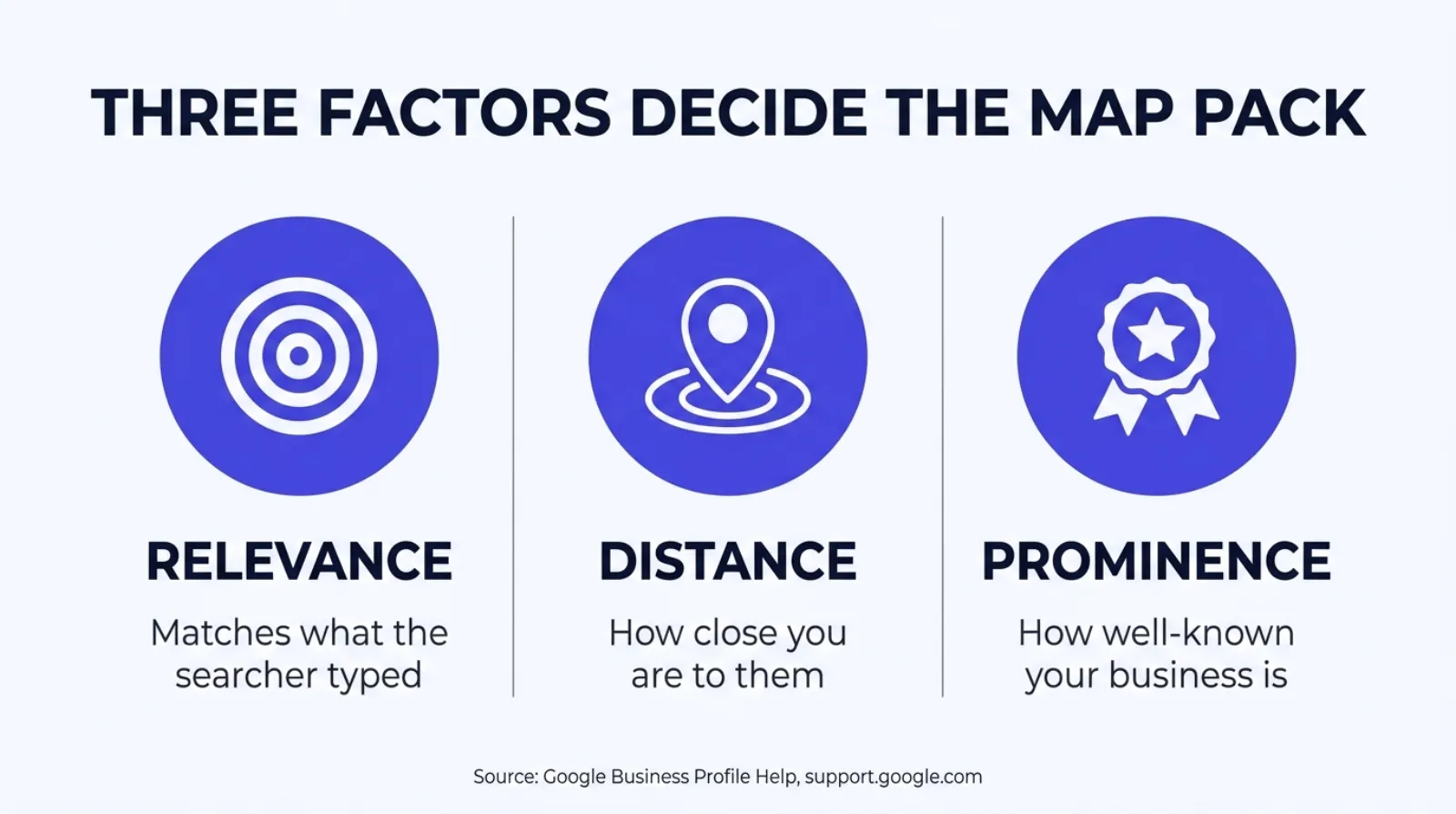
| Factor | What Google says | What it means for your agency |
|---|---|---|
| Relevance | "How well a Business Profile matches what someone is searching for"1 | Your primary category and business info need to actually say what you sell |
| Distance | "How far each business is from the customer who's searching"1 | A listed address in the city being searched outranks one a suburb over |
| Prominence | "How well-known a business is"1 | Reviews, citations, and links, built over time, not bought |
Three factors, one search box
A single search can weigh the three differently. A "near me" query leans harder on distance. A branded search for your agency's name leans harder on relevance. A broad category search in a competitive metro leans harder on prominence, because Google has more candidates within the same distance band to sort between.
The one field almost every agent skips
If relevance, distance, and prominence are the three factors, primary category is the single field that does more work than any other inside "relevance." Whitespark's 2026 Local Search Ranking Factors report, an annual survey of 47 local search specialists scoring 187 individual signals, put a number on it: primary GBP category scored 227 points, the highest of any individual local pack factor, ahead of proximity to the point of search at 225 and keywords in the business title at 2235.
Category isn't a label. It's an eligibility gate. Google uses it to decide which searches your profile is even allowed to compete for, before distance or prominence get a vote. Choose the generic "Insurance agency" category when your book is entirely Medicare, and you've made your profile relevant to every insurance search in town, including all the ones you don't want, while diluting how strongly it matches the searches you actually need to win.
Most agents pick a category once, at setup, and never revisit it. Google has added and split categories over the years, "Medicare service provider" and specific carrier-adjacent categories among them, and a profile set up in 2019 is often still running whatever generic option existed then.
Multi-line agents face a real, unavoidable tradeoff here, because a Business Profile only takes one primary category, plus a handful of secondary ones that carry far less weight. An agent writing Medicare, ACA, and final expense out of one office has to pick which product line is the primary relevance signal, and the honest answer is: whichever line drives the most new-client search volume, not whichever line is most profitable per policy. Relevance is scored against what a stranger types into Google, not against your commission schedule.
| Rank | Factor | Score | What it means for an insurance profile |
|---|---|---|---|
| 1 | Primary GBP category | 227 | Sets which searches you're even eligible to rank for |
| 2 | Proximity to point of search | 225 | Fixed by where your address is registered |
| 3 | Keywords in business title | 223 | Only use real, existing-name keywords, never stuffed ones |
| 4 | Physical address in city of search | 213 | A branch office in each city you serve outranks one central office |
| 5 | Business open at time of search | 189 | Stale hours quietly remove you from "open now" filtered searches |
Source: Whitespark, "2026 Local Search Ranking Factors," published 2025-11-06, 47 experts scoring 187 factors5.
What a "near me" search is actually worth
A profile fix is worth exactly as much as the traffic sitting behind it, so it's worth being precise about what that traffic actually looks like before spending a weekend on category settings.
First Page Sage's ongoing meta-analysis of local pack click behavior puts the click-through rate at 17.6% for the top map pack position, 15.4% for the second, and 15.1% for the third, last updated May 20257. Add the three together and the visible map pack, all three positions combined, accounts for roughly 48% of the clicks a local search generates. Less than half the clicks are left for every organic result on the page, combined.
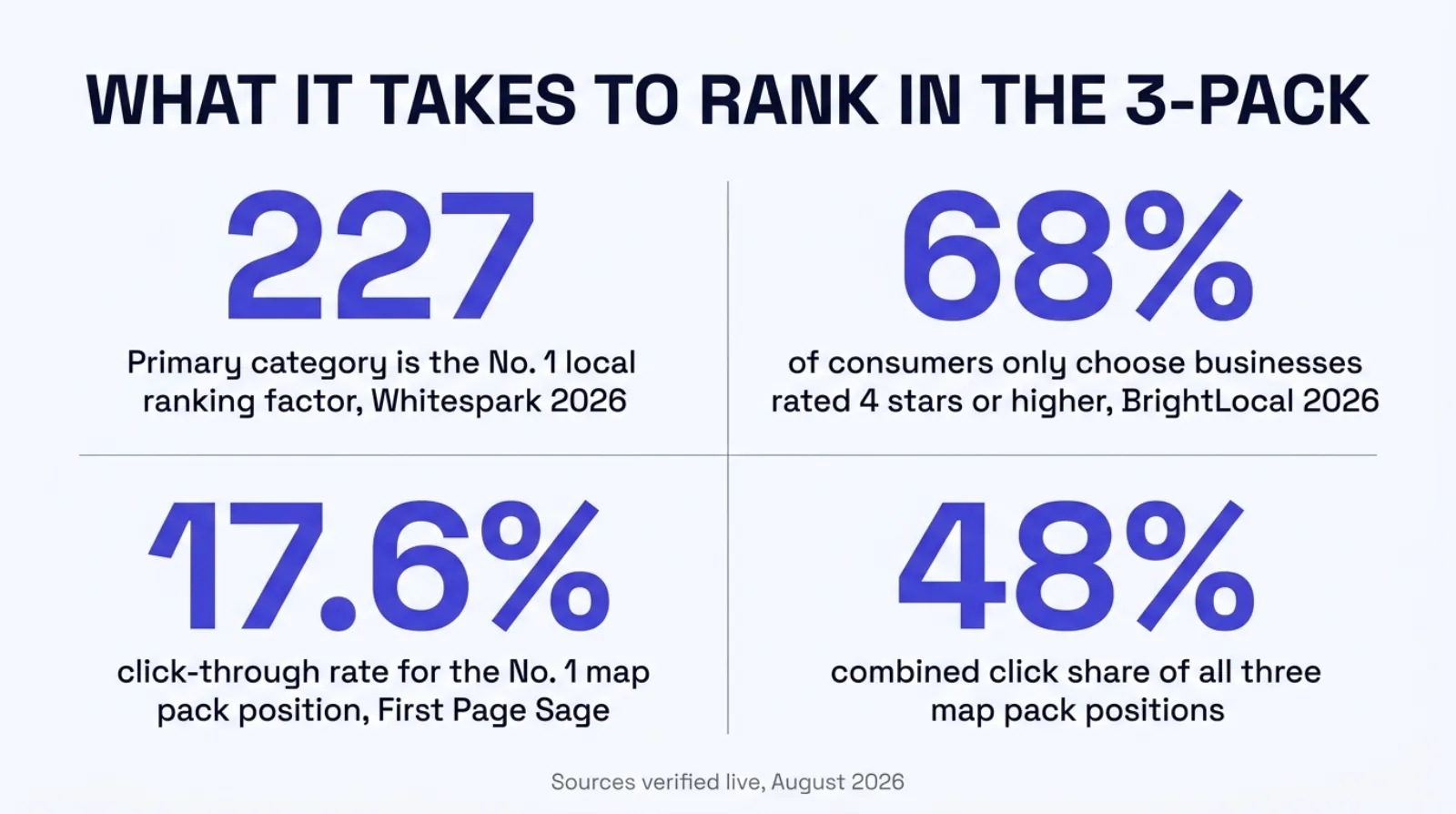
227
Whitespark's score for primary category, the No. 1 individual local ranking factor5
17.6%
Click-through rate for the No. 1 map pack position7
48%
Combined click share of all three map pack positions7
68%
Of consumers who only choose businesses rated 4 stars or higher6
Curious where your own listing stands
The free Audit checks a site's AEO and technical readiness in under a minute. Run one at strategicaiarchitects.com/audit before deciding how much of this to fix yourself.
None of that 48% is guaranteed to any specific agency. It's the ceiling available to whichever three businesses Google decides earned the box for a given search. The gap between being one of those three and being the fourth-best match, invisible unless someone scrolls, is the entire subject of this guide, and it's a gap that repeats on every single search a prospect runs, not once.
It's also a gap that compounds with the review data above. A prospect who reads reviews 97% of the time and filters out anything under 4 stars 68% of the time6 isn't evaluating your agency once. They're running that filter on whichever three names Google decided to show them, which means the profile fight and the review fight are really the same fight, arriving at the same moment, on the same small map.
The profile mistakes that cost agencies the pack
Google's own guidelines for representing a business on Google spell out what's allowed in a profile's name field, and most of the mistakes we see in agent profiles trace back to ignoring this one document. The core rule: "your name should reflect your business's real-world name, as used consistently on your storefront, website, stationery, and as known to customers"2.
Everything else in the guidelines is really just that one sentence enforced. Marketing taglines added to the name field aren't allowed. Service descriptions stuffed into the name, "Dave Miller Insurance, Medicare and ACA Quotes," aren't allowed. Fully capitalized names, except for genuinely established abbreviations, aren't allowed. Location descriptors tacked onto the end of a name aren't allowed2.
Address rules get just as specific. A physical listing needs "an actual, real-world address with permanent, fixed signage," and Google states plainly that "P.O. boxes or mailboxes located at remote locations aren't acceptable"2. A virtual office or a co-working membership doesn't qualify unless the location has visible signage, receives customers during business hours, and is staffed while it's open2.
None of these are cosmetic. Google's support documentation for suspended profiles states that a listing gets suspended when it "doesn't follow our guidelines," and once that happens, "the public can't go to the profile" at all, on Search or on Maps4. An agency chasing a small relevance boost by stuffing keywords into its name can lose the entire listing instead, which is a considerably worse outcome than the one it was trying to avoid.
The profile most agents run
- Generic "Insurance agency" category, set once in 2019 and never revisited
- Name field padded with "Free Quotes" or a service description
- A P.O. box or a shared co-working address with no real signage
- Hours from two office moves ago, never updated
- A handful of reviews, most from a single push years back
ResultBuried below the map pack, or suspended entirely
The profile built to compete
- Specific category matched to the actual book of business
- Real-world name only, exactly as it appears on signage
- A genuine staffed address, or a properly configured service area
- Hours kept current, checked monthly
- A steady, ongoing flow of new reviews, not one old burst
ResultEligible for the box on the searches that matter
Service-area business or storefront listing
A lot of independent agents work from a home office or travel to meet clients, and Google built a specific listing type for exactly that: the service-area business. It hides your street address from public view and instead lists the cities or zip codes you actually serve, up to 20 of them3.
The tradeoff is real, and worth knowing before you set it up. Google's own guidance states "the boundaries of your overall area shouldn't be more than about 2 hours of driving time from where your business is based"3, and if you don't serve clients at your listed address at all, the guidance is direct: "remove your address from your Business Profile"3. Claiming a service area that reaches three states away from a home office is the kind of overreach that draws exactly the guideline scrutiny that leads to suspension.
If you do meet clients at a real office with a sign on the door, keep the standard address-based listing. It scores better on distance for nearby searches than a service-area listing does, because Google can point to an exact location rather than a broad radius, and exact beats broad every time proximity is the tiebreaker.
Agencies with more than one office face a version of the category tradeoff again here. Google's own scoring rewards "physical address in city of search" as its fourth-highest individual local pack factor5, which means a genuine second office in a neighboring city, staffed and signed, will consistently outperform a single central office trying to cover both cities through a wide service area. It's more work to set up and maintain two real listings than one broad radius, but the ranking math rewards the harder path.
Audit your own profile in twenty minutes
You don't need a consultant to get a first honest read on where your listing stands. Most of it is checkable directly, from your own phone, right now.
Search your own business name, then a category search, from a different device
A branded search always finds you. A category search, "Medicare agent [your city]," tells you whether you're actually competing for the pack on the searches that bring in new clients rather than existing ones.
Check your primary category against your actual book of business
Open your profile in Google Business Profile Manager and look at the primary category. If your book is mostly Medicare and the category says "Insurance agency," that's the single highest-leverage fix available to you, per Whitespark's scoring5.
Read your business name against Google's own rule
If it includes a tagline, a service description, or anything beyond your real-world name as it appears on your sign and stationery, remove it before it draws a suspension rather than after2.
Confirm your address or service area matches reality
A P.O. box, a mailbox service, or a service area stretching past a two-hour drive from your actual base are all guideline violations, not gray areas23.
Check your hours against your actual hours
Stale hours quietly drop you from any search filtered to "open now," and business hours is Whitespark's fifth-highest individual local pack factor5.
Check every listing of your name, address, and phone number across the web
Your website footer, your Facebook page, any directory listing, and your Business Profile should all show the identical name, address, and phone number. Mismatches are a known drag on the prominence signal.
Count how many reviews you've earned in the last 90 days
A large total from three years ago reads very differently to a searcher than a steady trickle of recent ones, and it reads differently to Google's prominence signal too.
Reviews are doing two jobs now
Reviews used to be mostly a conversion lever, the thing a prospect skimmed after they'd already decided to click your listing. BrightLocal's 2026 Local Consumer Review Survey, a poll of 1,002 US consumers published in February 2026, shows that job getting bigger. 97% of consumers now read reviews for local businesses, and 41% say they "always" read them before choosing one, up from 29% the year before6.
The bar is rising with the habit. 68% of consumers now say they'll only use a business rated 4 stars or higher, up from 55% in the prior year's survey, and 31% say they'll only use one rated 4.5 stars or higher, nearly double the 17% who said the same thing a year earlier6. Reviews aren't a nice-to-have anymore. For a growing share of buyers, a rating under 4 stars is a hard filter, and your agency never gets considered at all.
That's the conversion side. The ranking side runs through prominence, the third of Google's three factors, where review count and rating feed directly into how "well-known" Google judges a business to be1. A listing with a thin, stale review history is weaker on both fronts at once: it converts fewer of the searchers who do see it, and it's less likely to be shown to them in the first place.
Harvesting reviews consistently, not a onetime push after a good month, but an ongoing system triggered after every closed policy, is one of the few prominence levers an agency fully controls. Distance is fixed by where your office sits. Category is a one-time fix. Reviews are the one factor you can keep moving every single week.
Citations, links, and the quiet half of prominence
Reviews get most of the attention because they're visible, but Google's own explanation of prominence names a second input right alongside them: "how many websites link to your business," in addition to "how many reviews you have"1. An agency can have a strong review count and still be thin on this second half of the signal, and it rarely gets checked because it isn't sitting on the Business Profile itself.
This is where citations come in, the mentions of your agency's name, address, and phone number scattered across the web: Yelp, Bing Places, the Better Business Bureau, state insurance department directories, chamber of commerce sites, industry-specific listings for licensed agents. Each one is a small vote that your business exists at the location it claims. The catch is consistency. A citation listing "Dave Miller Insurance Agency" at one address and another listing "Dave Miller Insurance" at a slightly different one doesn't add up to two votes. It can read as two different, unverified businesses, which weakens rather than strengthens the signal.
Google's own list of ranking improvement tips is short and doesn't require a specialist to execute: verify the business, keep the profile's information "complete and accurate," respond to reviews, since "positive reviews and helpful replies can help your business stand out," and add photos and videos1. None of it is exotic. Most of it is the kind of task that gets pushed to "later" indefinitely because nobody owns it.
Photos specifically are worth a second look, because they're the cheapest fix on this whole list. A profile with a handful of stale interior shots from setup day reads differently to a searcher, and to Google, than one with a recent team photo, a real office exterior, and headshots of the actual licensed agents a client would meet. It costs nothing but a phone and ten minutes, and it's one of the few levers Google names directly as worth pulling.
How we build this in
This section sticks to what's on our own live pages, verified this session. Digital Foundation's Starter tier, $247 a month with a 14-day free trial, includes Google Business Profile management and review harvesting as a standing part of the build, not a one-time setup task someone forgets about six months later8.
In practice that means the category, name, and NAP consistency work described in this guide gets checked as part of the build rather than left for an agent to discover on their own, and the review harvesting piece runs continuously, prompting for a new review after a closed policy instead of waiting for a quarterly reminder that never comes. The free Audit scores a site's AEO and technical readiness, including whether the on-page business information actually matches what's registered with Google, so you can see where your own current setup stands before deciding anything9.
Neither of those claims promises a specific ranking, a specific number of new reviews, or a guaranteed spot in the 3-pack. Nobody can honestly promise that, and anyone who does is selling something else. What we can say plainly is that the fields Google names directly, category, name, address, hours, are the ones we check first on every build, because they're the ones with a documented mechanism behind them rather than a guess.
When this isn't your problem
If your book is built entirely on referrals and renewals, and you're not trying to win new clients from a "near me" search at all, the map pack matters far less to your business than it does to an agent actively prospecting new local clients. Some agents genuinely don't need this.
It's also worth saying plainly: you can run the twenty-minute audit above, find that your category, name, address, and hours are all already correct, and be done. A meaningful number of agents will land there, especially anyone who set up their profile recently or had help doing it right the first time. The point of this guide is knowing which situation you're actually in, not talking every agent into a rebuild they don't need.
Where it applies almost without exception is any agency actively spending on ads or content to bring in new local clients, because a strong campaign driving traffic to a weak or suspended profile is spending twice: once on the ad, and again on the visibility it never gets credit for.
Questions agents ask
Why doesn't my insurance agency show up in the Google map pack?
Google ranks the map pack on three factors it names directly: relevance, distance, and prominence. If a closer or better-established competitor outscores you on any combination of the three, they take one of the three visible slots and you don't, regardless of how good your website is.
What is the single most important Google Business Profile ranking factor?
Primary category selection. Whitespark's 2026 survey of 47 local search specialists scored it the top individual local pack factor at 227 points, ahead of proximity to the searcher at 225 and keywords in the business title at 223. Picking the wrong category caps what you can rank for no matter what else is right.
Can I use a marketing tagline or 'insurance agent' after my name in my Google Business Profile?
No. Google's guidelines for representing a business state a profile's name must reflect the business's real-world name as used on its storefront and stationery, and explicitly bar marketing taglines, service descriptions, and location descriptors added to the name field. Adding them risks the listing being suspended.
Do I need a physical office to show up in local search as an insurance agent?
No. Google lets you register as a service-area business, hide your street address, and list up to 20 cities or zip codes you serve instead. The catch: Google's own guidance says that service area shouldn't extend farther than about two hours of driving time from where the business is actually based.
How many Google reviews does an insurance agency need to compete for the 3-pack?
Google has never published a specific number, and treat anyone who claims one with suspicion. What's measurable is buyer behavior once they see your listing: BrightLocal's 2026 survey of 1,002 US consumers found 68% now only choose businesses rated 4 stars or higher, up from 55% a year earlier.
Can Google suspend an insurance agency's Business Profile?
Yes. Google's own support documentation states a profile is suspended when it doesn't follow the guidelines, and a suspended listing is removed from both Search and Maps, meaning the public can't reach it at all. The most common trigger for an agency is a stuffed business name or a mismatched address.
How long before fixing my Google Business Profile shows up in rankings?
We can't promise a timeline, and any guide that does is guessing. What we can say honestly is that category and NAP fixes tend to matter immediately because Google reads the profile fresh each time it serves a result, while prominence signals like reviews and citations build over weeks, not days.
What is a service-area business, and should my agency use one?
It's a Google Business Profile type built for a business that goes to the customer rather than the customer coming to an office, common for agents who work from home or travel to clients. If you meet clients at a real storefront, a standard address-based listing with your physical location still performs better for nearby searches.
Sources
- Google Business Profile Help. "How local results are ranked," relevance, distance, and prominence factors, verified live 2026-08-13. support.google.com.
- Google Business Profile Help. "Guidelines for representing your business on Google," name, address, and prohibited content rules, verified live 2026-08-13. support.google.com.
- Google Business Profile Help. "Manage your service areas for service-area and hybrid businesses," two-hour driving time limit and address rules, verified live 2026-08-13. support.google.com.
- Google Business Profile Help. "Fix suspended or disabled profiles," suspension causes and effects, verified live 2026-08-13. support.google.com.
- Whitespark. "2026 Local Search Ranking Factors," Darren Shaw, published 2025-11-06, 47 experts scoring 187 factors, verified live 2026-08-13. whitespark.ca.
- BrightLocal. "Local Consumer Review Survey 2026," published 2026-02-11, 1,002 US consumers surveyed, verified live 2026-08-13. brightlocal.com.
- First Page Sage. "Google Click-Through Rates (CTRs) by Ranking Position," local pack data, updated 2025-05-28, verified live 2026-08-13. firstpagesage.com.
- Strategic AI Architects. "Digital Foundation," pricing and Google Business Profile management feature, verified live 2026-08-13. strategicaiarchitects.com.
- Strategic AI Architects. "Free Audit," AEO and technical readiness scan, verified live 2026-08-13. strategicaiarchitects.com.
Talk it through
Want a second pair of eyes on it?
Free 30 minutes. Bring what you found, or bring nothing and we will look together at how AI engines read your site and which fixes move first.
See what your own listing and site actually score
Run the free Audit, a live AEO Audit plus a HIPAA tracking scan of your site, in under a minute.
Related reading: is Google's AI summarizing your reviews · why your website only ranks in one county