Playbook
Does Your CRM Integration Need to See Raw Client PHI?
Almost four in ten AI interactions now carry sensitive data. If your agency has wired a chatbot, a voice AI, or a general AI assistant into your CRM in the last year, there's a real chance client PHI has already crossed that wire, whether or not anyone meant it to.


19 min read
39.7% of AI interactions now involve sensitive data, according to Cyberhaven's 2026 AI Adoption and Risk Report3. Most CRM-to-AI integrations are built to send the whole contact record by default, name, date of birth, plan details included, because that's the easiest way to wire two systems together, not because the AI tool needed all of it. A signed BAA with your CRM doesn't cover a separate AI service plugged in downstream. The fix isn't avoiding AI. It's knowing, integration by integration, whether raw PHI ever needed to leave your system at all, and building so that it doesn't unless it has to.
Every integration is a new place PHI can end up
Look at a typical agency's stack. A CRM holding client records, likely GoHighLevel. A texting and email automation layer sitting on top of it. A voice AI or an AI receptionist answering after hours. Maybe a chatbot widget on the quote form. Maybe a call-analysis tool that transcribes and scores every conversation. Maybe someone on staff who pastes a client's plan question into ChatGPT to draft a faster reply. None of these tools were added at once, and none of them came with a clear answer to the question that actually matters: does this specific piece of software need to see a client's name and date of birth attached to their plan or diagnosis, or is it doing a job that never required that combination in the first place.
Most agencies never ask the question, because nothing forces them to until something goes wrong. The CRM has a BAA. That feels like coverage. It isn't, not for what's connected downstream of it, and it's worth being precise about why before going any further.
Picture the actual sequence at a mid-sized Medicare agency. A client calls after hours about a Part D question. The AI receptionist answers, pulls the caller's record to greet them by name and confirm the right account, and routes the call. To do that, most setups hand the receptionist the whole contact card: name, phone, date of birth, current plan, and the note field where a previous agent wrote down a diagnosis-adjacent detail because it affected a recommendation. The receptionist only needed the name and the callback number. It got all of it, because the integration that connects the phone system to the CRM was built to pass the record, not a filtered version of it. If that receptionist runs on a general model with no BAA behind it, that whole card just left the building.
Before you keep reading
If you want a read on your own site's HIPAA-adjacent tracking exposure specifically, the free Audit's tracking scan checks it in under a minute6. strategicaiarchitects.com/audit. It's a different gate than the one this guide is about, and the difference matters, covered later on.
What "touching PHI" actually means for an API call
Protected health information, the details HIPAA protects, is a name, a date of birth, a phone number, or an address, once it's paired with anything about a person's health or coverage: a plan type, a diagnosis, a prescription, an enrollment status.2 A lead named "interested in ACA options" isn't PHI by itself. The instant your CRM attaches that lead's date of birth and the subsidized plan they're enrolled in, the record is PHI, and every system that reads it, forwards it, or logs it is now handling PHI whether it was built to or not.
A Business Associate Agreement is the contract that makes it legal for a vendor to handle PHI on your behalf. It obligates that vendor to specific safeguards and specific breach notification duties, and without one, sharing PHI with that vendor is the violation, not some later misuse. Most general-purpose consumer AI products, the free or basic tier of a chatbot, a browser extension, a personal AI assistant, don't offer a BAA at all. The enterprise or platform tiers of major AI providers often do, but only for the specific product and hosting arrangement named in that agreement, not for every way a company's models can be accessed.1
That last distinction is the one that trips up agencies that think they've handled this. Ambrose, the AI platform this site is built on, keeps its BAA-covered path narrow and explicit on purpose: PHI is restricted to running through Claude via Amazon Bedrock in U.S. regions, the specific arrangement actually covered by a signed agreement, not "an AI model" in the abstract.1 If your own stack can't name the specific model, the specific hosting environment, and the specific agreement covering it, you don't actually know whether you're covered. You're assuming.
There's a second version of this problem that has nothing to do with your official integrations: a staff member who gets stuck drafting a reply and pastes the client's full message thread, name and plan detail included, into whichever AI chat tool they already have open in another tab. Security teams call this "shadow AI," and it's not a hypothetical for an insurance office. Cyberhaven's own data, covered in more detail below, shows people feed sensitive information into AI tools once every three days on average across the workforce it studied.3 No integration, no API, no BAA to even check, because the CRM never touched it. This is why the fix in this guide has to include a written policy for staff, not just an audit of your official connections.
The question to ask every vendor
Not "are you HIPAA compliant." Ask which specific model or service handles the data, whether a BAA covers that specific model and hosting arrangement by name, and what happens to the data if the vendor changes which model they route requests to next quarter. A vague "yes" to the first question and no answer to the third is not coverage.
Why the default setting is always "send everything"
Nobody builds an integration to leak data on purpose. It happens because sending the whole record is the easy path, and stripping it down to only what's needed is extra work that has to be done deliberately, field by field, integration by integration.
When a CRM triggers an automation, an AI receptionist call, or a chatbot reply, the default way to wire that connection is to pass the full contact object, every field in the record, to whatever's listening on the other end. That's how most no-code automation tools (Zapier, Make, a CRM's own workflow builder) are designed to work: you drag the contact record into the next step, and every field comes with it unless someone goes back and manually removes the ones the next step doesn't need. A voice AI script that only needs to confirm an appointment time still typically receives the caller's full record, including plan and health details it never uses, because building a version of the integration that passes only the appointment time is more work than the default.
Layer a general-purpose AI tool on top of that pattern and the exposure compounds. An AI receptionist answering "what does my plan cover" needs some context to give a real answer, and the fastest way to give it that context is to hand it the whole client record and let it figure out what's relevant. The AI model itself doesn't request the extra fields. The integration just includes them, because nobody wrote the extra logic to leave them out.
| Integration | What the job actually requires | What most default setups send |
|---|---|---|
| AI receptionist / voice AI | Caller's name and the reason for the call, to route or schedule it | Full contact record: plan, DOB, enrollment status included |
| Chatbot on the quote form | Whatever the visitor types into the box | The typed message plus any CRM fields the widget was configured to pull in |
| Call transcription / analysis | The audio and the resulting text | The recording plus the linked contact record, often auto-attached by the CRM |
| Staff pasting into a general AI chat | Whatever detail the staff member is actually stuck on | Everything they copied to save time, often the entire record |
What an unmanaged integration actually costs
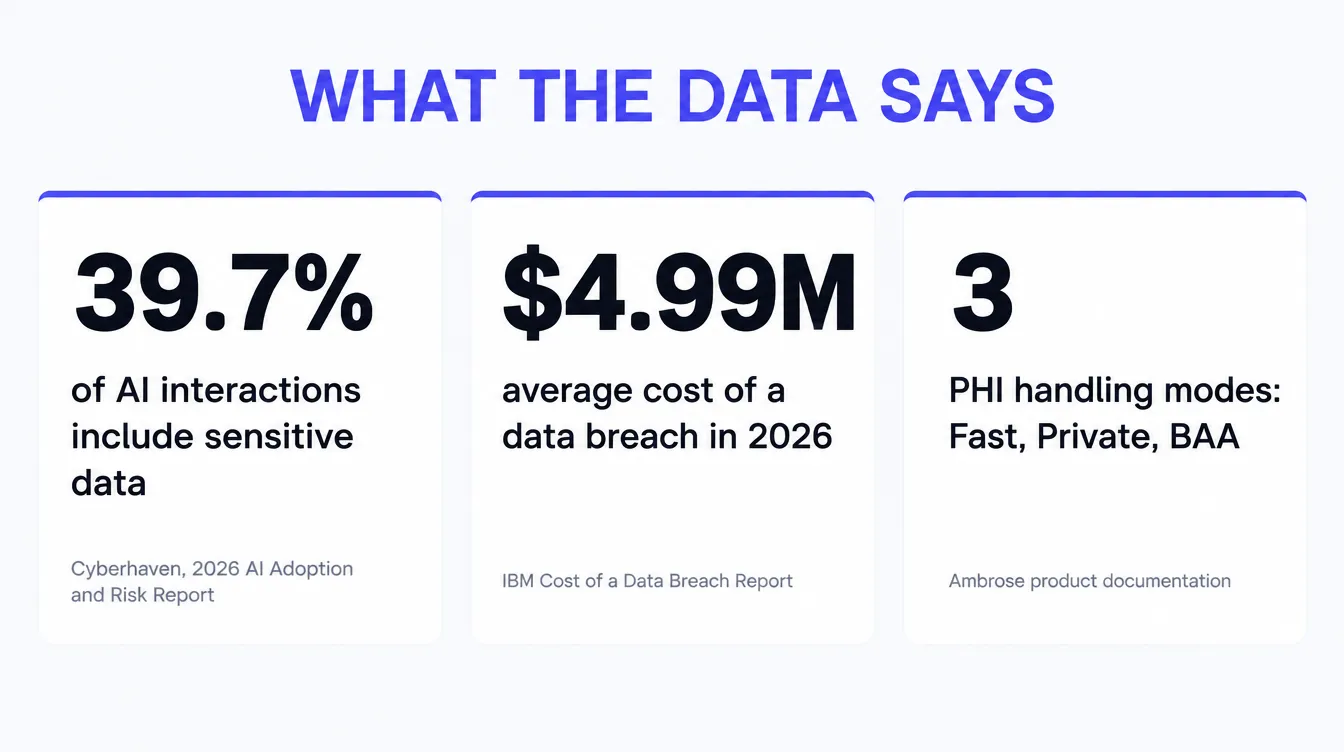
Start with how common this already is, industry-wide, not specific to insurance. Cyberhaven's 2026 AI Adoption and Risk Report found that 39.7% of all AI interactions, prompts, pastes, and file uploads, now involve sensitive data, and that employees feed sensitive data into AI tools once every three days on average.3 That figure isn't insurance-specific, but it's a reasonable floor for what's happening inside an industry that handles health and financial detail on every single contact record by default.
Now put a dollar figure next to what happens when that sensitive data is mishandled and it turns into a breach. IBM's Cost of a Data Breach Report 2026 puts the global average cost of a data breach at $4.99 million, a record high and a 12% increase over the prior year.4 That's an average across industries and breach types, not a prediction for any specific agency, and most breaches an independent agency will ever face look nothing like a $5 million event. The number is worth citing anyway, because it's the direction the cost curve is moving in industry-wide, and because the same report has tracked healthcare as one of the more expensive sectors to have a breach in for over a decade running, driven by exactly the kind of detection, notification, and lost-business costs a PHI leak through an unvetted integration would trigger.
There's a cost that shows up long before any breach, too: the time and legal fees of an OCR complaint investigation, or the internal scramble of a risk assessment nobody scheduled because a new integration went live without one. Those costs land whether or not anything was ever actually breached, the moment an investigator or an auditor asks the question this guide is asking: which of your integrations touch PHI, and which of them have a BAA that actually names them.
39.7%
Of AI interactions industry-wide now involve sensitive data3
$4.99M
Global average cost of a data breach in 2026, up 12% year over year4
3
PHI handling modes Ambrose documents by name: Fast, Private, BAA1
How to audit your own stack this week
None of this requires ripping out your tools. It requires knowing, integration by integration, what actually crosses the wire, and closing the gaps in the table above one at a time.
Inventory every place a client record travels. List every tool connected to your CRM that can read a contact record: your texting and email automation, your voice AI or receptionist, your chatbot widget, your call recording and analysis tool, any custom assistant or GPT staff use day to day. Most agencies have never written this list down in one place.
For each one, ask two questions. Does this destination have a signed BAA that names it specifically, not just a BAA with your CRM. And does the job this tool performs actually require the client's name, date of birth, and health or plan detail, or could it be done with an aliased ID and a narrower slice of the record.
Test it, don't assume it. Run one fake but realistic record through each integration and look at the actual outgoing request, most CRMs and automation platforms let you inspect this. If the payload includes fields the destination tool never displays or acts on, that's unnecessary exposure sitting in a request log somewhere, whether or not anything bad ever happens with it.
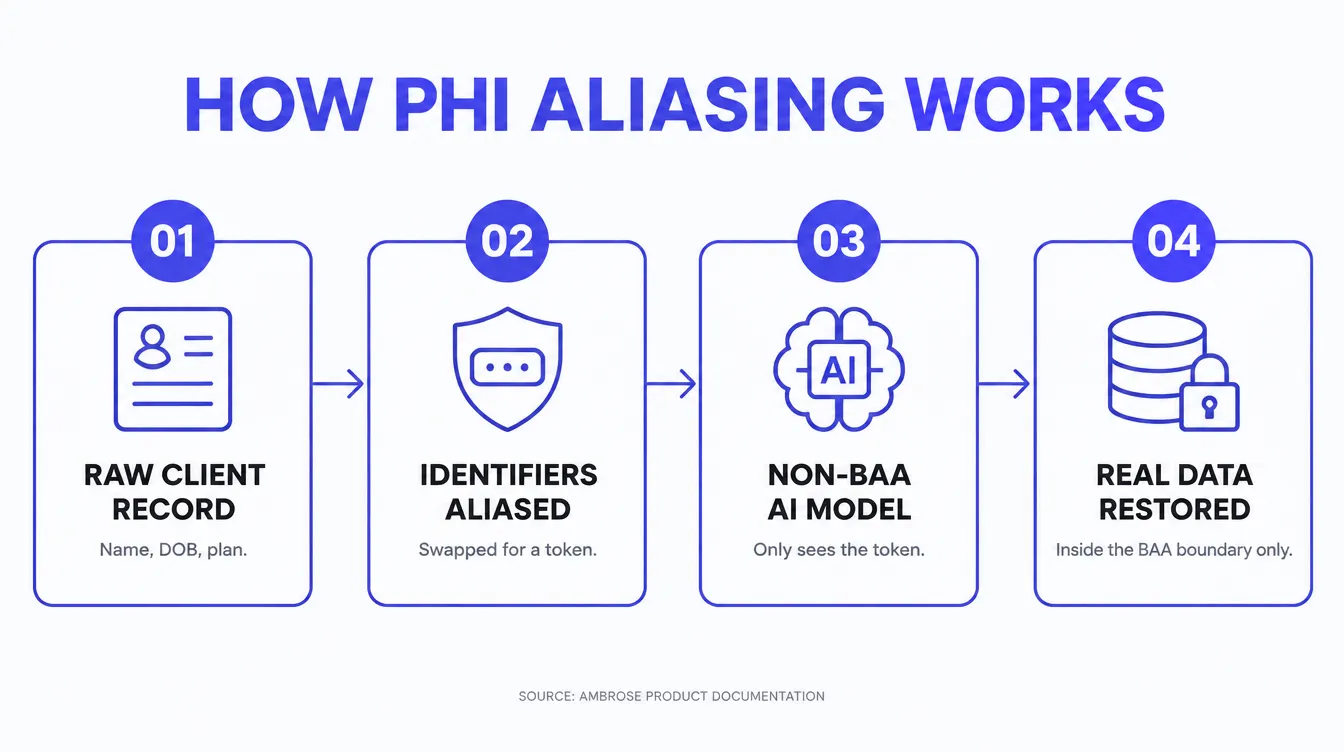
Set a default policy and write it down. The simplest workable rule for most agencies: no client identifier leaves the CRM for a non-BAA destination, ever, full stop. Everything that needs AI assistance without a BAA in place gets aliased first, a case number or a token instead of a name, and rehydrated only inside a system that's actually covered.
Re-check it after every vendor update. A tool that was fine six months ago can change which model it routes requests to, or add a new integration of its own, without telling you. Put a repeat reminder on the calendar, quarterly is reasonable, to re-run the test above.
Write the staff policy down, separately from the vendor audit. The integrations you control with settings and BAAs are one problem. What a staff member does with a personal AI account on their own laptop is a different one, and no vendor audit catches it. One sentence covers most of it: no client-identifying detail, name, date of birth, phone number, or plan and health specifics, goes into a personal or unapproved AI tool, ever. Post it somewhere staff actually see it, not just in an onboarding packet nobody reopens.
You can do this yourself
Everything above is doable with the tools you already have and an afternoon of actually looking at request logs instead of assuming. Most agents read this and decide they'd rather have someone build the aliasing layer for them instead of auditing five integrations by hand every quarter. Either outcome is fine.
How we keep PHI out of the wrong hands
This is the exact problem Ambrose was built to close, not as an add-on feature but as the default path data takes. Its own documentation names three explicit PHI handling modes, and the difference between them is worth understanding even if you never use Ambrose, because it's the clearest public description we've found of what "handling this correctly" actually looks like in practice.
| Mode | What happens to identifiers | Where it fits |
|---|---|---|
| Fast (default) | Identifiers are aliased before the prompt leaves for a non-BAA provider, then restored on the response. Documented as not sufficient on its own for genuine PHI protection. | General assistance where speed matters more than certainty |
| Private | PHI stays on-device or is routed only to BAA-allowlisted destinations | Day to day work that does touch real client health or plan detail |
| BAA | PHI may go to an external provider only under a signed agreement, with explicit user acknowledgment required | Specific integrations where a named vendor's BAA is confirmed and on file |
The mode can be set by default and overridden per request, and every call returns which mode was actually used and why, so there's a real record instead of a guess.1 That's the difference between a platform that treats PHI handling as a policy someone wrote once and a platform that enforces it, call by call, and can show its work.
It's also, plainly, what we build for agencies that hire us. Our own service page states it directly: anything that touches real client data runs through Ambrose, which masks protected health information before any non-BAA AI model ever sees it, then re-hydrates it for the agency afterward.5 The AI receptionist, the conversation follow-up, the call analysis, all of it runs on that same rail, on the agency's own accounts and domain, so the agency owns it rather than renting a black box.
Who this fits, and who's fine as is
This matters most for an agency that has already connected, or is about to connect, more than one AI tool to its CRM: an AI receptionist plus a chatbot plus a call-analysis tool is a very different exposure profile than a CRM running on its own with no AI layered on top. If you're actively using or evaluating an AI receptionist, a voice AI, or a general AI assistant anywhere near client records, this is worth the afternoon it takes to check.
It matters less if your agency genuinely isn't using AI tools against client data yet. A CRM with a signed BAA and no AI layer connected to it isn't the exposure this guide describes, and there's no need to build an aliasing layer for a connection that doesn't exist. The moment that changes, revisit this.
It matters more, not less, for an FMO or IMO running the same AI receptionist or chatbot setup across a dozen or more downline offices. One misconfigured integration replicated across every sub-account isn't one exposure, it's a dozen, and a single downline agent pasting a client record into the wrong tool becomes the FMO's problem the moment it's traced back to shared infrastructure. If that's your situation, the audit in this guide is worth running once at the FMO level rather than trusting each office to run it on its own.
Questions agents ask about PHI and AI tools
What actually counts as PHI for an insurance agency's website or CRM?
Protected health information is any detail that could identify a client combined with anything about their health or coverage: name, date of birth, phone number, or address paired with a plan type, a diagnosis code, a prescription, or an enrollment status. A contact record that just says "John Smith, interested in a quote" isn't PHI yet. The moment you attach his date of birth and the Medicare Advantage plan he's enrolled in, it is, and every tool that touches that combined record needs to be treated accordingly.
Does using ChatGPT or a general AI assistant at my agency automatically violate HIPAA?
Not automatically, and not never. HIPAA doesn't ban AI tools, it requires that anything handling PHI on your behalf is a business associate under a signed BAA, or that the data reaching that tool isn't PHI in the first place. Pasting a client's full record into a general consumer AI chat window without a BAA in place is the violation. Using a tool that never receives the identifying details, because they were aliased or stripped before the request left your system, is a different situation entirely.
What is "PHI aliasing" or identifier masking, in plain terms?
It's swapping the parts of a record that identify a person for a stand-in value before that record leaves your system for a general-purpose AI model, then swapping the real values back in once the response returns to a system that's allowed to hold them. The AI model does its job, drafting a message, summarizing a call, checking a plan detail, without ever seeing the client's actual name, date of birth, or contact information. Ambrose's own documentation describes this exact mechanism for its default mode: identifiers are aliased before a prompt leaves for a non-BAA provider, and restored on the response.
How do I check what data my current integrations are actually sending?
Run one real record with fake but realistic-looking details, a made-up name, date of birth, and plan type, through each integration, and watch what happens. Most CRMs and iPaaS tools (Zapier, Make, GoHighLevel's own automation panel) let you inspect the outgoing request body for a given workflow step. If the field for "name" or "date of birth" is populated in the payload leaving for a third-party AI endpoint, that's your answer, regardless of what the vendor's marketing page says about security.
Does a signed BAA with my CRM cover every AI tool connected to it?
No. A BAA is between you and one specific business associate for the services that associate performs. If your CRM has a BAA with you but pipes a workflow through a separate AI service, a texting API, or a call-analysis tool that doesn't have its own BAA with you, that connection is uncovered even though your CRM relationship is fine. Every hop in the chain needs its own coverage, or it needs to never see PHI at all.
Can an AI receptionist or voice AI safely handle client health details?
Yes, but only if the underlying platform is built to keep raw PHI inside a BAA-covered boundary while it works, rather than shipping the caller's full record to whichever general model happens to be cheapest that quarter. Ask the vendor directly: which model handles the conversation, is there a signed BAA covering that specific model and hosting environment, and what happens to the transcript afterward. If they can't answer specifically, assume the answer is no.
Does the free Audit check for this kind of PHI exposure?
The free Audit's HIPAA tracking scan checks a different, narrower gate: whether trackers and pixels on your public pages fire before a visitor consents, which is its own real liability on Medicare and ACA pages. It doesn't inspect the backend API calls your CRM makes to AI tools, because that traffic never touches the public page a scanner can read. Passing the tracker scan tells you your front end is clean. It says nothing about what your integrations are doing behind it.
What's the difference between "HIPAA compliant" and "HIPAA certified"?
There's no such thing as HIPAA certification. No government agency or private body issues a certificate that makes a product or vendor officially HIPAA-approved. "HIPAA compliant" describes a state you maintain through your own practices, your vendors' BAAs, and your safeguards, not a badge you earn once. Any vendor advertising "HIPAA certified" is using the wrong word, and it's worth asking what they actually mean by it.
Sources
- Ambrose. "How client data is protected" and "What is Ambrose" product documentation: identifiers are aliased before a prompt leaves for a non-BAA provider in Fast (default) mode and restored on the response, described as insufficient alone for genuine PHI protection; Private mode keeps PHI on-device or routed only to BAA-allowlisted destinations; BAA mode permits sending PHI to an external provider only under a signed agreement with explicit user acknowledgment; the default mode is configurable and can be overridden per request via a phi_mode parameter, with phi_mode, phi_reason, and phi_guardrail_applied returned on each call; PHI is restricted to routing through Claude via Amazon Bedrock in U.S. regions under Ambrose's BAA. Verified live 2026-09-27. app.hiambrose.com/docs/settings-phi.
- Ambrose. "What is Ambrose" product documentation: defines protected health information as the details HIPAA protects, such as a client's name, date of birth, and plan. Verified live 2026-09-27. app.hiambrose.com/docs/what-is-ambrose.
- Cyberhaven. "2026 AI Adoption and Risk Report," published February 11, 2026: 39.7% of all AI interactions (prompt text, copy and paste actions, and file uploads) involve sensitive data; employees input sensitive data into AI tools once every three days on average. Verified live 2026-09-27. cyberhaven.com.
- IBM. "Cost of a Data Breach Report 2026," conducted with the Ponemon Institute: global average cost of a data breach reached $4.99 million, a 12% increase over the prior year and a record high. Verified live 2026-09-27. ibm.com/reports/data-breach.
- Strategic AI Architects. AI Expert / custom build service page: "Anything that touches real client data runs through Ambrose, which masks protected health information before any non-BAA AI model ever sees it, then re-hydrates it for you." Custom builds scoped and priced on a strategy call, built on the agency's own accounts, domain, and CRM. Verified live 2026-09-27. strategicaiarchitects.com/ai-expert.
- Strategic AI Architects. Free AEO Audit service page: the audit's tracking scan checks every tracker on a site against consent and flags trackers firing before consent on health and Medicare pages. Verified live 2026-09-27. strategicaiarchitects.com/audit.
Talk it through
Want a second pair of eyes on it?
Free 30 minutes. Bring what you found, or bring nothing and we will look together at how AI engines read your site and which fixes move first.
Find out what your own stack is actually sending
Run the free Audit, a live AEO Audit plus a HIPAA tracking scan of your site, in under a minute.
Related reading: Is pasting a client's info into ChatGPT a HIPAA violation? · Your GoHighLevel BAA doesn't make your funnel HIPAA safe · Why your AI employee doesn't remember your clients