Playbook
Websites for Insurance Agents: Builder, Template or Custom?
Three paths, three different ongoing bills, and nobody selling you one of them has a reason to mention the other two.


19 min read
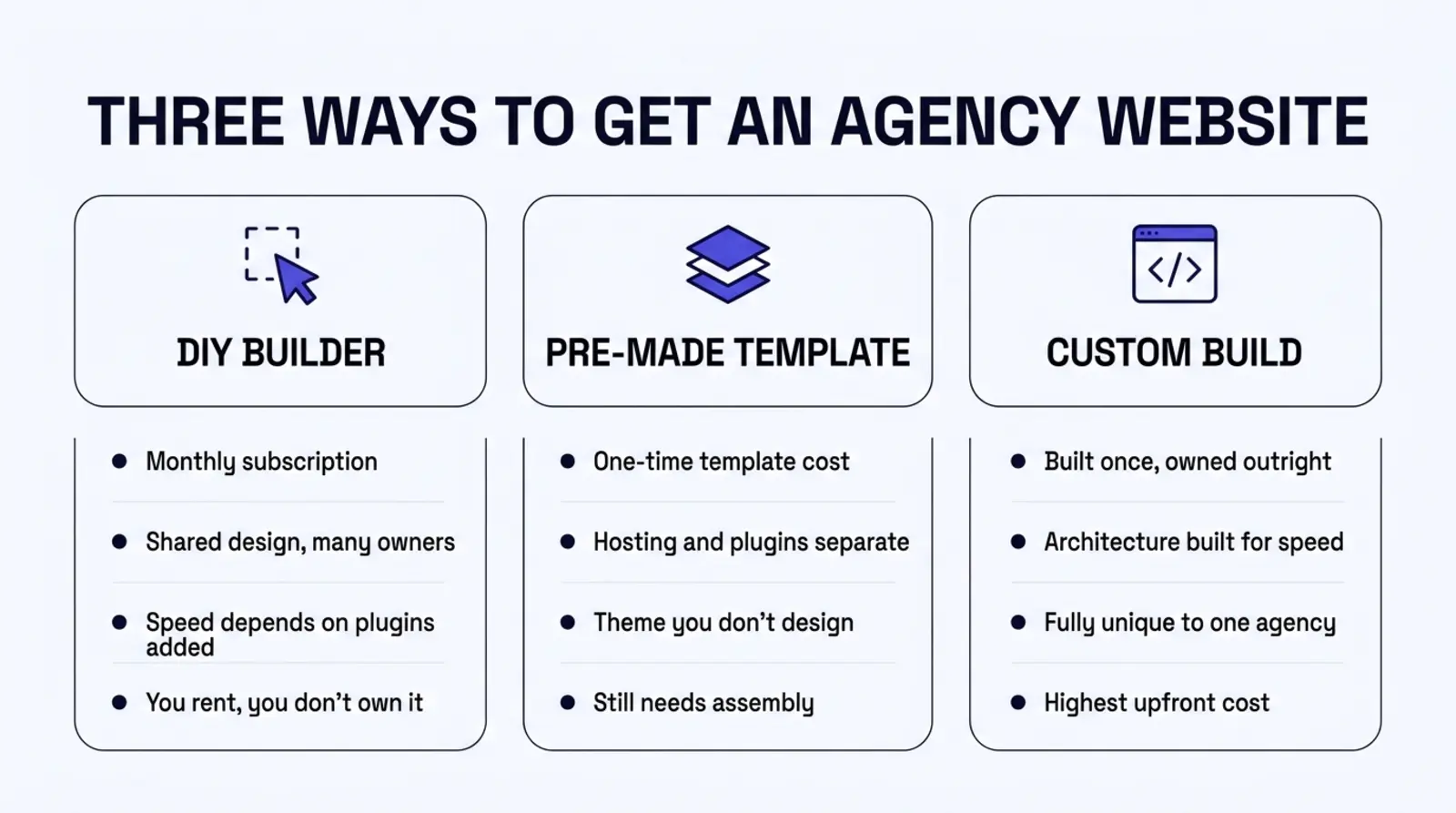
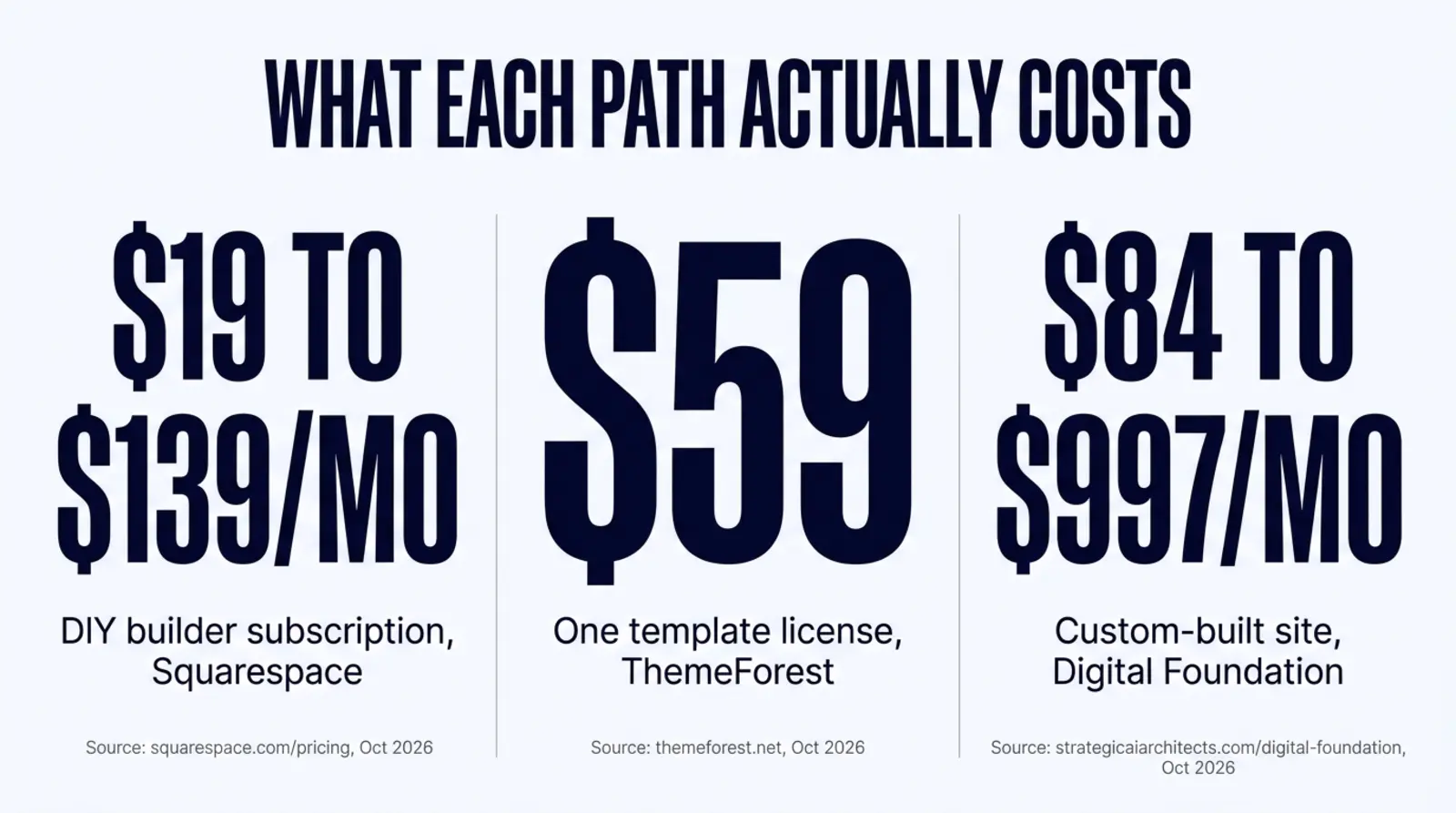
A DIY builder, a pre-made template, and a custom build are three different products with three different cost shapes, not three skins on the same website. A builder like Squarespace runs $19 to $139 a month depending on the plan, forever, and the design belongs to the platform, not you3. A pre-made WordPress template can be licensed for as little as $59 one time, but that is the theme file only, before hosting, plugins, or any insurance-specific content exist5. A custom build costs more to start, $84 a month on our own Website tier, and ends with a site built around your actual lines of business, owned outright, with an architecture built to clear Google's own Core Web Vitals thresholds12. None of the three is wrong. The mistake is picking one without knowing what the other two actually cost.
The question nobody answers honestly
You are a licensed agent, or you run an agency, and you need a website. Maybe you have none. Maybe you have one from a template a friend set up four years ago and it has not been touched since. Either way, you open a search engine and type some version of "insurance agent website builder" or "insurance agency website templates," and what comes back is a wall of opinions, each one written by somebody selling exactly one of the three answers.
A page builder's own marketing tells you a builder is the obvious choice, fast and cheap. A theme marketplace tells you a template saves you from paying a developer. A web design agency tells you templates look cheap and only custom work is worth your money. Every one of these sources has a reason to leave out the other two paths entirely, because naming them honestly would mean naming a tradeoff their own product does not win.
We are a company that sells custom-built websites, so you should weigh what follows with that in mind. But we are also going to put real, sourced numbers next to each path, including the two we do not sell, because an agent who reads a comparison with only one honest column is not actually being compared to anything.
Why this decision is confusing by design
Part of the confusion is structural. "Builder," "template," and "custom" are not three tiers of the same product, the way a small, medium, and large coffee are. They are three different relationships to the website entirely.
With a builder, you are renting a platform. The platform owns the editor, the hosting, the underlying code, and often the domain experience. You are a tenant who can rearrange the furniture. Stop paying, and the site goes dark the same day, because nothing about it exists outside that platform's servers.
With a template, you are licensing a design. Somebody built a theme once, sold it to anyone who wants it, and you are one of however many buyers run the identical layout with different logos and copy dropped in. You still need somewhere to host it, software to run it on, usually WordPress, and time to actually configure it for your lines of business, because the theme author has never heard of a TPMO disclaimer.
With a custom build, you are commissioning something built around your agency specifically: your lines of business, your counties, your compliance requirements, built by someone (or some process) that starts from your situation instead of a generic local-business template. That specificity is also why it costs more to start.
There is also a quieter reason the comparison stays confusing: the incentive runs the same direction at every price point. A builder wants you on its platform every month, indefinitely, which is why the editor is designed to make leaving feel harder than staying. A theme marketplace wants you to buy the next template the day this one starts to feel dated, which is why themes trend toward generic layouts that can be resold to any industry rather than configured deeply for one. And a custom shop, us included, has an obvious reason to make the other two sound worse than they are. None of that makes any one path dishonest on its own. It does mean the only comparison worth trusting is one that puts real numbers from all three next to each other, which is the rest of this guide.
A two-minute gut check
If you stopped paying your current website bill tomorrow, would the site still exist somewhere you control, or would it vanish the moment the subscription lapses? Your answer tells you which of the three paths you are actually on right now, whatever you call it.
Path one: the DIY builder
A DIY builder is a drag-and-drop editor running on the vendor's own infrastructure. You pick sections, drop in text and photos, and the platform assembles the page and hosts it. The entire pitch is speed to launch and zero code.
Pricing varies by vendor and by how much e-commerce or marketing functionality you need, and it is worth seeing the real numbers rather than a vague "affordable" claim. Squarespace's published pricing, fetched live for this guide, lists four website plans: Basic at $19 a month billed annually, Core at $29, Plus at $49, and Advanced at $99, each rising noticeably if billed month to month instead of annually3. That is a general-purpose builder with no insurance-specific features built in.
The builder a lot of agencies already touch is different: GoHighLevel, which bundles a website and funnel builder into the same subscription as its CRM, pipelines, and automations. GoHighLevel's published pricing, fetched live for this guide, lists Starter at $97 a month, Unlimited at $297, and Agency Pro at $4974. For an agency already paying for GoHighLevel's CRM, the website feels free, because the marginal cost of also using the builder is zero. We go through exactly why we still do not recommend the public website live there, even for clients who keep GoHighLevel running underneath, in a dedicated comparison linked later in this guide.
What a builder gets right: you can be live today. There is no waiting on a developer, no design files, no build queue. For a brand-new agent with nothing yet, that speed has real value.
What a builder does not do, by design, is know anything about insurance. There is no template section for a TPMO disclaimer. There is no built-in quoter wired to live federal rating data, only a generic form block you can relabel "Get a Quote." Every line of business you write still needs you to build its own page by hand inside the editor, and nothing stops you from accidentally stacking Medicare, ACA, and life insurance content onto one page the way a generic local-business template encourages. And every month you pay, you are renting, not buying. Cancel, and the site is gone the same day, because none of it exists outside the platform's own servers.
There is also a mechanical reason builder pages tend to run heavier than they need to. The editor itself is a runtime: a visitor's browser has to download and boot the builder's own JavaScript before it can finish assembling the page you designed, on top of whatever tracking scripts and widgets the account has added. None of that is a defect so much as the cost of the editing convenience the builder sells you. It is also exactly the kind of weight Google's Core Web Vitals measure12, which is why a builder page and a pre-rendered static page do not start that measurement from the same place, whatever either one eventually scores.
A multi-producer agency is where a builder's limits show up fastest. Add a second producer who sells a line the first one does not, and the generic "Services" page either grows into an unreadable list or someone has to remember to build a new page by hand, inside the same editor, carrying the right disclaimer for that specific product. Nothing enforces that consistency. The builder will happily let you publish a Medicare page with no disclaimer at all, because it has no idea that one is required.
Path two: the pre-made template
A template is a pre-designed theme you license once and install, most often on WordPress, sometimes as an HTML theme or an Elementor kit. You are not renting a platform's editor the way you are with a builder. You are buying a design file and then finding your own place to run it.
To put a real number on this rather than a guess, we fetched a live ThemeForest listing for this guide: an insurance and finance WordPress theme priced at $59 for a regular license, with 222 recorded sales at the time we checked5. That sale count matters more than the price. Two hundred twenty-two other buyers can run the identical layout, with their own logo and colors dropped in, and nothing in a theme license requires any of them to be an insurance agency, or even in the same industry. You are buying a look, not a strategy.
The $59 is also only the first bill. A template still needs hosting, which is a separate monthly or annual cost the marketplace never quotes for you, because it has nothing to do with the theme. It usually needs a handful of plugins on top, a form plugin, maybe a page builder like Elementor if the theme does not ship its own, an SEO plugin. And it needs your time, because a theme built for a generic "insurance consulting" template was never configured around your specific lines of business, your counties, or the disclaimer language your state or CMS requires on a Medicare-specific page.
Templates are a genuinely reasonable starting point for a lot of agents, which is a more honest statement than most comparisons like this one are willing to make. What they are not is free of ongoing cost, and what they are not is unique. If two agencies in the same metro both bought the same $59 theme, a prospect comparing them side by side is going to notice.
Templates also carry a maintenance obligation most agents do not price in at purchase time. A WordPress theme is code running on your server, alongside whatever plugins you added and WordPress's own core files, and all three need to stay patched. Skip updates for a year and the theme author has usually moved on to a newer template, which means the security patches may have stopped too. None of that shows up in the $59 price tag, because it is not a cost the theme author carries, it is one you do, for as long as the site runs.
Path three: the custom build
A custom build starts from your agency instead of from a theme marketplace's generic template. The page architecture is built around the lines of business you actually write, the counties you actually serve, and the compliance requirements that apply to your specific products, rather than retrofitted onto a layout designed for a plumber or a dentist.
Custom costs more to start, and there is no way to make that sound otherwise without lying about it. What that upfront number buys is specificity: nobody else's site looks like yours, because nobody else's agency is yours. The architecture question, specifically whether the site is built on a static, pre-rendered framework or a dynamic one like WordPress, is a separate decision from the custom-versus- template question, and it is the one that most directly decides how the finished site performs on Google's Core Web Vitals. We cover that platform question on its own in a linked guide later in this article, because conflating "custom" with "fast" is its own kind of marketing shortcut.
What custom gets right, when it is done correctly rather than just expensively: every page answers a question your actual prospects type, the compliance pages carry the disclaimer language your specific lines of business require, and you own the result outright instead of licensing someone else's design or renting a platform's editor. What it does not get right automatically is speed. A custom build on a bloated stack can be just as slow as a bad template. The custom label buys you uniqueness and ownership. The architecture underneath is what buys you speed, and that is worth checking regardless of which of the three paths you take.
What each path means for AI search
Ranking in Google is no longer the only job a website has. A growing share of insurance shoppers now ask ChatGPT, Perplexity, or Google's AI Overviews a question directly, and the answer either names your agency or it names someone else's. Which of the three paths you built on changes how easy your site is for those systems to read, trust, and quote, separately from how it looks to a human visitor.
A builder platform controls the document a visitor's browser receives, and most builders give you only partial access to the page's structured data, the schema markup that tells a crawler what kind of page it is looking at, and no access at all to root-level files like llms.txt or a custom robots policy. You can often inject some schema through a settings panel, but you are working inside whatever the platform's template exposes, not writing the full document yourself.
A template gives you more control in theory, since WordPress lets a plugin write schema markup into every page and llms.txt can be placed at the root of the site. In practice, that control is only as complete as the plugins you install and keep current, and it is common for a theme's own markup to conflict with a schema plugin's output, which is a page one crawler reads cleanly and another does not.
A custom build is where this is easiest to get exactly right, because nothing about the page exists that was not put there on purpose: every page type, a line-of-business page, a location page, a quote page, can carry its own complete, matching schema stack, and the sitemap and llms.txt file can regenerate themselves the moment a new page goes live, with the full absolute URL, because the build process controls the whole domain rather than a platform's exposed settings. That is not a reason to rule out a builder or a template outright. It is one more line item to weigh against the cost differences above, especially for an agency whose growth plan actually depends on organic search and AI citations rather than referrals and paid leads.
The comparison, factually
Laid out side by side, with every price pulled from the vendor's own page this session, the tradeoffs stop being abstract.
| Dimension | DIY builder | Pre-made template | Custom build |
|---|---|---|---|
| Starting cost | $19 to $139/mo, Squarespace; $97 to $497/mo, GoHighLevel34 | As low as $59 one time for the theme license5, plus separate hosting | $84/mo billed annually on our own Website tier6 |
| What you own | Nothing outside the platform; the site ends the day you stop paying | A licensed design file, shared with every other buyer of the theme | A site built for your agency specifically, not shared with anyone |
| Insurance-specific content | None built in; you add it by hand, page by page | None built in; the theme does not know what a TPMO disclaimer is | Built around your actual lines of business and counties from the start |
| Speed ceiling | Platform runtime and page-builder JavaScript load before content does | Depends on the theme and plugin stack; often heavy by default | Depends on the underlying architecture chosen; static builds ship near-zero JavaScript |
| Editing | Easiest; built for a non-technical owner to edit directly | WordPress's editor, once configured; moderate technical comfort helps | Varies by vendor; developer-gated unless a content pipeline is built in |
| Best for | A brand-new agent who needs to be live today with no budget yet | An agent comfortable configuring WordPress who wants a lower upfront number | An established agency whose website is an actual acquisition channel |
If you already know which comparison you actually need
This guide is the one-level-up decision: which category to start from. If you already know you want a custom site and are deciding the platform underneath it, read WordPress vs. static site for an insurance agency website. If you are specifically weighing GoHighLevel's builder against a custom build, read GoHighLevel website vs. custom-built site.
What three years actually costs
Monthly numbers are easy to wave away. A three-year total is harder to ignore, so here is the same math run out, using only the sourced figures above and nothing invented to fill a gap.
A DIY builder on Squarespace's Core plan, $29 a month billed annually, comes to $1,044 over three years3. That is the cheapest total on this page in dollars. What it does not include: at the end of three years you own nothing. The moment the subscription lapses, the site is gone, because it never existed anywhere you control.
A pre-made template starts at the $59 license fee we priced from ThemeForest5, but that number alone is not the real comparison, because it excludes hosting, which this guide is not going to invent a figure for since we did not price a specific host this session. What can be said honestly is that the $59 is a floor, not a total, and the real three-year number depends on which host and which plugins you add on top of it.
Our own Website tier, the entry point of a custom build with no ongoing content management, runs $84 a month billed annually, which comes to $3,024 over three years6. That is roughly triple the Squarespace total and still well short of what a from-scratch custom development quote typically runs, because it is a productized build rather than a bespoke one. What the extra cost buys over the builder: 30 pages live on launch day built around your actual lines of business, a 95 or higher mobile PageSpeed target, and a site that still exists the day you decide to stop paying for ongoing management, because it was built as a standalone asset rather than a rented platform seat6.
None of these totals include the thing hardest to put a dollar figure on: your own time spent configuring a builder's generic blocks or a template's unconfigured theme into something that actually answers an insurance shopper's question. We are not aware of a sourced industry figure for what that time is worth per agent, and we would rather say that plainly than invent a number to round out the math.
How to actually decide
None of this requires hiring anyone to start thinking through it. It requires an honest answer to a handful of questions about where your agency actually is right now.
If you have zero website and zero budget today, a DIY builder is a legitimate starting point, not a failure. Get live, get a license number and a working contact form on the page, and revisit the decision once you have a book of business and a real marketing budget. A placeholder that exists beats a perfect plan that does not.
If you are comfortable configuring WordPress yourself and want the lowest upfront number, a pre-made template is a reasonable middle path, as long as you go in knowing you are buying a design file, not a finished insurance website, and that hosting and plugin costs stack on top of the license price.
If your website is an actual acquisition channel, meaning organic search and AI citations are part of how you expect to grow, not just a digital business card for people who already found you another way, the custom path is where the extra upfront cost starts paying for itself. A generic builder block cannot carry your state's specific license disclosure requirement correctly. A shared template cannot differentiate you from the other buyer of the same theme two towns over.
If you are already on a builder or a template and it mostly works, the honest move is rarely "rebuild everything." It is auditing what you have against the actual page architecture a converting agency site needs, one page per line of business, real location pages, a quote page that returns a real number, and fixing the specific gaps rather than starting over on principle.
Put two real agents side by side and the decision usually becomes obvious once you stop comparing sticker prices in isolation. Agent A got licensed six months ago, writes ACA business in one county, and has not spent a dollar on marketing yet. A DIY builder, live this week for under $30 a month, is the correct answer, not a compromise, because there is no book of business yet to justify a larger number, and the fastest path to a working contact form and a license disclosure on the page is the right priority.
Agent B runs a four-producer agency writing Medicare, ACA, life, and final expense across six counties, spends real money on paid traffic, and has watched two competitors start showing up in AI Overviews for searches the agency used to own alone. The same $29-a-month builder plan that was correct for Agent A is now actively working against Agent B: one generic services page cannot carry four disclaimers correctly, six counties are competing against one regional page, and the platform's own runtime is adding weight that a pre-rendered custom build would not carry. The upfront cost difference between paths stopped being the deciding factor the moment the agency's growth depended on the website doing real work instead of just existing.
The mistake we see most often
Not picking the wrong path. Picking a path and then never revisiting it as the agency grows. A builder site that made sense in year one of a solo practice is often still running, unchanged, in year five of a four-producer agency writing five lines of business across a dozen counties. The cost of that mismatch compounds quietly, long after the original decision stopped being the right one.
How we build the custom path
We re-fetched our own Digital Foundation pricing page live while writing this guide, the same standard this article holds every other price to6. The Website tier, $84 a month billed annually, ships a complete site with 30 pages live on launch day: service pages for each insurance line you write, an educational library, 10 blog posts, 10 location pages, and 10 answer pages, built to a 95 or higher mobile PageSpeed score and checked against a 60-point SEO and AEO checklist6. From there, Starter at $247 a month adds a weekly publishing cadence and Google Business Profile management, Pro at $497 adds up to 17 new pages a month and a 24/7 AI voice receptionist, and Scale at $997 scales content to roughly one new page a business day6.
We build on Astro, which ships zero JavaScript to the browser by default, so pages arrive as finished HTML instead of a runtime your visitor's phone has to download and boot before anything appears. Our builds score 90 or higher on Lighthouse performance on both mobile and desktop, and some score 100. Every page type, line of business, location, quote, and compliance, carries its own matching schema markup, and the sitemap and llms.txt file update themselves with the full absolute URL the moment a new page publishes, so nothing goes stale because someone forgot to update it by hand.
What changes for your agency
Whichever path you are on today, none of this promises a ranking position, a traffic number, or a specific lead count, because none of those can be honestly promised by anyone. What picking the right path for where your agency actually is changes is more concrete than that.
A cost you chose on purpose
Knowing what each path actually bills over three years, not just the sign-up price, before you commit to one.
A site that matches your stage
A brand-new solo agent and a five-producer multi-line agency do not need the same starting point, and now you know why.
An honest view of what you own
Whether the site still exists the day you stop paying for it, before that question matters.
A clearer next decision
If you do move toward a custom build, the platform and architecture questions linked throughout this guide tell you what to ask next.
Questions agents ask
Which is cheapest: a builder, a template, or a custom site?
Cheapest upfront is almost always a DIY builder, because the sign-up cost is low and nothing is built yet. Cheapest over three years depends entirely on what you compare. Squarespace's Core plan runs $29 a month billed annually, which is $1,044 over three years, and you still don't own anything if you stop paying. A $59 ThemeForest template is the lowest one-time number on this page, but it needs separate hosting and plugin costs stacked on top, and it is still not insurance-specific. Our own Digital Foundation Website tier runs $84 a month billed annually, which is $3,024 over three years, for a site built around your actual lines of business from day one. None of these numbers include your time, which is the cost every agent forgets to count.
Can a DIY builder site like Squarespace or Wix actually work for an insurance agency?
It can get you live, which matters when you are brand new and have nothing yet. What it cannot do out of the box is carry a Medicare-specific disclaimer on a Medicare-only page, route a Spanish-speaking prospect correctly, or quote a real premium from live rating data instead of collecting a phone number and calling it a quote. Those gaps are fixable with enough plugins and enough of your own time, but at that point you are doing custom development inside a tool that was never built for it.
Is GoHighLevel a builder, a template, or something else?
For the purposes of this guide, GoHighLevel's website and funnel builder belongs in the DIY builder category: a page-builder interface on shared platform infrastructure, bundled into a CRM subscription most agencies already pay for CRM, pipelines, and automations. We cover the GoHighLevel question on its own, including the architecture reasons we build the public website separately from the CRM even for clients who keep GHL underneath, in GoHighLevel website vs. custom-built site for an insurance agency.
What is the real difference between a template and a custom build if both end up as a finished website?
Ownership and uniqueness. A template is licensed, not built for you. The $59 insurance theme we priced from ThemeForest for this guide had sold 222 times as of this session, which means 222 other buyers can run the identical layout, and nothing in the license requires any of them to be an insurance agency. A custom build starts from your lines of business, your counties, and your compliance requirements, and nobody else's site looks like it on purpose. The platform question, WordPress versus a static architecture like the one we build on, is a separate decision from the template question, and we cover it in full in WordPress vs. static site for an insurance agency website.
If I already built my site on a template, do I have to start over?
No. A template is a reasonable place to start, and plenty of agencies run one for years without issue. What is worth doing on any timeline, on any platform, is checking the actual page architecture against what a converting agency site needs: a dedicated page per line of business, a real quote page, location pages, and the two pages where the law already dictates part of the content. We cover that architecture question directly in insurance agency website design: the pages that sell policies, independent of which of the three paths in this guide you started on.
Does a custom-built site really score better on Google's PageSpeed test than a builder or template site?
We are not going to quote a number we did not measure this session for a specific builder or template page, because results vary enormously by which theme, which plugins, and which tracking scripts a given install carries. What we can state is architectural and sourced: Google's own Search Central documentation states that Core Web Vitals performance aligns with what its core ranking systems reward, and defines the good threshold as 2.5 seconds or less for Largest Contentful Paint, 200 milliseconds or less for Interaction to Next Paint, and 0.1 or less for Cumulative Layout Shift, each measured at the 75th percentile of real visits. A page assembled by a builder's runtime or a theme's bundled JavaScript has more weight to clear those thresholds with than a page that ships as finished HTML. Run PageSpeed Insights on your own current page and judge your own result against those numbers directly.
Can I mix paths, like keeping GoHighLevel for CRM while building the public website somewhere else?
Yes, and it is the split we actually build for clients. The CRM, the automations, and often the paid-traffic funnels stay on GoHighLevel, because that is genuinely what the platform is strong at. The public website, the pages Google ranks and AI engines read, is a separate custom build that talks to the CRM underneath: forms post into the same contacts, booking hits the same calendars. The visitor never sees two systems. We go through exactly why in GoHighLevel website vs. custom-built site for an insurance agency.
Sources
- Google. "Understand and measure Core Web Vitals," Search Central Documentation: page experience "aligns with what our core ranking systems seek to reward," with thresholds to "strive to have LCP occur within the first 2.5 seconds," "an INP of less than 200 milliseconds," and "a CLS score of less than 0.1." Fetched live October 25, 2026. developers.google.com/search/docs/appearance/core-web-vitals.
- web.dev (Google). Core Web Vitals thresholds, measured at the 75th percentile of page loads, segmented by device: LCP good is 2.5 seconds or less; INP good is 200 milliseconds or less; CLS good is 0.1 or less. Page last updated 2024-10-31. Fetched live October 25, 2026. web.dev/articles/vitals.
- Squarespace. Published website pricing: Basic $19/mo, Core $29/mo, Plus $49/mo, Advanced $99/mo, each billed annually (higher if billed monthly). Fetched live October 25, 2026. squarespace.com/pricing.
- HighLevel, Inc. Published pricing: Starter $97/month, Unlimited $297/month, Agency Pro $497/month. Fetched live October 25, 2026. gohighlevel.com/pricing.
- Envato Market (ThemeForest). "Insurance WordPress Theme" listing, item 19277890: Regular License $59, 222 sales recorded at time of check. Fetched live October 25, 2026. themeforest.net/item/insurance-wordpress/19277890.
- Strategic AI Architects. Digital Foundation service page: Website $84/mo billed annually (30 pages live on launch day, 95+ mobile PageSpeed, 60-point SEO/AEO checklist); Starter $247/mo (weekly publishing cadence, Google Business Profile management); Pro $497/mo (up to 17 new pages/mo, 24/7 AI voice receptionist); Scale $997/mo (roughly one new page per business day). Fetched live October 25, 2026. strategicaiarchitects.com/digital-foundation.
Talk it through
Want a second pair of eyes on it?
Free 30 minutes. Bring what you found, or bring nothing and we will look together at how AI engines read your site and which fixes move first.
See where your current site actually stands
Run a free Audit and see how your site scores on speed, AI citation readiness, and HIPAA safe tracking, in about a minute, whichever of the three paths it is on today.
Related reading: WordPress vs. static site for an insurance agency website · GoHighLevel website vs. custom-built site · Insurance agency website design: pages that sell policies