Playbook
Can a Photo Lead Someone to Your Insurance Agency's Website?
On September 24, 2026, Google Search Console quietly split your Web search traffic into two kinds: the queries someone typed, and the searches that started with a photo instead. Most insurance agency sites have never looked at the second number, because until three weeks ago there was no second number to look at.


17 min read
Google now reports a second kind of Web search. On September 24, 2026, Search Console's Performance report split the Web type into "Web (text)" and "Web (multimodal)," the latter counting searches where an image did some or all of the asking: Google Lens, Circle to Search on Android, an uploaded image, or Chrome's "Search this image."1 It isn't in the public Search Analytics API yet, confirmed against Google's own API reference this session, so anyone pulling Search Console data through code is blind to it until Google adds it.2 Google's own guidance says alt text is "the most important attribute" for helping an image get found,3 and a Google VP put monthly Lens volume at more than 25 billion searches, 20% of them with commercial intent, in prepared remarks reported in March 2026.4 Most agency sites have never written alt text for anything beyond the logo.
The search traffic Search Console just started showing you
Open Search Console right now, click into the Performance report, and look at the Search type filter. For twenty years that filter has offered the same handful of choices: Web, Image, Video, News, and a couple of Google-surface specific ones like Discover. As of September 24, 2026, Web isn't one bucket anymore. Google's Search Central Blog announced that day that the Performance report now separates Web results into "Web (text)" and "Web (multimodal)," with the multimodal group counting any search where an image was part of the query rather than only typed words.1
That's a real, immediate change to a report agency owners already have open. It isn't a roadmap item or a beta waitlist. If your site has had any traffic at all since the rollout, there is a number sitting in your own Search Console property right now that didn't exist as a visible figure three weeks ago.
Here's why that matters more for an insurance agency than it sounds like it should. Your site exists mostly to answer questions a prospect or an existing client has about a document they're holding: a card, a bill, a letter from a carrier, a formulary page, a denial notice. Those are exactly the objects people now point a phone camera at instead of typing a description of them. A client who gets a confusing letter about their 2027 plan doesn't always type "what does my Medicare Advantage non-renewal letter mean." Increasingly, they take a photo of the letter and search from there.
Picture the actual moment. A woman in her late sixties opens an envelope from her carrier, doesn't recognize the term on the first line, and reaches for her phone. She doesn't open a browser and type a sentence. She opens the camera, points it at the paper, and taps the Lens icon that already sits inside her phone's own camera app. Whatever page Google decides best matches that photograph is the page she lands on, not the page that happens to rank highest for the typed phrase an agent might guess she'd use. If your site has never published an image that actually resembles the document she's holding, with real alt text describing it, you were never a candidate for that result. Not because you ranked lower. Because you were never in the running to begin with.
Before you keep reading
Open your own Search Console property in another tab. You'll want it for the "check your own data" section further down. If you'd rather have someone else look first, the free Audit scores your site's speed, AI citations, and HIPAA safe tracking in about a minute.
How Google decides a search counts as multimodal
A search counts as multimodal when an image did some or all of the work a typed query usually does. Google's announcement names four specific entry points, and it's worth knowing all four by name, because each one shows up differently on a phone versus a desktop.1
| Entry point | What the person actually does | Where you'll see it |
|---|---|---|
| Google Lens | Points a phone camera at an object, document, or screen and asks Google what it is or wants to know more. | Mobile, overwhelmingly. The single largest multimodal entry point by volume.4 |
| Circle to Search | On supported Android phones, holds the home button or edge gesture and circles something on screen, in any app, to search it. | Android only. No typed query involved at all. |
| Image upload | Uploads or drags a photo directly into the Google Search box on desktop or mobile web. | Desktop and mobile web, often paired with a typed follow-up question. |
| Search this image | Right-clicks an image already on a webpage in Chrome and selects "Search this image." | Desktop Chrome. Frequently used to check or compare something already found elsewhere. |
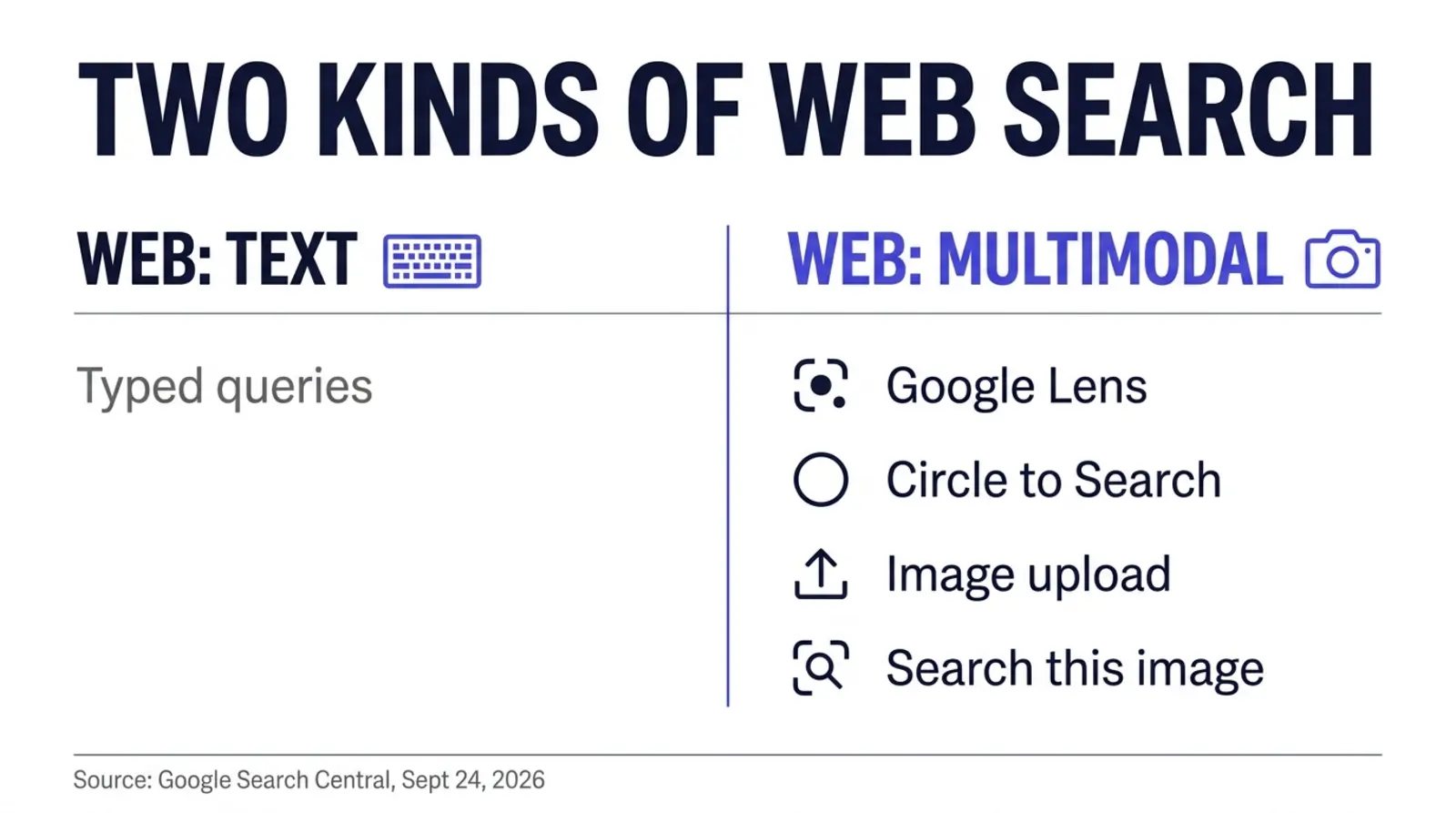
None of these four require the person to know the right words for what they're looking at. That's precisely the problem they solve, and precisely why they matter for insurance. A client doesn't always know whether the letter in their hand is a non-renewal notice, an Annual Notice of Change, or a Summary of Benefits. They know what it looks like. Lens, Circle to Search, and the other three entry points let them search from the object itself instead of from a description of it they'd have to construct first.
Where Lens and Circle to Search actually came from
Neither of these is a brand new product dressed up in a new report. Google first announced Google Lens at Google I/O in May 2017, pitched then as a way for a phone's camera to identify a restaurant, a flower, or a concert poster and hand back relevant information inside Google Assistant.8 Circle to Search is newer and narrower: Google's own blog post announcing it states it launched January 31, 2024 on the Pixel 8, Pixel 8 Pro, and the Samsung Galaxy S24 series, letting someone circle, highlight, or tap anything on their screen, not just a photo, to run a Lens powered search without leaving whatever app they're in.8 What changed on September 24, 2026 isn't the underlying technology. It's that Google finally started telling individual site owners, through their own Search Console property, whether either one is sending anyone their way.
This is not the same report as AI Overviews impressions
Search Console already has a separate Generative AI performance report, which reached every property worldwide by August 31, 2026 and tracks impressions from AI Overviews and AI Mode.5 That report measures Google's generated text answers. The multimodal filter measures something different: ordinary Web search results reached through an image-based query. A single page of yours can earn impressions in both, for different reasons, and they live in different tabs of the same Performance report.
What you can see, and what you still can't
The Performance report UI shows multimodal impressions and clicks broken out by page, country, device, and date, the same dimensions you're used to for ordinary Web search. What it does not show, by design, is the Queries tab. Most multimodal searches don't start with typed words at all, so there's no query string to report. You can see that a page earned 40 multimodal impressions last week. You cannot see what the person was looking at when they got there.
There's a second, more practical gap. I checked Google's own Search Analytics API reference
this session, the same endpoint any custom dashboard or reporting tool would call to pull
Search Console data programmatically. Its documented list of allowed values for the search
type filter is web, image, video, news,
googleNews, and discover.2 No
multimodal value exists. If your agency, your marketing vendor, or an FMO's
reporting dashboard pulls Search Console numbers through the API rather than the dashboard
UI, that pipeline is still reporting web as text-only data and has no idea the
split exists. The new number is real. It just isn't wired into automated reporting yet.
The new number is real. It just isn't wired into automated reporting yet, which means the only place to see it right now is the dashboard you're probably not opening every week.
Why this lands differently depending on what you sell
A Medicare or ACA book carries more of this exposure than a life or final expense book does, and it's worth saying why instead of assuming it. Medicare and ACA clients handle physical objects constantly during AEP and open enrollment: a card, an Annual Notice of Change, a Summary of Benefits, a formulary printout, a premium bill that suddenly changed. Those are things a person holds, reads, gets confused by, and photographs. A life insurance policy or an annuity contract gets signed once and filed away. Nobody circles a universal life illustration with their phone six months after closing. If your book leans Medicare or ACA, the entry points in the table above are worth real attention. If it leans life, final expense, or annuities, this is still worth checking, just with lower urgency and a shorter list of pages to fix first.
What this is worth, and what not knowing costs
Three weeks of data isn't enough to build an insurance-specific benchmark, and it would be dishonest to hand you one that doesn't exist yet. Nobody, including us, has a verified figure for what share of insurance agency search traffic is currently multimodal. What does exist, sourced and dated, is the scale of the underlying behavior Google is now finally measuring for individual sites.
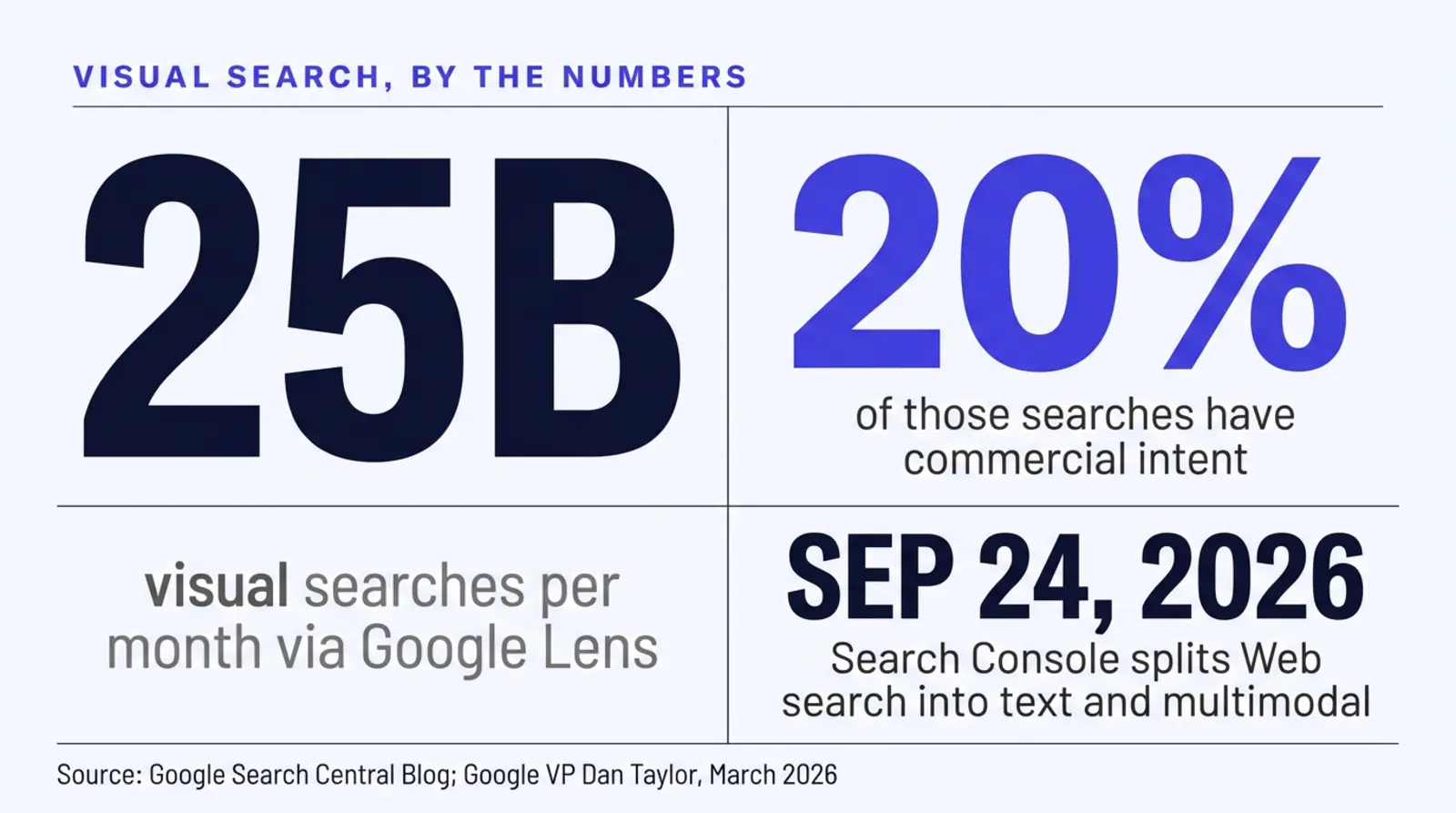
In prepared remarks at a press briefing on March 12, 2026, Google's Vice President of Global Advertising, Dan Taylor, put monthly Google Lens volume at more than 25 billion visual searches, with 20% of those carrying commercial intent, meaning the person was in some kind of buying or comparison mindset when they searched.4 That figure was reported independently by multiple outlets covering the same briefing, with consistent wording across them.4 Do the arithmetic on Taylor's own two numbers and roughly 5 billion of those monthly Lens searches carry commercial intent, against roughly 20 billion that don't.
25B
Visual searches per month via Google Lens, per Google's own VP4
20%
Of those Lens searches carry commercial intent4
Sept 24
2026: the date Search Console split Web into text and multimodal1
0 of 6
API search types named "multimodal," confirmed this session2
What that scale actually costs an agency that ignores it isn't a traffic number, because no one can source one yet. It's the plainer kind of cost: you cannot optimize for a channel you cannot see, and until three weeks ago, you couldn't see this one. An agency that keeps publishing generic stock photography with no alt text isn't losing to a competitor who's beating them at multimodal search. Both of them are flying blind. The cost of waiting is that whoever starts describing their images properly first gets however many weeks or months of head start before this becomes the obvious thing everyone tells agents to do.
The timing is worth saying plainly, since this guide publishes on October 1, 2026. AEP opens October 15 and runs through December 7, the single heaviest search window most Medicare and ACA agency sites see all year. Every photographed card, letter, and formulary page that's about to get circled, Lens-searched, or uploaded this fall is a search your site either has a described image ready to answer, or doesn't. Fixing alt text this week costs an afternoon. Fixing it in November, after the search volume has already peaked and moved on, costs the same afternoon for a smaller share of the season's traffic.
You don't need a new platform for this
Fixing alt text and file names is something you can do yourself in whatever CMS you're already running, this afternoon, for free. If you'd rather see how a site built with this handled by default, from the first page, look at Digital Foundation. Either path is reasonable.
Check your own Search Console this week
This takes about five minutes and tells you whether you're already earning multimodal impressions or starting from zero.
1. Open the Performance report
In Search Console, go to Performance, then Search results. Set the date range to the last 28 days so it covers the rollout window.
2. Filter by search type
Click Search type, and you should now see Web split into two sub-options alongside the older Image, Video, News, and Discover choices. Select the multimodal option.
3. Read the Pages tab, not Queries
The Queries tab will be empty or near-empty for this filter, by design. Go straight to Pages and sort by impressions. Whatever shows up there is the content Google has already matched to an image-based search, however small the number.
4. Note which pages show up, and which don't
If your highest multimodal impressions land on pages with strong, specific images, carrier logos, a labeled Medicare card graphic, a plan comparison chart, that's a signal worth building on. If nothing shows up at all, or only your homepage does, that's your honest starting point. Either way, now you know, instead of guessing.
Don't overread three weeks of data
Whatever number you see right now is small, new, and noisy. Treat this check as establishing a baseline, not as a verdict on whether multimodal search "works" for insurance. Re-check it monthly and watch the trend instead of the single snapshot.
The fix: what makes an image find-able
Google's own guide to images in Search, last updated March 2, 2026, is specific about what actually helps, and none of it is exotic.3 Four things matter, in roughly this order of effort versus payoff.
Write alt text that describes the image, not the keyword you want to rank for
Google's guidance states plainly: "The most important attribute when it comes to providing more metadata for an image is the alt text (text that describes an image), which also improves accessibility for people who can't see images on web pages, including users who use screen readers or have low-bandwidth connections."3 It also warns against keyword stuffing, recommending contextual, information rich descriptions instead of repetitive phrases.3 "Medicare Advantage HMO plan" as alt text on every single image on a page helps nobody. "A side by side comparison of HMO and PPO plan networks, showing in-network-only coverage for HMO against in and out of network coverage for PPO" describes an actual image a camera-based search could plausibly match.
The image nobody described
- Filename:
IMG_4821.jpg - Alt text: blank, or "image"
- Dropped into the page with no surrounding context
- Generic stock photo, unrelated to the page's actual topic
Findable by image searchEffectively not
The image built to be found
- Filename:
medicare-advantage-hmo-vs-ppo-network-comparison.webp - Alt text: a real, specific description of what's shown
- Placed directly beside the text it illustrates
- An original graphic or photo, not a stock substitute
Findable by image searchMatched on filename, alt text, and context
Name the file like a person would describe it
Google's own example is almost comically plain: use a descriptive filename like
my-new-black-kitten.jpg instead of IMG00023.JPG or
image1.jpg.3 Most insurance agency media libraries are
full of the second kind. Renaming a file costs nothing and takes ten seconds per image.
Put the image near the text it illustrates
Google explicitly recommends placing images near the relevant text on a page that is topically related to the image's subject matter.3 A plan comparison graphic belongs on the plan comparison page, next to the plan comparison text, not buried in a generic "resources" gallery three clicks away from anything that explains what it shows.
Mark it up and make sure it can actually be found
Structured data that enables rich results in Google Images, and an image sitemap that helps Google discover images it might otherwise miss, including ones served from a CDN, round out Google's own list of what helps.3 This is the one step that benefits from a site built to do it automatically rather than hand-maintained.
| Step | What to do | Effort |
|---|---|---|
| 1. Alt text audit | Pull every image on your five highest traffic pages and check for blank or generic alt text | An afternoon, free, no code |
| 2. File naming | Rename new uploads descriptively going forward; backfill the worst offenders | Ten seconds per file, ongoing habit |
| 3. Placement | Move or replace images that sit far from the text they're supposed to illustrate | Light content editing |
| 4. Structured data and image sitemap | Add ImageObject schema and make sure images are listed in your sitemap | Developer time, or a platform that ships it by default |
How we build this in by default
We build insurance agency websites on Astro, which ships zero JavaScript to the browser by default, so pages arrive as finished HTML. Our builds score 90+ on Lighthouse performance on mobile and desktop, and some score 100.6 None of that is specific to multimodal search, but it's the foundation everything else sits on, since a slow page that never finishes loading its images gives Google less to work with regardless of how well you describe them.
On top of that foundation, every page we ship carries the schema stack that answer engines and image search both lean on: Organization, Service, Article, FAQ, and breadcrumb markup that actually matches what's on the page. Real, descriptive alt text and sensible file naming are part of how we build a page, not an optional extra someone has to remember to add later. The two explainer images in this guide are a working example: both carry alt text that describes exactly what the graphic shows, in enough detail that the description alone would tell you the content even without seeing the image.
We also build real quoters and comparison tools wired to live federal data, not a static form with example numbers pulled from last year's rates. That distinction carries over to how those tools should eventually be built for a visual search world: a plan comparison widget that renders its output as a real, labeled graphic, with the carrier names and coverage differences actually printed on it, gives Google something to match against an image-based query. A quoter that only outputs numbers into an unlabeled table on screen gives Lens or Circle to Search nothing to recognize later if someone screenshots it or photographs a printout of it.
Per the live pricing page, verified today, Digital Foundation's Starter tier covers a complete, compliant site built this way, and Pro and Scale add a weekly or daily publishing cadence on top of it, each new page built with the same image discipline as the last.7 That matters here specifically because this is still a new surface. Nobody, including Google, fully knows yet which kinds of insurance content earn multimodal impressions and which don't. A site that publishes consistently, with real described images every time, accumulates more shots on an unproven target than one that publishes once and stops.
What changes for your agency
None of this replaces ranking well in ordinary text search, and none of it is a reason to panic about a report that's three weeks old. It's a second, smaller lane opening up next to the one you already compete in.
A measurement you didn't have before
You can now see, by page, whether an image-based search is reaching your site at all.
Images built to be found, not decoration
Real alt text, descriptive filenames, and sensible placement, done once, as standard practice.
A head start while this is still new
Almost no agency site is optimized for this today, which is exactly when a head start is cheapest to earn.
A fast, crawlable foundation underneath it
90+ Lighthouse on mobile and desktop, measured, so nothing slow undercuts the image work.
A cadence that keeps testing it
Weekly or daily publishing means more pages, more images, and more chances to learn what actually earns impressions.
When this doesn't change much for you
If your site runs on a handful of static brochure pages and you have no plans to add new content, a multimodal search filter in a dashboard you rarely open isn't going to move your business this quarter. Fix the worst alt text offenders on your highest traffic pages and move on. The bigger payoff is for agencies that already publish regularly and can fold this into content they're producing anyway, rather than agencies treating it as a reason to start a whole new workstream.
Questions agents ask about multimodal search
What is "multimodal search" in Google Search Console?
It's a new split inside the existing Web search type. As of September 24, 2026, Search Console's Performance report separates Web search into two groups: Web (text), ordinary typed queries, and Web (multimodal), searches where an image was part of the query, through Google Lens, Circle to Search on Android, an image uploaded directly to Google Search, or Chrome's "Search this image" right-click action.
When exactly did this roll out?
Google's Search Central Blog announced the global rollout on September 24, 2026, under the title "Announcing web multimodal Search performance reporting in Search Console." Independent trackers reported multimodal impressions appearing in their own properties' data as early as September 10, 2026, roughly two weeks before the public announcement, though Google's post doesn't state how far back the report's history reaches.
Can I pull this data through the Search Analytics API, or only see it in the dashboard?
Only in the dashboard, as of this writing. Google's own Search Analytics API reference lists six allowed values for the type filter: web, image, video, news, googleNews, and discover. There is no multimodal value. If you or a developer built a reporting pipeline on the API, it will keep returning web as text-only data and will not surface the new split until Google adds it.
What counts as a multimodal search, exactly?
Any Google Search where an image was part of how the person searched, rather than only typed words. That includes pointing a phone camera at something through Google Lens, drawing a circle around part of a screen with Circle to Search on Android, uploading a photo directly into the Google Search box, or right-clicking an image in Chrome and choosing "Search this image." A person typing "what does a Medicare card look like" is text search. A person photographing their actual card and asking what it is would be multimodal.
Does adding alt text actually help with this?
It's the single most consequential thing you control. Google's own guide to images in Search states plainly that alt text is "the most important attribute when it comes to providing more metadata for an image," and that Google uses it alongside computer vision and surrounding page content to understand what an image shows. A photo with no alt text, a generic filename, and no relevant text nearby is working with one hand tied behind its back.
Is this related to AI Overviews or AI Mode?
It's a different report. Search Console's Generative AI performance report, which reached every property by August 31, 2026, tracks impressions from AI Overviews and AI Mode, Google's generated-answer surfaces. The multimodal filter announced September 24, 2026 is a split inside ordinary Web search results, triggered by an image in the query rather than by an AI-generated answer. They sit in different tabs and measure different things, though a page can appear in both.
Do I need to change anything on my site before AEP?
You don't need a rebuild. Check the filter, decide which of your existing images are worth describing properly, and fix the worst offenders first: the generic stock photo used as alt text "image," the infographic with no alt text at all, the team photo filed as IMG_4821.jpg. None of that requires new code or a new platform, just an afternoon with your CMS's media library before the October 15 AEP surge starts sending more people to your site to begin with.
Does this cover video too, or only still images?
Only images, as far as Google's own September 24, 2026 announcement describes it. Video already has its own separate search type in Search Console, distinct from both Web (text) and Web (multimodal). If a prospect films a short clip and searches from it, Google's existing Video reporting is the more likely home for that, not the new multimodal filter. Treat the two as different surfaces until Google says otherwise.
Sources
- Google. "Announcing web multimodal Search performance reporting in Search Console," Google Search Central Blog, published September 24, 2026: Search Console's Performance report now separates Web search into Web (text) and Web (multimodal); multimodal covers searches via Google Lens, Circle to Search on Android, an image uploaded to Google Search, and Chrome's "Search this image" action; the Queries dimension is not available for the multimodal type. Verified live October 1, 2026. developers.google.com/search/blog/2026/09/web-multimodal-in-sc.
- Google. Search Analytics API reference, Search Console API v1: the documented allowed values for the search results "type" filter are web, image, video, news, googleNews, and discover; no "multimodal" value is listed. Verified live October 1, 2026. developers.google.com/webmaster-tools/v1/searchanalytics/query.
- Google. "Images in Google Search," Search Central documentation, last updated March 2, 2026: alt text described as "the most important attribute when it comes to providing more metadata for an image"; guidance to use descriptive filenames, place images near relevant text, add structured data for Google Images rich results, and submit image sitemaps; warns against keyword-stuffed alt text in favor of contextual descriptions. Verified live October 1, 2026. developers.google.com/search/docs/appearance/google-images.
- Dan Taylor, Google Vice President of Global Advertising, prepared remarks at a virtual press briefing, March 12, 2026: "There are more than 25 billion visual searches per month through Google Lens, and 20% of those have commercial intent." Reported by The Asia Business Daily, "Google VP: 'AI Is Changing Search... Over 25 Billion Searches Per Month with Google Lens,'" March 12, 2026, with the same figures independently reported by other outlets covering the same briefing. Verified live October 1, 2026. asiae.co.kr.
- Strategic AI Architects. "Search Console Will Show You Your AI Overviews Impressions. It Still Won't Show You the Clicks," published September 18, 2026: Search Console's Generative AI performance report, covering AI Overviews and AI Mode impressions, reached every property worldwide by August 31, 2026. Verified live October 1, 2026. strategicaiarchitects.com/post/search-console-ai-overviews-report-insurance-agency.
- Strategic AI Architects service bible and live builds: Astro static sites served from the edge on Cloudflare, scoring 90+ on Lighthouse performance on mobile and desktop, with some pages scoring 100. Verified against current build practice October 1, 2026.
- Strategic AI Architects. Digital Foundation pricing page: Website $84/mo billed annually (complete site with 30 pages live on Launch Day, calculators and widgets, AI CLI access, monthly report); Starter $247/mo (adds 2 blog posts, 2 location pages and 2 answer pages a month, Google Business Profile management, AI chat widget); Pro $497/mo (adds 1 blog post, 1 location page and 1 answer page every week, up to 4 languages, review harvesting, 24/7 AI receptionist); Scale $997/mo (adds 1 of each every business day, up to 10 custom pages, monthly newsletter); Full Clone, Update and Handoff $1,000 one time; 14-day free look period. Verified live 2026-10-12. strategicaiarchitects.com/digital-foundation.
- Google. "Introducing Circle to Search on Android," Google Keyword blog: "Circle to Search is launching January 31 on select premium Android smartphones, the Pixel 8, Pixel 8 Pro and the new Samsung Galaxy S24 series," using Google Lens to power searches drawn, circled, highlighted, or tapped directly from the screen. Google Lens itself was announced at Google I/O in May 2017. Verified live October 1, 2026. blog.google/products/search/google-circle-to-search-android.
Talk it through
Want a second pair of eyes on it?
Free 30 minutes. Bring what you found, or bring nothing and we will look together at how AI engines read your site and which fixes move first.
See whether your images are already working for you
Run a free Audit and see how your site scores for speed, AI citations, and HIPAA safe tracking, in about a minute.
Related reading: Search Console's AI Overviews impressions report · We ran PageSpeed on 1,080 insurance agency websites · Getting cited by AI in 2026