Playbook
Why Your Accessibility Widget Won't Stop an ADA Lawsuit
UsableNet's own 2026 litigation data says overlays have not proven to be a meaningful deterrent. Here is what a screen reader and a plaintiff's scanner actually see instead.


21 min read
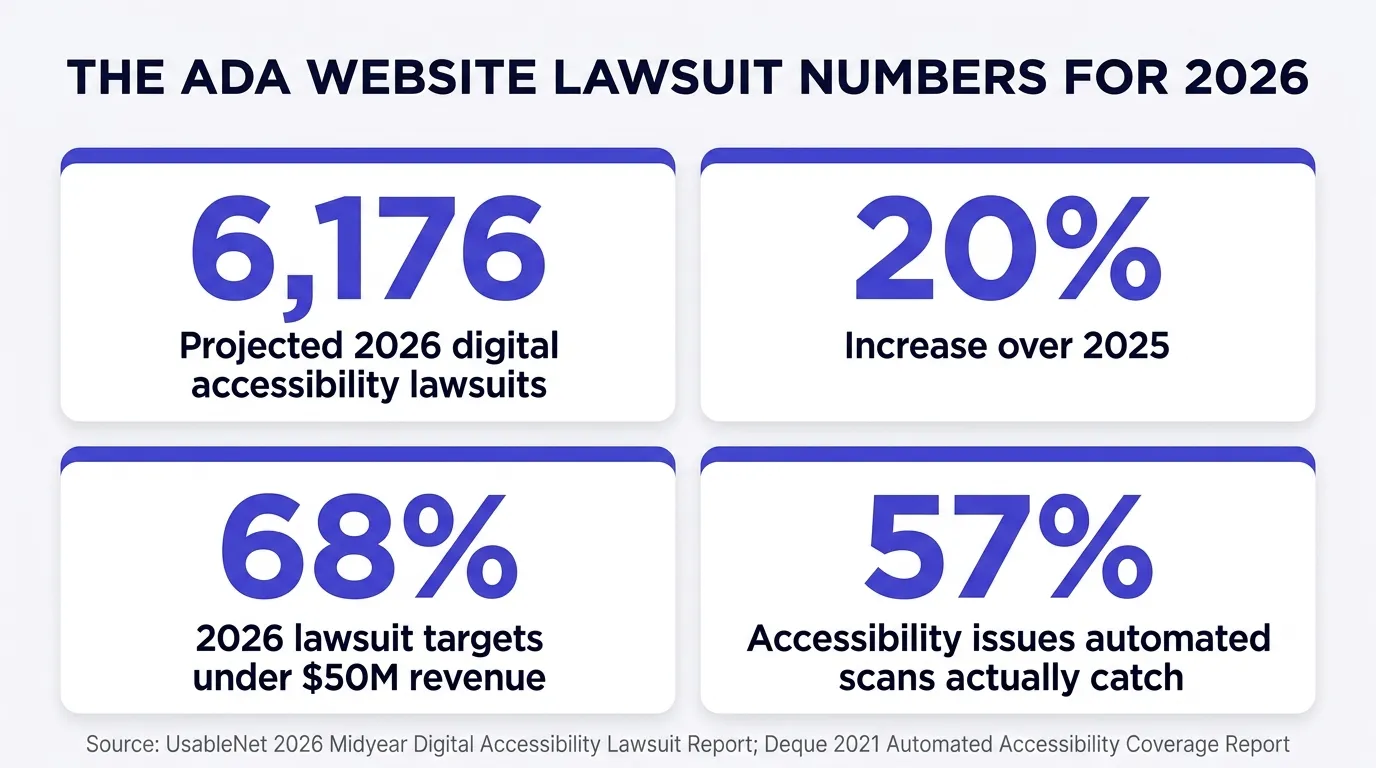
Digital accessibility lawsuits are on pace for about 6,176 filings in 2026, close to a 20 percent jump over 2025, according to UsableNet's own midyear litigation tracker1. Two thirds of this year's targets carry under 50 million dollars in annual revenue1, and the same tracker found lawsuits filed against sites running an accessibility overlay widget in every single month of 2025, with its analysts stating plainly that overlays "have not proven to be a meaningful deterrent"1. There is no specific federal regulation telling a private insurance agency exactly what its website has to do to be compliant3, which is precisely the ambiguity that turns a missed alt tag into a demand letter. Every figure below comes from a tracker, a federal guidance page, or a real Department of Justice settlement, fetched and read this session.
How an ADA website lawsuit actually starts
Nobody visits your site and files paperwork the same afternoon. Most of these cases start with an automated scan, run at scale against thousands of small business sites at once, checking for the kind of markup problems a machine can flag in seconds: an image with no alt text, a form field with no label, a button a screen reader announces only as "button," text with contrast too low to read against its background. A firm runs that scan across a list of sites in a given industry or region, gets a stack of hits, and a demand letter follows for the ones that flag the most violations.
That letter usually lands with a plaintiff who says they tried to use your site with a screen reader or other assistive technology and could not complete something a sighted visitor could, request a quote, read your coverage pages, fill out a contact form, and hit a specific, documented barrier along the way. From there, an agency typically has a narrow window to respond before the letter turns into a filed complaint, and the calculus most small businesses face is the same one that drives quick settlements in cases like this everywhere: litigating a claim like this to a verdict costs more, in both money and time, than fixing the site and settling does.
This is not insurance-mechanics education
This guide is not about how to sell a policy. It is about a mechanism in federal civil rights law that touches your website specifically, and what an insurance agency's own site tends to do that makes it an easier target than it needs to be.
The firms behind these filings tend to work a specific niche, not the whole internet at once. A firm builds a list of businesses in a state or an industry, runs the same scan against every site on that list, and files against the ones with the clearest, most reproducible violations, since a barrier that is easy to demonstrate in a complaint is easier to settle quickly. That is part of why the state concentration above is so lopsided toward New York, Florida, and Illinois: filing patterns follow which state courts and local firms have built a working pipeline around this kind of claim, not just where the population happens to be largest.
How many of these lawsuits there actually are
Two firms track this from different angles, and both point the same direction. UsableNet's 2026 midyear report puts the year on pace for roughly 6,176 digital accessibility lawsuits, nearly a 20 percent increase over 2025, calling it a historic high1. Seyfarth Shaw runs a separate tracker built on federal court filings found through Courthouse News keyword searches, and it counted 3,117 website accessibility lawsuits filed in federal court in 2025, itself a 27 percent jump from 2,452 in 20242. The two totals do not match because the two firms are not counting the same universe of cases, UsableNet's figure is broader, Seyfarth's is federal court only, but neither tracker shows this slowing down.
The geography is concentrated but not narrow. Seyfarth's full 2025 count put New York first with 1,021 federal filings, Florida second with 961, almost double its 470 filings in 2024, and Illinois third with 585, passing both Minnesota and Pennsylvania that year2. UsableNet's first half of 2026 alone counted 1,269 filings in New York, 508 in Illinois, 391 in Florida, and 390 in California1. Read those two numbers next to each other and something jumps out: New York's first six months of 2026, by UsableNet's count, already exceed New York's entire 2025 total by Seyfarth's count, even allowing for the fact that the two trackers use different methodology.
| State | Seyfarth Shaw, full year 20252 | UsableNet, first half of 20261 |
|---|---|---|
| New York | 1,021 | 1,269 |
| Florida | 961 | 391 |
| Illinois | 585 | 508 |
| California | Not among Seyfarth's top three | 390 |
UsableNet's revenue and industry breakdown for 2026 is worth sitting with too. Through June, 68 percent of lawsuit targets carried under 50 million dollars in annual revenue1, and e-commerce accounted for 79 percent of filings with every other industry combined making up the remaining 21 percent1. Insurance is not the headline industry here, e-commerce is. But an agency running a quote form, a policy portal, or any page where a visitor submits personal information sits closer to that flagged pattern than a static brochure site does, and the revenue data makes clear that being small does not take you off the list.
| Breakdown | Category | Share of 2026 filings |
|---|---|---|
| By annual revenue | Under $50 million | 68% |
| $50 million to $1 billion | 22% | |
| Over $1 billion | 10% | |
| By industry | E-commerce | 79% |
| All other industries combined | 21% |
Read that revenue split plainly: nine out of ten targets sued in 2026 carry under a billion dollars in annual revenue, and more than two thirds carry under 50 million1. Nothing about that profile requires a national brand or a large marketing budget. A single-location agency fits the revenue profile of the majority of this year's docket.
Why an insurance agency site is exposed
Three things about a typical agency site add up to a wider violation surface than a simple brochure page. First, interactive elements: a quote form, a plan comparison tool, a Medicare eligibility calculator, an appointment scheduler. Every one of those needs labeled inputs, a logical tab order, and error messages a screen reader can actually announce, and every one of those is a place a page-builder template or a hastily added third-party widget commonly gets wrong.
Second, the pages carry health-adjacent content. Medicare and ACA shoppers researching plan options are, by definition, often older or managing a health condition, exactly the population most likely to rely on assistive technology, larger text, or a screen reader in the first place. A site built without that reader in mind is failing the visitor most likely to need the accommodation.
Third, and this is the part most agencies never hear until a demand letter arrives: the "quick fix" most small businesses reach for is an accessibility overlay widget, a small script that adds a floating accessibility menu to an existing site without touching the underlying code. It is marketed as a fast, affordable path to compliance. The litigation data says that marketing claim does not hold up.
Think through what a quote form actually asks a visitor to do. Pick a plan type, enter a date of birth, select a county, sometimes answer a health question, then submit. Every one of those steps has to work without a mouse, has to announce itself correctly when a screen reader lands on it, and has to give a clear, programmatically associated error message if something is filled in wrong. A brochure page with no forms has almost none of that surface area. A quoting tool has all of it, on the exact page most likely to be the one a prospect, or a plaintiff's tester, actually tries to use.
Why the accessibility widget doesn't hold up
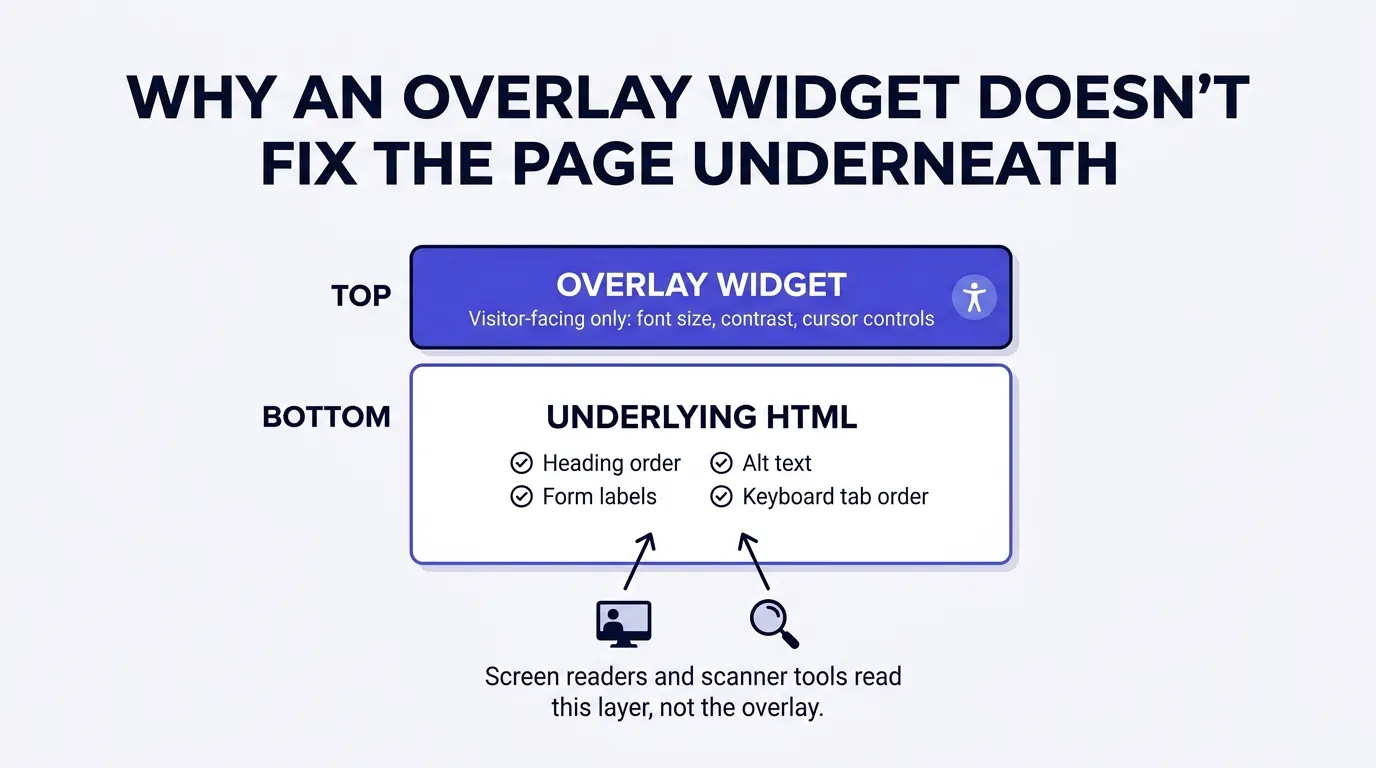
An overlay widget works by injecting a script into the browser that adjusts things like font size, contrast, and cursor size, and sometimes attempts to auto-generate alt text or fix labels on the fly using pattern matching. It sits as a layer on top of the page. It does not rewrite your site's actual HTML.
A screen reader does not open the overlay's control panel by default. It reads the underlying document object model, the actual markup your site serves, heading by heading, label by label. So does the automated scanning tool a plaintiff's firm runs to build its list of targets. Both are reading past the widget to the code underneath, and if that code has an unlabeled form field or a heading structure that skips from an H1 straight to an H4, the widget sitting visually on top of the page does not change what gets read.
What the data actually shows
UsableNet tracked accessibility overlay mentions inside 2025 lawsuit filings every single month, from 165 in January down to 98 by June, and its analysts state plainly that these tools "have not proven to be a meaningful deterrent," with lawsuits against sites running one continuing to rise1. In some cases, a plaintiff's filing goes further and names the overlay itself as evidence the business knew it had an accessibility problem and chose a superficial fix instead of a real one.
"Widgets have not proven to be a meaningful deterrent."1
None of that means every accessibility overlay is worthless for every visitor. Some do give real users useful controls, larger text, a dyslexia-friendly font, reduced motion. The narrow point is a legal one: installing a widget and treating the underlying compliance question as solved is the exact pattern the litigation data shows failing, over and over, across thousands of filings.
There is no bright line rule, and that is the actual problem
Here is the part that makes this genuinely harder than most compliance questions: there is no specific federal regulation spelling out what a private business website has to do. The Department of Justice's own web accessibility guidance says it directly: "The Department of Justice does not have a regulation setting out detailed standards, but the Department's longstanding interpretation of the general nondiscrimination and effective communication provisions applies to web accessibility"3. That guidance, published March 18, 2022, points to the Web Content Accessibility Guidelines as "helpful guidance" without naming a required version or conformance level3, and it carries an explicit disclaimer that the guidance itself has "no legally binding effect, and [has] no force or effect of law"3.
Contrast that with what the same Department of Justice did for government websites. Its April 24, 2024 final rule under Title II of the ADA requires state and local government entities to meet WCAG 2.1 Level AA for their web content and mobile apps, a defined standard covering 50 success criteria, on a phased compliance schedule5. DOJ extended those dates on April 20, 2026: entities with a population of 50,000 or more now have until April 26, 2027, up from April 24, 2026, and smaller entities and special district governments now have until April 26, 20286.
State and local government sites
- A specific named standard: WCAG 2.1 Level AA5
- A defined, phased compliance calendar6
- A codified federal regulation, not just guidance
StandardDefined and dated
Private business sites, including your agency
- No named technical standard in a formal regulation3
- No compliance calendar, no phase in period
- WCAG cited as "helpful guidance" only3
StandardUndefined, litigated case by case
That gap is not a technicality. It is the actual mechanism driving the demand letter model. When there is a codified standard, a business can point to a checklist and say it met it. When there is only "effective communication" as a general principle and WCAG as informal guidance, every case turns on the specific facts of what a specific visitor could or could not do, which is exactly the kind of dispute that gets resolved by settlement rather than a clean pass or fail. In practice, WCAG 2.1 AA is still the working yardstick courts and settlement agreements lean on, it is just not one your agency is formally required to hit.
What a real insurance company's ADA case required
Rather than guess at a hypothetical, here is an actual Department of Justice settlement involving an insurance company. In an agreement dated January 16, 2020, Progressive Insurance resolved a Title III complaint after allegedly failing to provide account information in accessible formats to a customer who is blind or has low vision, a failure the complaint tied to that customer's insurance policy being cancelled4.
The financial payment in that specific case was modest, 1,000 dollars in compensatory damages to the individual complainant4. The operational commitments were not. Over the following three years, Progressive agreed to adopt and distribute an Auxiliary Aids and Services Policy to every employee and agency it worked with within 60 days, post accessible notices at claim service centers stating that auxiliary aids are available free of charge, publish that policy on its website in accessible formats within 90 days, provide annual ADA compliance training to relevant staff, and maintain records with annual compliance reporting4. The agreement also specified concrete aids the company had to be ready to provide, "qualified readers; printed information provided in Braille, in large print, in electronic format," and audio recordings for customers with vision loss4.
The real cost is rarely the check
A thousand dollar payment sounds small next to the operational lift behind it, three years of policy work, training, reporting, and public commitments, all triggered by one customer who could not get accessible account information. That ratio, a small direct payment next to a large remediation and monitoring commitment, is the pattern worth planning around, not a specific dollar figure we would have to guess at.
How to check your own site in fifteen minutes
You do not need a vendor call to get a first read on where your site stands. Run these five checks yourself, today.
Unplug your mouse and try to reach your quote form using only the Tab key
If you cannot see where focus is on the page, or you get stuck in a menu with no way out using the keyboard alone, that is a real barrier for anyone who cannot use a mouse.
Run a free automated scan against your homepage and your quote page
A tool built on axe-core, the same engine behind Lighthouse's accessibility audit, will flag missing alt text, unlabeled form fields, and contrast failures in under a minute. Treat what it finds as a floor, not a ceiling.
Check your image alt text for anything generic or blank
"image1.jpg" or an empty alt attribute on a meaningful photo tells a screen reader user nothing. Every image that carries information needs a real, specific description.
Confirm your heading structure actually nests in order
One H1 per page, then H2s, then H3s underneath the right H2, with nothing skipped. A broken outline is disorienting for a screen reader user navigating by headings, which is how many actually browse a long page.
Ask honestly whether an overlay widget is your only accessibility work to date
If the widget is the entire plan, the litigation data above is telling you plainly that is not where this stops. It is a reasonable place to start, not to finish.
If you want a broader check on where your site stands
The free Audit scores a site's content depth, question and answer structure, trust signals, schema, and technical and agentic readiness in under a minute. It does not score accessibility specifically, so pair it with the five checks above rather than treating it as a full accessibility review. strategicaiarchitects.com/audit9.
What an automated scan catches, and what it misses
Lighthouse, Google's own auditing tool, scores accessibility as a weighted average across more than 60 automated checks, each one scored strictly pass or fail with no partial credit, weighted by real world user impact using the axe-core engine7. The highest weighted checks cover the fundamentals: images need alt attributes, form elements need associated labels, buttons need an accessible name, and ARIA attributes have to actually match the roles they claim7.
That is genuinely useful, and it is free. It is also not the whole picture. Deque, the company behind the axe-core engine that powers Lighthouse's own accessibility audit, published a study in 2021 built from more than 2,000 real audits across over 13,000 pages and nearly 300,000 individual issues, and found automated testing fully covered 57 percent of the accessibility issues those audits turned up8. That figure is still the most cited benchmark for what automated testing alone actually catches, and it means a clean automated scan still leaves roughly four in ten real issues unfound, the kind a manual keyboard and screen reader pass catches that pattern matching cannot.
The gap between the two is usually judgment, not code. A scanner can confirm a form field has a label attribute. It cannot tell you whether the label text actually makes sense out of context, whether an error message gets announced when it appears instead of sitting silently on the page, or whether a multi-step quote flow keeps focus in a sane place when a step changes. Those are the things a person actually tabbing through the page, or a real screen reader like NVDA or VoiceOver reading it aloud, catches, and an automated crawler does not. Fifteen minutes with a keyboard and a screen reader on your own quote form will teach you more about what a real visitor experiences than a second automated scan will.
The fixes that actually hold up
None of what actually works here is exotic. It is unglamorous, specific, and entirely doable without hiring a specialist firm for a first pass.
Real alt text
Every meaningful image gets a specific description, not a filename or a blank tag.
Labeled form fields
Every input on your quote form has a programmatically associated label, not just a placeholder.
Keyboard reachable everything
Every link, button, and form field is reachable and operable with the Tab key alone.
Clean heading order
One H1, nested H2s and H3s in order, so a screen reader user can navigate the page by structure.
Contrast that actually passes
Body text and buttons meet a real contrast ratio against their background, checked, not eyeballed.
Semantic markup, not div soup
Real button, nav, and heading elements instead of a generic div styled to look like one.
Every item on that list is a property of the underlying HTML. That is the throughline back to the widget problem: a script layered on top of a page cannot retroactively add a label that was never coded into a form field, or fix a heading order that skips levels. The fix has to happen in the markup itself.
One more that is easy to skip if your agency runs webinars or recorded plan explainer videos: captions. A visitor who is deaf or hard of hearing gets nothing from an embedded video with no captions. Most platforms that host video, including YouTube, generate a rough caption track automatically, and cleaning up that auto-generated track into an accurate one is a lighter lift than most of the fixes on this list. If your agency posts an AEP webinar recording or a plan comparison video, uncaptioned is one of the easiest misses to fix and one of the easiest for a scan to flag.
How we build this into the foundation, not bolt it on
This section sticks to what is documented on our own live pages, verified this session. We build agency sites on Astro, which ships pages as static, semantic HTML rather than a runtime that assembles markup from a page-builder theme at request time. Real headings, real labels, and real alt text on every image are part of how a page gets built the first time, not a remediation pass added after a demand letter.
That is a difference in starting point, not a guarantee of a specific legal outcome, and we are not going to promise you one. What we can say plainly: a site built from semantic HTML gives you direct control over the exact things Lighthouse's accessibility audit checks and the exact things a real screen reader reads, headings, labels, alt text, focus order, instead of inheriting whatever a theme or an overlay widget generates on your behalf7.
What you get
Concretely, moving off an overlay-only approach and onto a site built with real semantic markup gets you three things. A quote form and site structure that a screen reader can actually navigate the way it was designed to be used, not a visual layer patched on top of broken markup. A lower starting violation count on the exact checks an automated scanner and a Lighthouse accessibility audit run, since the fixes above target the same things those tools score. And a real answer, beyond "we installed a widget," if a demand letter or an audit ever asks what your agency actually did.
None of that is a promise about litigation outcomes, and nobody honest can make you one. It is an infrastructure and content decision, and it is a cheaper one to make now than mid remediation, after a letter, with a deadline attached.
When your current site is already fine
Say this plainly: if your site was built with real semantic HTML, your team already tests with a keyboard and, ideally, a real screen reader before publishing new pages, and your images and forms carry proper alt text and labels, you do not need to rebuild anything over this article. An overlay widget layered on top of a site that already does the underlying work right is a genuine usability add on for some visitors, not a red flag.
The pattern actually worth worrying about is the more common one: a site built on a page-builder theme nobody has accessibility tested, with an overlay widget added at some point as the entire plan, and no one on the team who has actually tried using the site with a keyboard alone. If that is closer to your agency, the fifteen minute check above will tell you within the hour, not after a letter arrives.
Questions agencies ask
Does an accessibility overlay widget protect my insurance agency from an ADA lawsuit?
The litigation data says no. UsableNet's own 2026 tracking shows lawsuits filed against sites running an accessibility overlay every month of 2025, and its analysts describe overlays as not having proven to be a meaningful deterrent. A widget that sits on top of a page does not fix broken markup underneath it, and a screen reader, along with a plaintiff's attorney's own testing tools, interacts with that underlying markup, not the widget.
Is my insurance agency legally required to meet WCAG 2.1 AA?
Not by a specific regulation. The Department of Justice's own guidance states plainly that it has no regulation setting out detailed technical standards for private business websites under Title III of the ADA. What it does say is that WCAG offers helpful guidance, and in practice, courts and settlement agreements consistently point to WCAG 2.1 AA as the working standard, the same version DOJ formally adopted for state and local government sites under Title II in 2024. No regulation for you, but a widely used yardstick anyway, which is exactly the kind of ambiguity that produces a demand letter instead of a clear checklist.
How would a plaintiff's attorney even find my agency's small website?
The same way scanning tools find every other small business site: automated crawlers that run WCAG checks at scale and flag missing alt text, unlabeled form fields, poor color contrast, or a broken tab order. UsableNet's data shows 68 percent of 2026's lawsuit targets carry under 50 million dollars in annual revenue. Size is not a shield. If anything, a small site with a bolt-on quote form and no accessibility review is an easier scan to flag than a large enterprise site with a dedicated accessibility team.
What actually happens after I get an ADA demand letter or complaint?
It varies by firm and by jurisdiction, and we are not going to guess at a specific dollar figure here, since we could not verify one against a primary source this session. What we can say, sourced directly from a real Department of Justice settlement involving an insurance company, is that the remedy usually runs past a payment: a written accessibility policy, staff training, accessible notices, and a multi-year compliance commitment with reporting attached.
Does this apply to a one-person agency, or only larger companies?
It applies regardless of size. Title III of the ADA covers places of public accommodation, and the Department of Justice's guidance treats a business website as an extension of that, without a small business carve-out. UsableNet's revenue breakdown, where two-thirds of 2026's targets sit under 50 million dollars, is the practical proof: small businesses are the majority of the docket, not the exception to it.
Does building on Astro instead of a page builder actually reduce this risk?
It changes the starting point, not the guarantee. A static, hand-authored HTML page gives you direct control over heading order, labels, and alt text instead of inheriting whatever markup a page-builder theme or a bolted-on overlay generates. That lowers the surface area for the violations these lawsuits target. It does not make a site immune, because accessibility is also about content decisions your team makes every time a new page or image gets added, not just the framework underneath it.
What is the real difference between Title II and Title III of the ADA?
Title II covers state and local government entities, and the Department of Justice's 2024 final rule gives those entities a specific technical standard to hit: WCAG 2.1 Level AA, on a phased deadline. Title III covers private businesses open to the public, including an insurance agency, and there is no equivalent specific regulation. That gap between a defined standard for government and an undefined one for private business is exactly why Title III litigation runs on demand letters and settlements instead of a fixed compliance checklist.
Can I just run one automated scanner and call the site done?
No, and this is the most commonly missed step. Deque's own coverage study, still the most cited benchmark on this question, found automated testing catches 57 percent of accessibility issues. That is genuinely useful as a first pass, since it is fast and free, but it means close to half of what a real screen reader user would run into does not get caught by a scanner alone. Automated tools should be the starting checklist, not the finish line.
Sources
- UsableNet. "Inside the 2026 Midyear Numbers: Where Digital Accessibility Litigation Is Going," 2026 Midyear Digital Accessibility Lawsuit Report, read and verified live 2026-08-17. blog.usablenet.com.
- Seyfarth Shaw LLP. "ADA Title III" website accessibility litigation tracker, full year 2025 federal court filing data compiled via Courthouse News Service keyword search, read and verified live 2026-08-17. adatitleiii.com.
- U.S. Department of Justice, Civil Rights Division. "Guidance on Web Accessibility and the ADA," published March 18, 2022, read and verified live 2026-08-17. ada.gov.
- U.S. Department of Justice. Settlement Agreement Between the United States of America and Progressive Insurance under Title III of the Americans with Disabilities Act, dated January 16, 2020, read and verified live 2026-08-17. archive.ada.gov.
- U.S. Department of Justice. "Nondiscrimination on the Basis of Disability; Accessibility of Web Information and Services of State and Local Government Entities," final rule, Federal Register document 2024-07758, published April 24, 2024, read and verified live 2026-08-17. federalregister.gov.
- U.S. Department of Justice. "Extension of Compliance Dates for Nondiscrimination on the Basis of Disability; Accessibility of Web Information and Services of State and Local Government Entities," interim final rule, Federal Register document 2026-07663, published April 20, 2026, read and verified live 2026-08-17. federalregister.gov.
- Google Chrome Developers. "Lighthouse Accessibility Scoring," accessibility category methodology documentation, read and verified live 2026-08-17. developer.chrome.com.
- Deque Systems. "Automated Testing Study Identifies 57% of Digital Accessibility Issues," published March 10, 2021, read and verified live 2026-08-17. deque.com.
- Strategic AI Architects. "Digital Foundation" and "Free Audit" service pages, pricing and audit scope verified live 2026-08-17. strategicaiarchitects.com/digital-foundation, strategicaiarchitects.com/audit.
Talk it through
Want a second pair of eyes on it?
Free 30 minutes. Bring what you found, or bring nothing and we will look together at how AI engines read your site and which fixes move first.
Start from semantic HTML instead of patching it later
Run the free Audit, a live AEO Audit plus a HIPAA tracking scan of your site, in under a minute.
Related reading: why your insurance website fails Google's speed test · why your insurance website's pixel could get you sued