Playbook
ADA Compliant Website: The Insurance Agency Checklist
The DOJ has no specific rule for your agency's website, only guidance that calls WCAG "helpful." Here is what WCAG 2.1 AA actually requires, item by item, on the pages your agency runs every day.


20 min read
There is no regulation that defines "ADA compliant website" for a private business. The DOJ's own guidance says so directly, and calls WCAG "helpful guidance," not a mandate2. That gap is exactly why so many agency sites run an overlay widget and call it done. The standard that actually holds up, because it is the same one DOJ picked for government sites, is WCAG 2.1 Level AA3. This guide maps the parts of it that matter on an insurance agency site, your quote form, your rate PDFs, your testimonial videos, item by item, plus what UsableNet's 2026 litigation data says about who actually gets sued1.
"Compliant" is a word with no checklist behind it
Somewhere in the last few years you probably added an accessibility widget to your agency's site. A little icon in the corner, a menu of options, maybe a line in your footer that now says something like "This site is ADA compliant." It felt like closing a loop. You searched "ada compliant website," found a tool, installed it, moved on.
Here is the uncomfortable part. There is no government checklist that widget is actually checking you against. Not because the rule is buried somewhere you haven't looked, but because for a private business like an insurance agency, the rule does not exist yet in the specific, numbered way you'd expect from something with legal teeth. The Department of Justice has explained what the Americans with Disabilities Act requires of a business's website in general terms, but it has stopped short of publishing a regulation that says, line by line, what counts.
That absence is not an invitation to skip the work. It is the reason so many agencies end up with a widget instead of an actual fix, because a widget is something you can install in an afternoon and a real fix is not. This guide is the second part, the actual item by item list, written against the standard that already has the force of law behind it for government sites and that plaintiffs' attorneys already use to measure everyone else.
It also helps to say plainly what "accessible" actually buys an agency, beyond the legal framing. A screen reader user comparing three agencies in three browser tabs does not stay on the tab that reads as a wall of unlabeled buttons. A prospect with low vision does not zoom into a rate sheet that breaks when it hits 150%. An older client, who is statistically the exact person shopping for a Medicare plan on your site, often benefits from the same contrast and text sizing fixes a formal accessibility audit would flag, whether or not they'd describe themselves as having a disability at all. The checklist below is written for the legal question, because that is the question that brought most readers here, but the actual payoff shows up every day, in whether a real visitor can finish what they came to do.
Before you read further
If you landed here after a demand letter or a lawsuit, this guide is the reference checklist, not the full picture of your exposure. We cover how these lawsuits actually start, what the current litigation numbers look like, and why the widget most agencies already bought doesn't hold up in that situation here. Read that one first if a letter is already sitting on your desk, then come back to this one to fix the site.
Why the DOJ left Title III open
The Americans with Disabilities Act splits into titles, and the title matters more than most agency owners realize. Title II covers state and local governments. Title III covers "places of public accommodation," which is the part that reaches a private business, including an insurance agency.
DOJ's own web accessibility guidance, published March 18, 2022, states its position plainly: the ADA's requirement that businesses provide "full and equal enjoyment" of their goods and services extends to what they offer on the web2. But the same guidance says DOJ has not issued a regulation spelling out detailed web accessibility technical standards for Title III businesses. It calls the Web Content Accessibility Guidelines, WCAG, and Section 508 "helpful guidance," and says businesses can choose how to comply2. No named version, no named conformance level, no specific numbered checklist, for Title III.
Title II is a different story, and it is worth knowing about even though it does not bind your agency directly, because it tells you exactly which way the wind is blowing. In April 2024, DOJ finalized a rule for state and local governments that does name a standard: WCAG 2.1 Level AA, by name, as "the technical standard for state and local governments' web content and mobile apps"3. Under an interim final rule that extended the original deadlines, public entities serving 50,000 people or more have until April 26, 2027 to comply, and smaller entities and special purpose districts have until April 26, 20283.
Put those two facts side by side and the practical answer writes itself. DOJ will not tell your agency which standard to build to. But DOJ already told itself, and every government website in the country, which standard to build to. Building your own site to that same bar, WCAG 2.1 Level AA, is the most defensible position available today, not because a law requires it of you yet, but because it is the standard the government you'd eventually answer to already had to meet.
What an accessibility lawsuit actually looks like
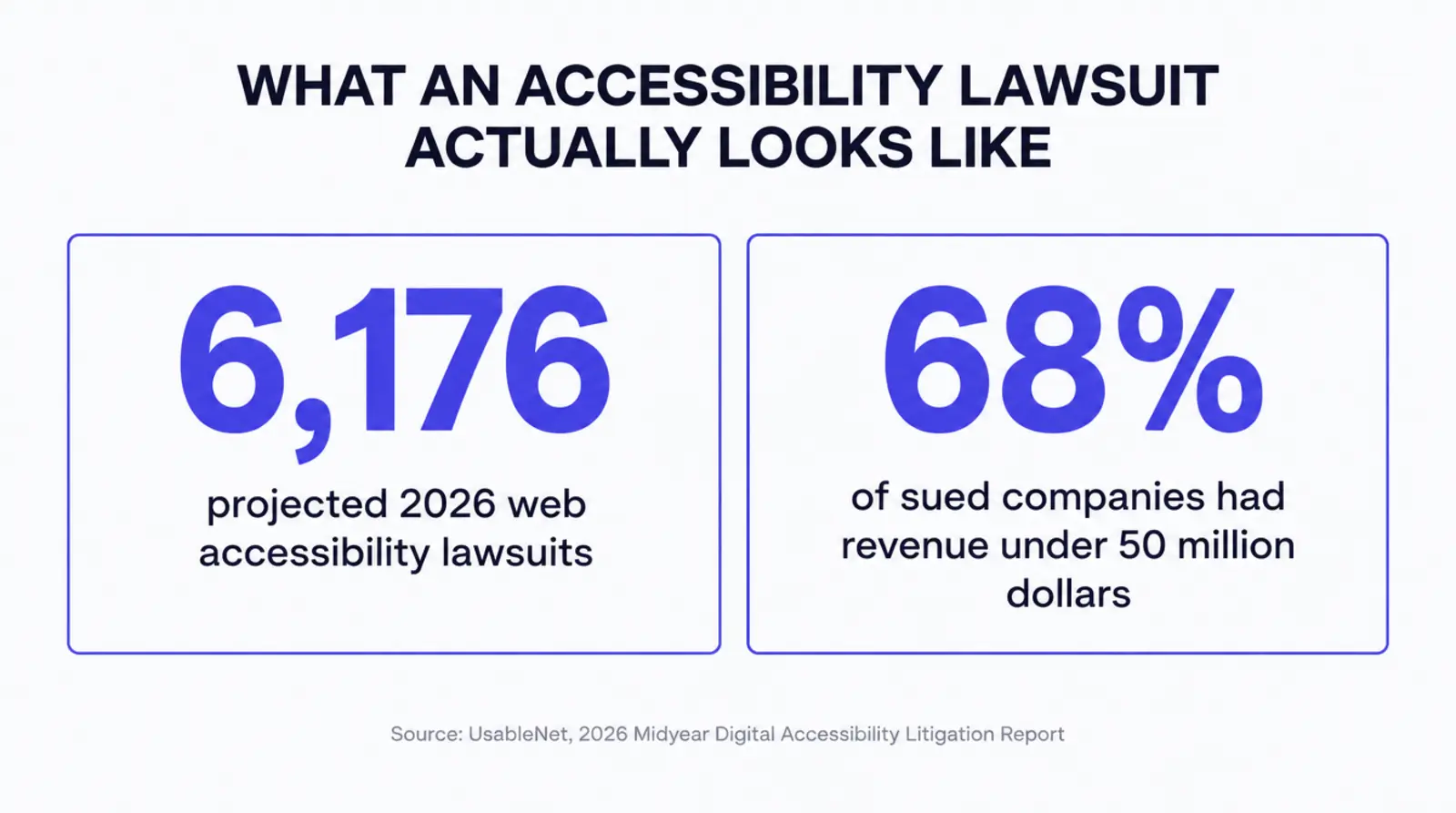
It is fair to ask whether any of this is a real risk for an agency your size, or a problem mostly for large companies with a national brand to protect. The 2026 litigation data says the opposite. UsableNet's midyear report projects roughly 6,176 website accessibility lawsuits filed in 2026, based on filings recorded through June 14, 2026, putting the year on track to surpass 6,0001. Of the companies sued in the first half of 2026, 68% had annual revenue under $50 million, 22% had revenue between $50 million and $1 billion, and only 10% had revenue above $1 billion1. This is not a large company problem.
| Defendant annual revenue | Share of companies sued |
|---|---|
| Under $50 million | 68%1 |
| $50 million to $1 billion | 22%1 |
| Above $1 billion | 10%1 |
In fairness, insurance is not the sector driving the bulk of this volume. eCommerce accounts for 79% of digital accessibility lawsuits in the same report1, and a lot of what UsableNet tracks is retail checkout flows, not agency quote forms. But 79% still leaves 21%, and 21% of roughly 6,176 projected 2026 filings works out to about 1,297 lawsuits, by our own calculation from UsableNet's two published figures, spread across every other industry in just six months1. Insurance sites with a PDF rate sheet, a video testimonial, and a quote form built the way most page builders generate them sit squarely inside that remaining share, not outside it.
If you want a second opinion before you read the checklist
The free Audit scores a live site against accessibility and AEO signals like the ones below in about a minute, no signup required. Run a free Audit.
The WCAG 2.1 AA checklist, mapped to your actual pages
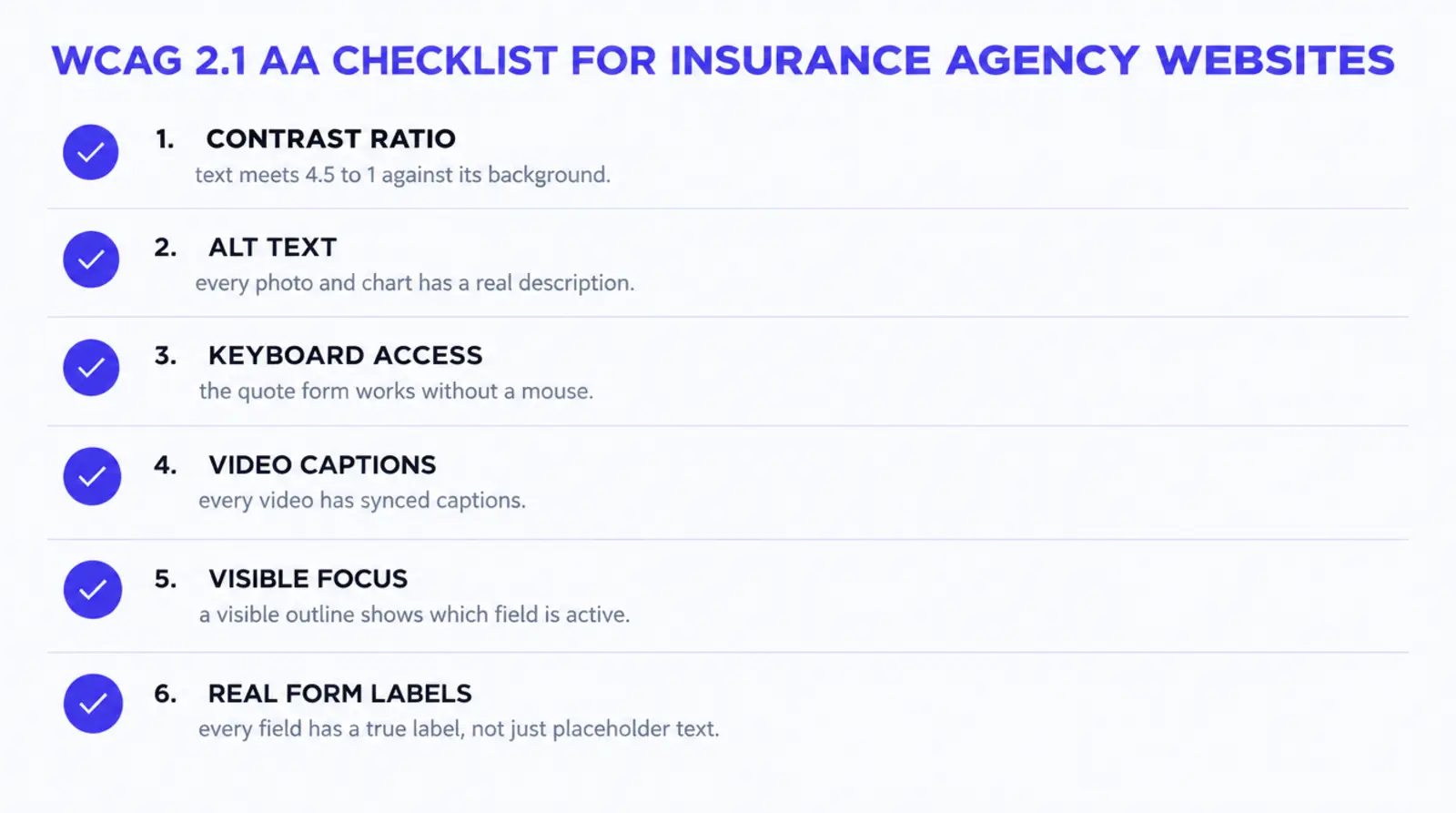
WCAG organizes its success criteria into four principles, perceivable, operable, understandable, and robust, each with numbered criteria at Level A, AA, or AAA4. Level AA is the bar DOJ picked for government sites, and it includes everything required at Level A too, since AA conformance requires meeting every Level A criterion as well4. The table below is not the full standard. It is the subset that shows up, over and over, on an actual insurance agency site: the quote form, the rate PDF, the testimonial video, the carrier logo wall.
The four principles are worth knowing by name, because they explain why the checklist groups the way it does. Perceivable means a visitor can actually sense the content, which is why contrast ratios and alt text live here: information that only works at full color saturation, or only exists as pixels in an image, is not perceivable to everyone. Operable means every control can be worked, by someone using a keyboard, a switch device, or voice control, not just a mouse. Understandable means labels say what they mean and errors are explained in a way a person can act on, not a red border with no text attached. Robust means the markup is built cleanly enough that current and future assistive technology can parse it correctly, which is the principle a page builder's auto generated div soup most often fails4.
The A, AA, and AAA levels are not a difficulty slider so much as a scope of audience. Level A covers the items that make content unusable for some people if missing entirely, a missing text alternative, a keyboard trap. Level AA adds the items that make content difficult, not impossible, for a wider group, contrast, resize, reflow. Level AAA goes further still and is not realistically achievable across an entire site, which is why neither DOJ's own Title II rule nor most legal guidance anywhere asks for it3. AA is the bar that shows up in regulation, in litigation, and in this checklist, because it is the point where the return on the work still clearly justifies it.
| Criterion | Level | What it requires | On your agency site |
|---|---|---|---|
| 1.1.1 Non-text Content | A | A text alternative for every non-text element4 | Carrier logos, the founder photo, and every chart need real alt text, not a blank attribute or the filename |
| 1.3.1 Info and Relationships | A | Structure shown visually is also conveyed in code4 | A rate comparison table built as a real <table> with header cells, not a grid of styled boxes |
| 1.4.3 Contrast (Minimum) | AA | 4.5:1 contrast for text, 3:1 for large text4 | Body copy, button labels, and the fine print under a quote form |
| 1.4.4 Resize Text | AA | Text resizes to 200% without losing content or function4 | A visitor zooming in on a rate sheet on a phone still has to be able to tap submit |
| 1.4.10 Reflow | AA | Content works at 320 CSS pixels wide without two directional scrolling4 | A mobile quote form that doesn't force sideways scrolling to read a premium table |
| 1.4.11 Non-text Contrast | AA | 3:1 contrast for UI components and meaningful graphics4 | Form field borders, checkbox outlines, and icon buttons on a quote tool |
| 2.1.1 Keyboard | A | Every function is operable from a keyboard alone4 | The whole quote funnel, including any date picker or dropdown, tabs through without a mouse |
| 2.4.6 Headings and Labels | AA | Headings and labels describe their purpose4 | "ZIP code" as a real label, not a gray placeholder that disappears the moment someone starts typing |
| 2.4.7 Focus Visible | AA | A visible indicator shows keyboard focus4 | A visible outline on the active field and button, not suppressed by custom CSS |
| 1.2.4 / 1.2.5 Captions and Audio Description | AA | Live audio needs captions, prerecorded video needs audio description4 | A founder intro video, a recorded client testimonial, or a live open enrollment webinar |
| 3.3.4 Error Prevention | AA | Legal, financial, or data-changing submissions are reversible, checked, or confirmed4 | A quote or application submission that doesn't lock in a selection without a review step |
| 4.1.3 Status Messages | AA | Status updates reach assistive technology without moving focus4 | A chat widget's "agent is typing" message or a quote tool's "your rate is ready" message |
None of these are exotic. Every one of them is a markup decision, how a form field is coded, whether a video has a captions track, whether a color pairing was checked against a ratio, not a design decision that forces your site to look different. A site can meet every row in this table and still look exactly like the one you have now.
Who this doesn't reach as hard
It would be dishonest to write a checklist like this and pretend every row carries the same weight for every agency. A solo producer running a mostly informational site, a bio page, a licensed states list, a contact form with three fields and nothing else, has a much smaller surface area of risk than an agency running video testimonials, an embedded PDF rate sheet library, and a multi step quote funnel. Fewer moving pieces means fewer places for 1.2.5 Audio Description or 3.3.4 Error Prevention to even come into play.
That is not an argument for skipping the basics. Contrast, alt text, real form labels, and a visible focus state cost almost nothing to build correctly from the start and apply to every site regardless of size. It is an argument against over engineering a simple site to a standard built for a complex one, and against assuming the inverse, that a complex funnel with a lot of interactive pieces can coast on the same five minute fix that works for a static bio page. The fifteen minute test below will tell you honestly which category your own site falls into, rather than a generic rule guessing for you.
Why an overlay widget doesn't check these boxes
It is worth being specific about why the accessibility widget most agencies already installed does not satisfy the table above, because the honest answer is more useful than a blanket "widgets don't work."
An overlay script runs in the browser, after your page has already loaded, and tries to patch things
it can detect: boosting contrast on the fly, guessing at alt text for an image that has none, trying
to reorder a tab sequence it did not build. It can genuinely help with a handful of surface level
items. What it cannot do is rewrite the underlying HTML your page was built with. A quote form missing
real <label> elements is still missing them underneath the widget's menu. A video
with no captions track does not gain one because a script runs on the page around it. A PDF rate
sheet saved as a flat image is still a flat image.
That is the structural reason items like 2.1.1 Keyboard, 1.3.1 Info and Relationships, and 1.2.5 Audio Description in the table above are rarely things a widget actually fixes, regardless of what its marketing claims. They are decisions made in the code the page ships with, not patches applied after the fact. If a widget is currently your agency's entire accessibility plan, treat this table as the honest list of what it is probably not covering, and read the companion guide on how these lawsuits actually start for the litigation side of that same gap9.
Test your own site in fifteen minutes
You do not need to hire anyone to find out where your own site actually stands today. Two checks, done back to back, cover most of what matters.
Check one: run Lighthouse (five minutes)
- Open your site in Chrome, open DevTools, go to the Lighthouse tab, and run an Accessibility audit, or run the same URL through PageSpeed Insights for free.
- Lighthouse's accessibility audits are weighted by real world user impact, with items like missing alt text and unlabeled form fields carrying the heaviest weight5.
- Read the failed audits, not just the score. The score is a weighted average, so one missing label on a short page can move it more than you'd expect.
Check two: the keyboard test (ten minutes)
- Put your mouse away. Load your homepage and your quote form, and navigate using only the Tab, Shift+Tab, and Enter keys.
- Watch for a visible outline on whatever is currently focused. If you lose track of where you are, 2.4.7 Focus Visible is failing.
- Try to complete your own quote form this way, start to finish. If you get stuck on a dropdown, a date picker, or a "Submit" button you can't reach, 2.1.1 Keyboard is failing.
- Play any video on the site with the sound off. If there's no captions option, 1.2.5 is failing.
Check three, optional but worth ten minutes: a real screen reader pass
Windows ships without a built in screen reader strong enough for this test, but NVDA is free and takes a few minutes to install. On a Mac, VoiceOver is already there, turn it on with Command+F5. Close your eyes, or turn your monitor off, and try to find out what your homepage is about and reach your phone number using only what you hear. If the first thing you hear is "image, image, image, button" with no sense of what any of it is, that is 1.1.1 failing in the way that matters most, not as a line item on a report, but as an actual visitor unable to tell what your site does.
The reason this three part check works is that it splits the problem the way the research splits it. Deque Systems measured automated testing catching 57% of accessibility issues across a dataset of more than 13,000 pages, well above the 20 to 30% estimate the company says is commonly cited for automated tools generally6. Lighthouse catches a meaningful share. The keyboard and screen reader passes catch most of what automation structurally can't, because both are checking whether a real human using real assistive technology can actually get through your site, not whether a rule engine can detect the absence of an attribute.
How we build this into the foundation
This section sticks to what is documented on our own live pages, verified this session, not a general promise. We build agency sites on Astro, which ships pages as static, semantic HTML rather than a runtime that assembles markup from a page builder theme at request time7. Real headings, real labels, and real alt text on every image are part of how a page is built the first time, the same markup decisions the table above is made of, not a remediation pass added after something went wrong.
That is a difference in starting point, not a guarantee of a specific legal outcome, and we are not going to promise you one. What we can say plainly: every Digital Foundation plan includes AI CLI access, so changes to your own site, including fixes to a specific label, alt attribute, or focus order, go through Claude Code or Codex on your own account, with a preview link before anything goes live8.
| Tier | Price | What it adds |
|---|---|---|
| Website | $84/mo | 30 pages at launch on semantic HTML, AI CLI access8 |
| Starter | $247/mo | 7 new pages a month, AI chat widget, GBP management8 |
| Pro | $497/mo | Plus weekly new pages, review harvesting, 24/7 AI receptionist8 |
| Scale | $997/mo | Plus daily new pages, up to 4 languages, monthly newsletter8 |
Every subscription tier is month to month with a 14-day free look period, verified live on the Digital Foundation page this session8. If your current site is on a page builder and the fix means rebuilding markup you don't control, that is the more realistic starting point than trying to patch a theme's output criterion by criterion.
It is fair to ask whether a full rebuild is worth it if your current site is otherwise working fine. For a lot of the table above, the contrast ratios, the form labels, the alt text, a developer can fix the specific failing items on your existing site without a rebuild, and the fifteen minute test above will tell you how many items you're actually dealing with. The case for rebuilding the foundation gets stronger when the keyboard test fails broadly across the whole site, because that usually means the underlying theme or page builder, not a handful of individual pages, is the actual source of the problem.
What you get
Strip away the legal framing and the outcome is narrow and concrete. A visitor using a screen reader can actually fill out your quote form instead of abandoning it at the first unlabeled field. A visitor navigating by keyboard, which includes people with motor impairments and a meaningful share of power users who simply prefer it, can tab through your site instead of getting stuck. A rate PDF someone zooms into on a phone stays usable at 200%. None of that requires your site to look different. It requires the code underneath it to be built the way the table above describes, once, instead of patched after a letter arrives.
There is a second benefit that shows up even if nobody using assistive technology ever visits your site. Several of the criteria in the checklist above, real headings, real alt text, a logical heading structure, real labels, are the exact same signals an AI answer engine or a search crawler reads when it tries to understand what your page is about. A site built to be understandable by a screen reader is, by construction, also a site built to be understandable by the systems increasingly deciding whether your agency gets found and cited at all.
There is a third benefit that is easy to miss because it never shows up as a line item: fewer broken
pages for everyone, not just visitors using assistive technology. A form with real labels is also a
form that autofills correctly in a browser. A table built as a real <table> is also
a table Google can read and potentially surface as a direct answer. A video with captions is also a
video someone can follow with the sound off on a phone in a waiting room. None of the work in this
checklist is accessibility shaped work that happens to also help everyone else. It is the same work,
done once, that every visitor to your site benefits from whether they notice it or not.
Questions agents ask
What does "ADA compliant website" actually mean if there's no federal regulation spelling it out for businesses?
For a private business like an insurance agency, there is no single regulation to point to. The Department of Justice's own web guidance says plainly that it has not issued a regulation setting out detailed website accessibility technical requirements, and it calls WCAG and Section 508 "helpful guidance" rather than a mandate. In practice, agencies that want a defensible answer build to WCAG 2.1 Level AA anyway, because it is the exact standard the DOJ itself chose for government websites under Title II, and it is the standard plaintiffs' firms and courts already measure private sites against.
Does WCAG 2.1 AA apply to my insurance agency the same way it applies to a city government website?
Not as a matter of law, not yet. The Title II rule that names WCAG 2.1 Level AA as the required technical standard only binds state and local governments, with compliance dates of April 26, 2027 for public entities serving 50,000 people or more, and April 26, 2028 for smaller entities and special purpose districts. Title III, the part of the ADA covering private businesses open to the public, has no equivalent regulation naming a specific technical standard. DOJ's own guidance says the ADA still applies to what a business offers on the web, just without a named standard to build to.
Will an accessibility overlay widget make my insurance agency's site compliant?
An overlay script can adjust some things in the browser, but it cannot rewrite the markup underneath it. Most of the checklist above, real alt text, real form labels, a logical heading structure, a sane focus order, lives in the HTML itself, and a widget loaded on top of broken markup is patching a symptom rather than fixing the structure a screen reader actually reads. We cover why overlays specifically hold up poorly once a lawsuit is filed in a companion guide linked below.
Do PDF rate sheets and brochures need to be accessible too?
Yes, and this is one of the more commonly missed items on an otherwise reasonable site. WCAG applies to web content generally, and DOJ's guidance does not carve out PDFs as an exception. A rate sheet or brochure built as a scanned image with no underlying text layer is invisible to a screen reader no matter how accessible the page linking to it is.
How much does it cost to fix accessibility problems after a demand letter, versus building it in from the start?
We do not have a verified dollar figure for either side of that comparison to hand you, and anyone who quotes you a precise number without naming a source is guessing. What we can say with confidence: a site built on semantic HTML has real headings, real labels, and real alt text as part of how each page gets assembled the first time, not as a remediation project added under the time pressure a demand letter creates. Fixing markup after the fact, on a deadline a lawyer set, is a different and harder kind of work than building it correctly once.
Can a small agency actually get sued over this, or is it only large companies?
Small businesses are the more common target, not the exception. UsableNet's 2026 midyear digital accessibility litigation report found that 68% of companies sued over website accessibility in the first half of 2026 had annual revenue under $50 million. eCommerce accounts for the large majority of filings, 79% in the same report, which leaves roughly 1,297 lawsuits spread across every other industry in just six months, by our own calculation from UsableNet's two published figures.
Does an automated accessibility scanner catch everything?
No. Deque Systems, measuring across more than 13,000 pages and nearly 300,000 issues, found that automated testing caught 57% of the accessibility issues in its dataset, which the company frames as well above the commonly cited 20 to 30% estimate for automated tools generally. The remaining issues, a keyboard trap, a focus order that jumps around, alt text that is present but meaningless, need an actual human or assistive technology test to catch.
What's the fastest way to check my own agency's site today?
Run it through Lighthouse first, free inside Chrome DevTools or via PageSpeed Insights, since its accessibility audits are weighted by real world user impact and surface missing alt text, unlabeled buttons, and missing form labels in under a minute. Then run the five minute keyboard test covered below, because that category of problem is exactly what an automated scanner structurally cannot see on its own.
Sources
- UsableNet. "Inside the 2026 Midyear Numbers: Where Digital Accessibility Litigation Is Going," lawsuit projections, state and revenue breakdowns, filings recorded through 2026-06-14, verified live 2026-11-02. blog.usablenet.com.
- ADA.gov (U.S. Department of Justice). "Guidance on Web Accessibility and the ADA," published 2022-03-18, verified live 2026-11-02. ada.gov.
- ADA.gov (U.S. Department of Justice). "Fact Sheet: New Rule on the Accessibility of Web Content and Mobile Apps Provided by State and Local Governments," WCAG 2.1 Level AA standard and compliance deadlines, verified live 2026-11-02. ada.gov.
- W3C. "Web Content Accessibility Guidelines (WCAG) 2.1," W3C Recommendation, republished 2025-05-06, verified live 2026-11-02. w3.org.
- Chrome Developers (Google). "How Lighthouse determines your accessibility score," weighting methodology, verified live 2026-11-02. developer.chrome.com.
- Deque Systems. "Automated Testing Study Identifies 57 Percent of Digital Accessibility Issues," study of 2,000+ audits and 13,000+ pages, published 2021-03-10, verified live 2026-11-02. deque.com.
- Astro. "Why Astro," zero JavaScript by default, verified live 2026-11-02. docs.astro.build.
- Strategic AI Architects. "Digital Foundation," pricing and features, verified live 2026-11-02. strategicaiarchitects.com.
- Strategic AI Architects. "Insurance Agency ADA Accessibility Lawsuit," companion guide on litigation trends and the overlay widget myth. strategicaiarchitects.com.
Talk it through
Want a second pair of eyes on it?
Free 30 minutes. Bring what you found, or bring nothing and we will look together at how AI engines read your site and which fixes move first.
See where your own site actually stands
Run the free Audit, a live AEO Audit plus a HIPAA tracking scan of your site, in under a minute.
Related reading: how ADA website lawsuits actually start, and why the widget doesn't hold up · the full pre-publish checklist before a new page goes live