Playbook
Can an AI Shopping Agent Use Your Insurance Website?
Comet and ChatGPT can browse, compare, and fill out forms without a person clicking anything. Here is what actually happens when one lands on a typical agency site, sourced live.


18 min read
Cloudflare's own network data shows more than 50% of internet traffic is now non-human1, and the share of that traffic tied to AI purposes keeps climbing, with AI training's share of crawler requests rising from 22% in spring 2025 to 52% in June 20261. A browsing agent like Perplexity's Comet or ChatGPT's in-app browser can already open your site, read it, and try to fill out your quote form on a shopper's behalf. Most agency sites were never built for that. A JavaScript-heavy funnel page, a form the agent cannot parse, or no machine-readable way to say what the site does at all, and the agent either fails silently or moves on to the next agency in the list. This guide covers what breaks, what it costs, and how to fix it, including WebMCP, the new browser standard that lets a site expose a real, callable tool instead of a page an agent has to guess its way through.
The visit you never see in your analytics
Somewhere this week, a shopper comparing Medicare Advantage plans in her county opened Perplexity's Comet browser, typed one sentence describing what she wanted, and let it go find and compare three local agents on her behalf while she made dinner. It read your homepage. It looked for a way to ask a question or start a quote. It either found one it could use, or it did not, and either way she never touched your site herself. Your analytics logged a session, maybe, or maybe nothing at all, because plenty of agentic browsing traffic does not fire a typical JavaScript analytics tag the way a human's click does.
That is not a hypothetical scenario written to sell you something. It is a description of how Comet and ChatGPT's browsing mode already work today, in August 2026, and it is the reason this guide exists. Your site has a job it has always had, which is convincing a human to call or fill out a form. It now also has a second, newer job most agencies have never thought about: being usable by a piece of software acting on that human's behalf. The two jobs overlap, but they are not the same job, and a site that does the first one well can still fail the second one completely.
What this guide is and is not
This is not a claim that agentic shopping has replaced how most people buy insurance. It has not, and probably will not for a while yet. This is a guide to a traffic source that is small today, growing fast by every measure we could source, and effectively free to prepare for, because the work overlaps almost entirely with getting cited by AI answer engines in the first place.
Why this stopped being a hypothetical
Three things converged in the last few weeks that make this worth an agency's attention now rather than in a year. None of them are speculation. All three are dated, sourced, and verifiable today.
First, the traffic itself. Cloudflare, which sits in front of a large share of the internet and can see the difference between a human browser and an automated one at the network level, published a report stating plainly that "more than 50% of traffic on the Internet is now non-human"1. The same report tracked AI crawlers specifically and found that AI training accounted for 52% of crawler requests as of June 2026, up from 22% in spring 20251, and that more than 30% of humanity, roughly 2.5 billion people, has adopted regular use of generative AI within just three and a half years1. That last figure is the one worth sitting with. Adoption at that scale means the tools that browse and act on a person's behalf are not a fringe habit anymore. They are getting handed to the same 2.5 billion people who now use generative AI regularly.
Second, the standard for how a site talks to an agent stopped being theoretical. WebMCP, the
Web Model Context Protocol, is a browser API under active development by the W3C Web
Machine Learning Community Group, with editors credited from both Google and
Microsoft2. It defines a way for a website to register a JavaScript
function as a named, described tool, complete with a schema for what it needs and what it
returns, that an agent can call directly through a browser API called
navigator.modelContext, instead of clicking through a form field by
field2. Two of the largest companies building both browsers and AI
models are actively co-authoring the spec for how those browsers should let a page hand an
agent a real tool. That is a strong signal about where this is headed.
Third, and most concretely, OpenAI announced it is retiring its standalone Atlas browser on August 9, 2026, four days from when this guide was written, folding browsing and agentic capability directly into the main ChatGPT app and its Codex product instead3. An OpenAI staffer, quoted in coverage of the change, framed it as building on what the company learned from Atlas users rather than abandoning the feature3. The practical effect for an agency is that agentic browsing stops being a thing a small group of early adopters downloaded on purpose, and becomes a capability sitting inside an app hundreds of millions of people already have open.
Your site has three kinds of visitors now
It helps to be precise about the vocabulary here, because "AI traffic" gets used loosely and the fixes for each kind are different. There are three distinct categories worth telling apart.
A human
Reads your page, judges your design and your copy, decides whether to trust you, and clicks a button or picks up a phone.
A crawler
GPTBot, PerplexityBot, ClaudeBot. Reads your pages in bulk to build an index or ground a future answer. Never acts on behalf of one specific person in real time.
An agent
Comet, ChatGPT's browsing mode, Gemini in Chrome. Acting for one specific person, right now, trying to complete a task like comparing agencies or starting a quote.
AEO, answer engine optimization, is mostly about the second category: being structured and sourced well enough that a crawler's underlying model trusts you enough to name you in an answer. We have written about what actually makes a page citable at length elsewhere on this blog. This guide is about the third category, which is a newer and different problem. Being citable does not automatically make you usable. A page can be perfectly structured for a crawler to read and cite, and still be a wall of custom JavaScript widgets an agent cannot click through to actually start a quote.
What actually breaks when an agent lands on your site
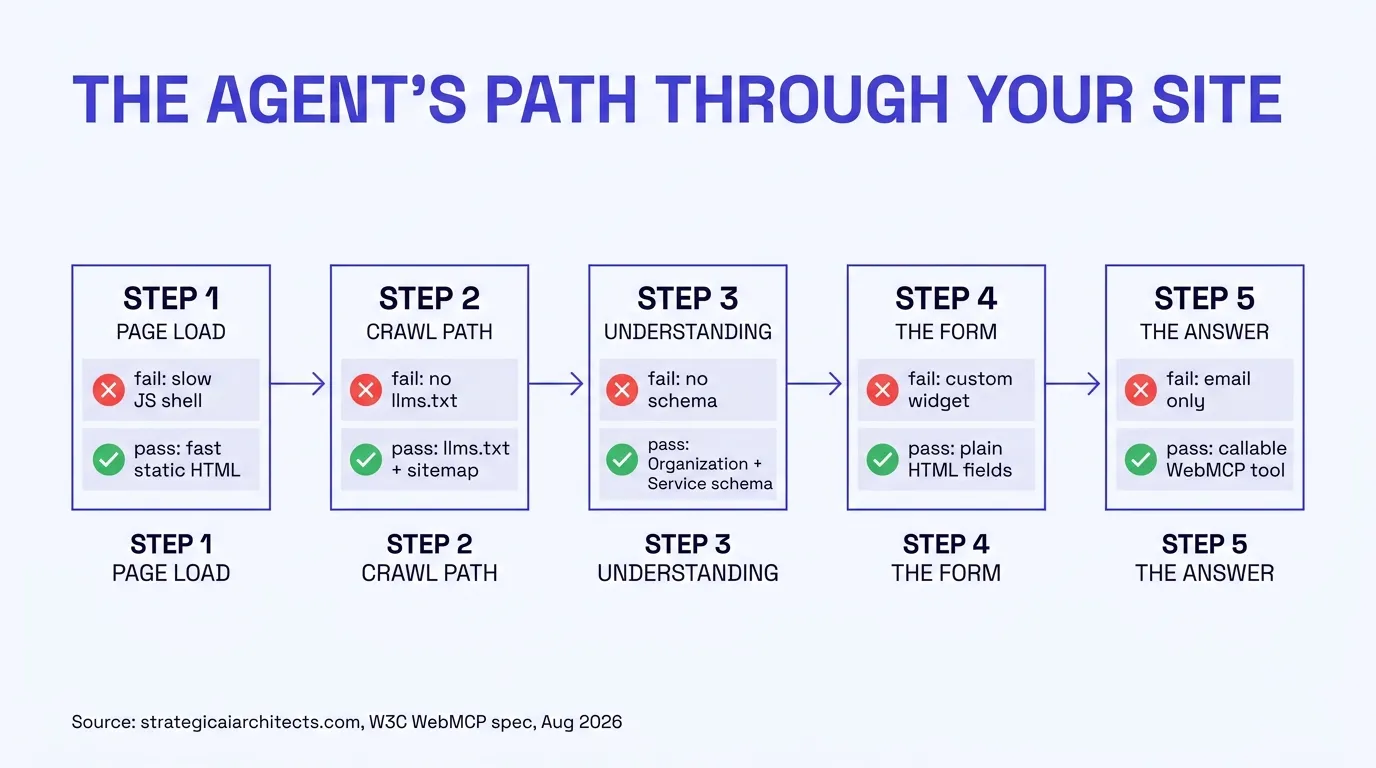
Picture Comet, or ChatGPT's browsing mode, arriving at a typical agency's homepage with one instruction: find out if this agency writes Medicare Advantage in this county, and start a quote if it does. Here is where that task commonly fails, in the order an agent usually hits them.
| Where it breaks | What the agent hits | Why it fails |
|---|---|---|
| The page load itself | A page-builder site loading a runtime and a stack of plugins before content appears | Agents run under time budgets and often give up on slow, JavaScript-heavy pages the same way an impatient human would |
| Finding the right page | No llms.txt, no sitemap the agent can trust, or a robots.txt that blocks the crawler feeding the agent's model | The agent has no reliable map of what the site offers or where to find it |
| Understanding what the site does | No Organization, Service, or LocalBusiness schema stating plainly what the agency writes and where | The agent is guessing from marketing copy instead of reading a structured, machine-parseable fact |
| The quote or contact form | A custom JavaScript widget, a multi-step funnel with hidden fields, or a form embedded in an iframe from a third party | Ordinary HTML form fields are straightforward for an agent to fill in. Custom widgets built for a mouse and a human's eyes often are not |
| Getting an actual answer | A static form that only emails a lead to your inbox, with no way to return a real number | Submitting a form and waiting for a callback is a much weaker outcome for an agent's task than calling a tool that returns a quote instantly |
None of these are exotic failures. They are the same handful of problems that make a site slow, hard to crawl, or hard to trust, showing up in a new context. That overlap is the good news buried in this whole guide: an agency that has already fixed its site's speed and structure for humans and for AEO has done most of the work an agent needs too.
What being agent-blind costs
It is hard to put a precise dollar figure on a lead that never happened, because unlike a quote your team forgot to follow up on, an agent that fails silently leaves no record anywhere in your CRM. That is exactly the point, and it is worth naming directly rather than inventing a number to fill the gap. What we can say, sourced, is the shape of the risk.
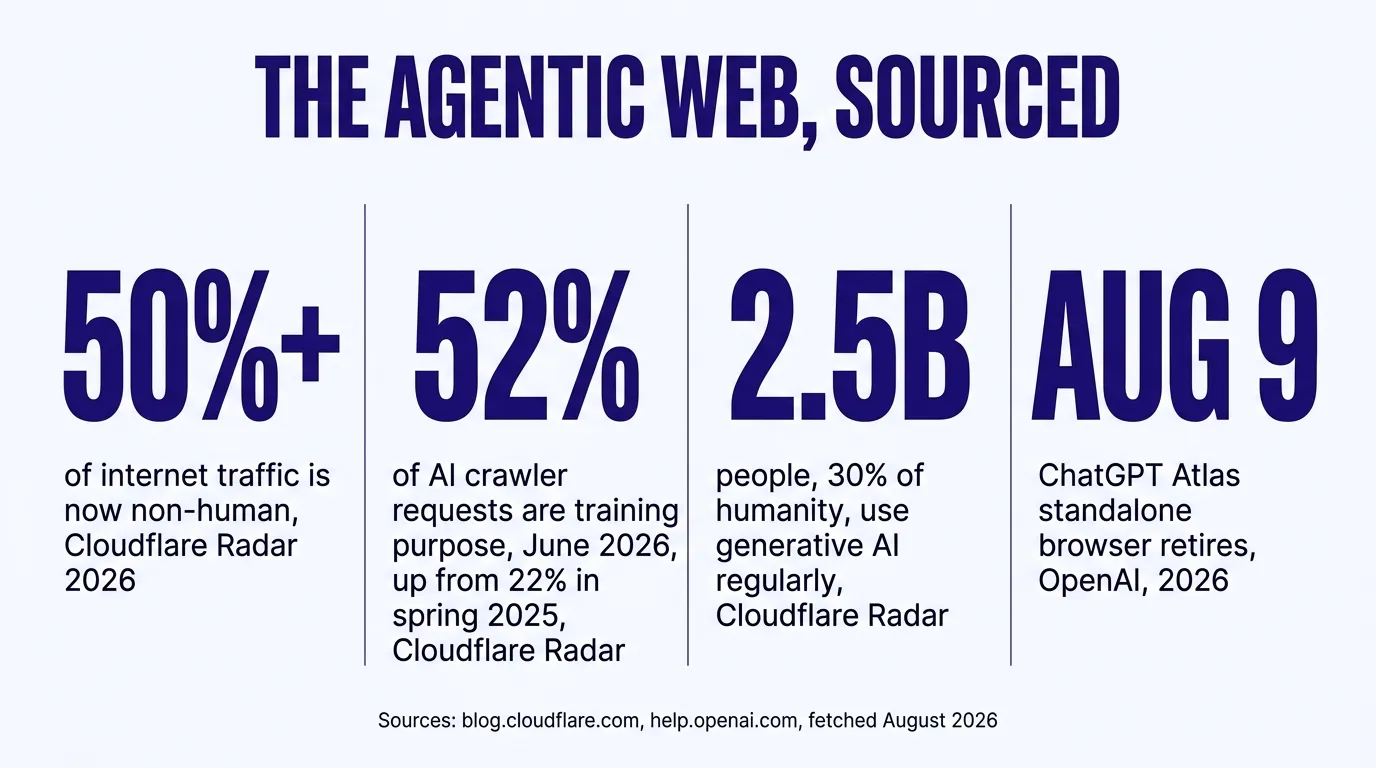
Non-human traffic crossing 50% of the internet1 means the fraction of your total site visits that are some kind of automated system, not a person with a mouse, is already larger than most agency owners assume. Some of that is search crawlers, which have been part of the internet for two decades and are not new risk. But the report is explicit that AI-purpose crawling has grown from 22% to 52% of crawler requests in about a year1, which means the automated share of your traffic that is specifically AI-related, not classic search indexing, is the part growing fastest.
50%+
Of internet traffic is non-human, per Cloudflare network data1
52%
Of crawler requests are AI purpose as of June 2026, up from 22% in spring 20251
2.5B
People have adopted regular generative AI use in 3.5 years1
Aug 9
Date OpenAI retires the standalone Atlas browser into the main ChatGPT app3
There is a second, more familiar cost sitting underneath all of this, and it is the same one that shows up in every guide we have written about site speed and structure: what fails an agent usually fails a human too. A JavaScript-heavy funnel page that an agent gives up on is also the page that misses Google's published Core Web Vitals thresholds4 — LCP, INP, and CLS, each defined with its threshold in our Answers pages — which Google states plainly aligns with what its core ranking systems reward5. A missing Organization schema block that leaves an agent guessing what you do is the same gap that keeps an AI answer engine from citing you with confidence. You are not paying two separate costs for two separate audiences. It is one underlying gap in the site, charged twice. For the full breakdown of why a page-builder site fails that mobile speed test in the first place, see our guide on why insurance websites fail Google's speed test.
If you want to know where your own site stands
The free Audit scores your site's technical health, including the schema and crawl signals this guide is about, in under a minute. Run the free Audit.
Check your own site in five minutes
Before the fix, the diagnostic. You do not need special software for a first pass. Open your own site in a fresh browser tab and work through this list honestly.
Signs your site fails today
- Your homepage takes more than a couple seconds to show real content on a phone
- Visiting yoursite.com/llms.txt returns a 404
- Your quote or contact form is a multi-step widget with a progress bar, not plain fields
- Your robots.txt is a default file that never mentions GPTBot, ClaudeBot, or PerplexityBot by name
- Right-clicking your homepage and choosing "View Page Source" shows almost no readable text, just a JavaScript shell
What this meansAn agent likely times out, misreads, or gives up before completing a task on this site
Signs your site is prepared
- Your homepage's real content is visible within a second or two on a phone connection
- yoursite.com/llms.txt returns a real file describing your site and its pages
- View Page Source shows your actual headline, body text, and navigation as plain HTML
- Your robots.txt explicitly welcomes named AI crawlers instead of a generic default
- Your forms use ordinary HTML fields an agent's browser tooling can identify and fill
What this meansAn agent can read, understand, and act on this site inside the time it usually budgets for a task
That last item on the "agent-blind" list, an almost empty View Page Source, is worth a specific callout because it is the single fastest tell. A page rendered by a heavy client-side framework often ships an HTML document that is nearly empty until JavaScript runs and builds the page in the browser. A human never notices, because their browser does the work invisibly. An agent that reads the raw document before or during that process can miss your content entirely, which is a different and more basic failure than anything about forms or schema.
The fix, in the order it actually matters
None of this requires exotic engineering. It is the same build order we use on every site we ship, sequenced so each step actually supports the next one instead of getting undone by whatever comes after it.
| Step | What you build | Why it comes at this point |
|---|---|---|
| 1. Ship real HTML | A static or server-rendered page, not a JavaScript shell an agent has to execute to see content | Nothing downstream matters if the agent cannot read the page at all |
| 2. Open the crawl path | A robots.txt that names the AI crawlers explicitly, plus a current sitemap.xml | An agent's underlying model is often only as current as the last time it, or a crawler feeding it, could reach your pages |
| 3. Publish llms.txt | A plain-text file at /llms.txt describing your site, your services, and links to your key pages | Gives an agent a fast, structured map instead of forcing it to infer your site's shape from navigation alone |
| 4. Add real schema | Organization, LocalBusiness or InsuranceAgency, Service, and FAQPage JSON-LD that actually matches the page content | Turns marketing prose into a structured fact an agent, and an answer engine, can trust and quote |
| 5. Use plain forms | Ordinary HTML form fields with clear labels for your quote and contact forms, not a custom widget | Agent browser tooling is built to recognize and fill standard form fields far more reliably than bespoke JavaScript components |
| 6. Expose a real tool | A WebMCP tool, or a documented endpoint like a .well-known/mcp.json manifest, that returns a real answer instead of just accepting a submission | This is the step that turns "an agent can technically use this site" into "an agent can get a useful answer from this site" |
The mistake we see most
An agency adds a WebMCP tool or an llms.txt file to a site that still loads slowly and ships a nearly empty HTML document. The tool exists, but the agent never gets far enough into the page to find it. Step one is not optional groundwork. It is the step that determines whether any of the later steps get seen at all.
WebMCP, explained without the jargon
MCP, the Model Context Protocol, is the standard Anthropic introduced for connecting an AI model to external tools and data on the server side, and it is what lets an assistant like Claude call a defined function running on someone's backend. WebMCP takes the same basic idea, a named tool with a description and a schema that a model can call, and moves it into the browser itself, so a website can expose its own functionality directly to whatever agent is browsing it, without either side needing a separate server integration2.
Practically, a developer registers a tool using a browser API called
navigator.modelContext.registerTool(), giving it a short unique name, a
human-readable title, a plain-language description of what it does, a schema describing what
input it needs, and a function that actually runs when called2. An
agent browsing the page can then see that tool listed and call it directly, the same way it
would click a button, except the call is structured and reliable instead of a guess at which
pixel to click. The specification also includes a simpler declarative path still under
development that lets a standard HTML form expose itself as a tool without any of the
JavaScript API at all2, which matters because it means agent
readiness does not have to mean a full engineering rebuild for a simple contact form.
A live example, on this site
We publish a WebMCP-style tool manifest at /.well-known/mcp.json on this domain, listing three callable tools: a free AEO audit request, a free HIPAA tracking scan request, and a strategy call booking, each with a named input schema an agent can read and fill without guessing. It is a small example, but it is a real, live one, not a mockup, and it is the same pattern a quoting tool for a specific agency would follow.
It is worth being precise about what WebMCP does not do, too. It does not make an agent trust a source it otherwise would not, and it does not replace the schema and sourcing work that earns an AI citation. Registering a tool is closer to handing an agent a phone number that actually connects, compared to leaving it to read a business card and guess. The business card, your schema, your sourced content, your named author, still has to convince the agent the number is worth calling in the first place.
How we build this in
This is the same foundation every site we ship starts from, not an add-on tier. We build on Astro, which ships zero JavaScript to the browser by default and renders pages to finished HTML rather than assembling them client-side6, so an agent reading the raw page source sees your actual content immediately instead of an empty shell waiting on a script. Every build ships llms.txt, sitemap.xml, and a robots.txt written to welcome the named AI crawlers rather than a generic default, and all three regenerate themselves the moment a new page or post goes live, with the full absolute URL, so nothing goes stale.
On top of that foundation, we build the schema stack, Organization, LocalBusiness or InsuranceAgency, Service, and FAQPage, that gives both agents and answer engines a structured fact instead of prose to interpret. And where an agency's quoting or eligibility tool is more than a static form, we wire it to a real WebMCP-style tool exposed through a manifest like the one this guide just showed you, so an agent calling it gets an actual number pulled from live data, not a submission that waits on a callback.
Curious what your own site scores
Run it through PageSpeed Insights before you read further — here is the score an agency site actually needs — and check whether yoursite.com/llms.txt returns anything at all. If either comes back thin, the rest of this guide is worth your time. Or run the free Audit, which checks both along with your schema and HIPAA tracking exposure in about a minute.
A real quoter wired to live federal data is the clearest example of why this matters beyond a checkbox. A static form with example numbers gives an agent nothing to call. A quoter built on live data and exposed as a callable tool gives an agent an actual answer it can hand back to the person who asked, with your agency's name attached to it. That is the difference between a site an agent passes through and a site an agent uses.
What you get
None of this is about chasing a traffic source that is still, honestly, a small share of most agencies' total visits today. It is about not being the site an agent silently fails on while a competitor's site, built on the same fast, structured foundation that already helps with search and AI citations, hands that same shopper a real answer. The floor and the ceiling are the same investment: a fast, structured, honestly documented site serves the human who clicks, the crawler that cites, and the agent that acts, without three separate projects.
If you want to see where your own site sits against that bar, start with the free Audit, then decide whether the gap is worth closing yourself or worth handing to us. See Digital Foundation.
Questions agencies ask
Is an AI shopping agent actually going to visit my insurance website?
Cloudflare's own network data shows more than 50% of internet traffic is now non-human, and the share of crawler requests tied to AI purposes has grown sharply through 2026, so the honest answer is that automated visitors, including agents acting on a person's behalf, are already a meaningful and growing share of your traffic, not a future scenario.
What is the difference between an AI crawler and an AI agent?
A crawler like GPTBot or PerplexityBot reads your pages to build an index or ground an answer, similar in spirit to Googlebot. An agent, like Perplexity's Comet or ChatGPT's in-app browsing, is acting on behalf of one specific person in real time, trying to complete a task such as comparing three agency sites or filling out a contact form. Being readable by a crawler and being usable by an agent are related but not identical, and this guide is about the second one.
What is WebMCP?
WebMCP, the Web Model Context Protocol, is a browser API under development by the W3C Web Machine Learning Community Group, with editors from Google and Microsoft, that lets a website register JavaScript functions as named, described tools an AI agent can call directly, instead of clicking through a form field by field.
Do I need to rebuild my whole website to be agent-ready?
No. The groundwork, a fast static site, clean schema, an llms.txt file, and a robots.txt that welcomes the named AI crawlers, is the same foundation that makes a site AEO ready for answer engines. WebMCP tools are an addition on top of that foundation, not a replacement for it.
Is ChatGPT Atlas shutting down going to matter to my agency?
The standalone Atlas browser itself, not much. What matters is the reason OpenAI gave for retiring it: folding browsing and agent capability directly into the main ChatGPT app instead of a separate download, which puts agentic browsing in front of ChatGPT's much larger existing user base rather than the smaller group who had installed a standalone browser.
Can an AI agent actually fill out my quote form and get a real number?
That depends entirely on what the form is wired to. A static form that emails a lead to your inbox can be filled in by an agent the same way a human fills it in, field by field, assuming the fields are ordinary HTML rather than a custom JavaScript widget the agent cannot parse. A quoter that returns a real number instantly, the way our WebMCP-exposed tools do, is a different and more useful thing for an agent to call, because it can retrieve an actual answer instead of just submitting a request and waiting.
Does making my site agent-ready help with AEO and AI citations too?
Yes, and that overlap is not a coincidence. Structured schema, a clean crawl, a machine-readable llms.txt, and fast static pages are exactly what answer engines need to cite you and what agents need to use you. The two problems share the same foundation.
Sources
- Cloudflare. "Content Independence Day, one year on: building the business model for the agentic Internet," non-human traffic share, AI crawler purpose share, and generative AI adoption figures, verified live 2026-08-05. blog.cloudflare.com.
- W3C Web Machine Learning Community Group. "WebMCP," specification for navigator.modelContext, registerTool, and the declarative HTML forms API, editors from Google and Microsoft, verified live 2026-08-05. webmachinelearning.github.io.
- 9to5Mac. "OpenAI is discontinuing ChatGPT Atlas, its standalone desktop browser," retirement targeted for 2026-08-09, reporting on OpenAI's official announcement, verified live 2026-08-05. 9to5mac.com.
- web.dev. "Web Vitals," LCP, INP, and CLS good thresholds, verified live 2026-08-05. web.dev.
- Google Search Central. "Understanding Core Web Vitals and Google search results," ranking systems statement, verified live 2026-08-05. developers.google.com.
- Astro. "Why Astro," zero JavaScript by default and server-first rendering, verified live 2026-08-05. docs.astro.build.
Talk it through
Want a second pair of eyes on it?
Free 30 minutes. Bring what you found, or bring nothing and we will look together at how AI engines read your site and which fixes move first.
See if your own site is agent-ready
Run the free Audit, a live AEO Audit plus a HIPAA tracking scan of your site, in under a minute.