Playbook
Why Your Insurance Agency's CRM Automation Keeps Breaking
The AI didn't fail. A duplicate contact quietly got merged, and your CRM's own trigger logic did exactly what it was built to do: nothing.


18 min read
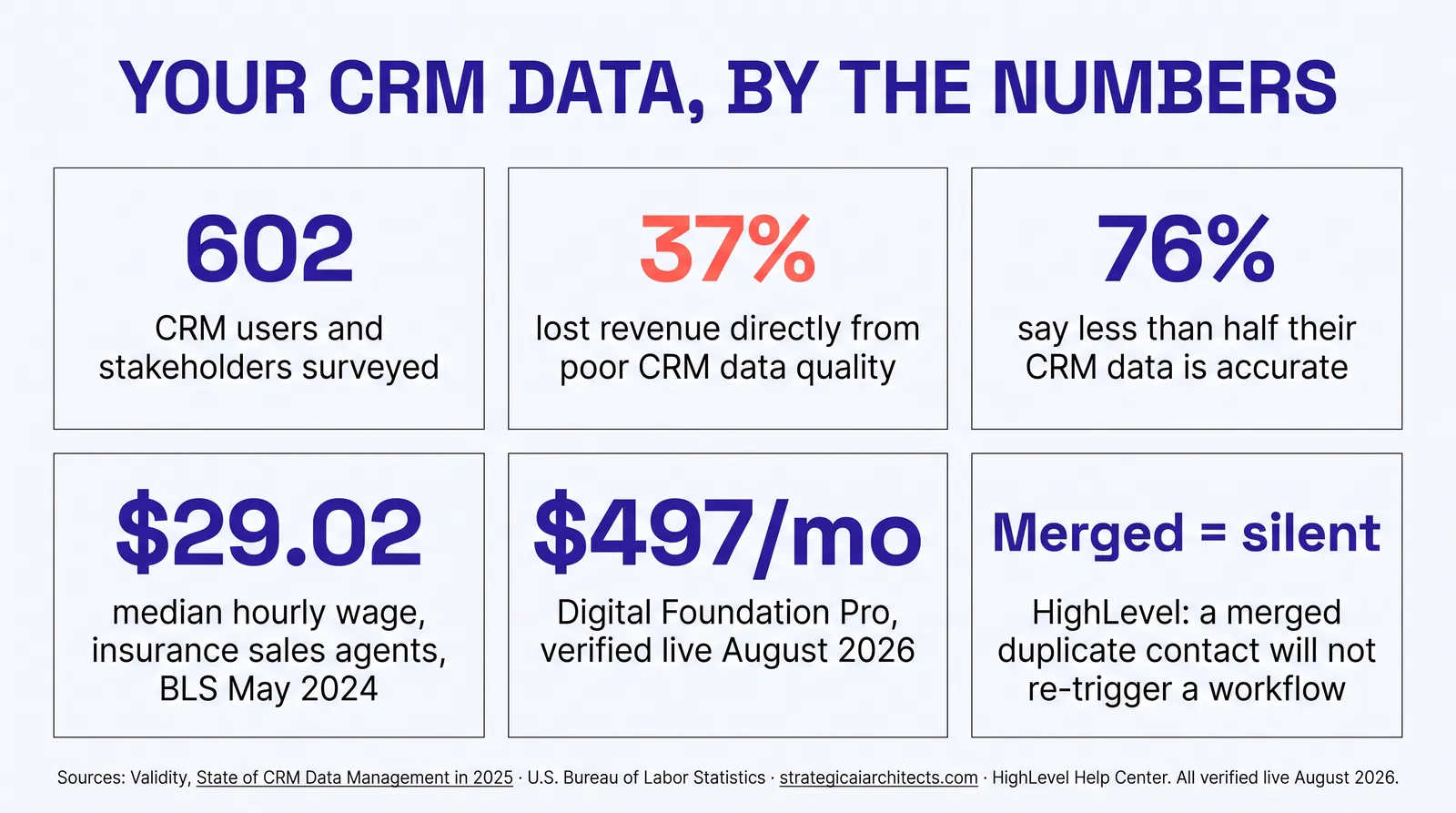
Automation does not fail randomly. It fails at specific, documented moments, and the most common one is a duplicate contact getting merged. HighLevel's own Help Center states plainly that "if the contact is merged with an existing record, the workflow will not trigger again1." Bulk imports carry the same silent gap by design1. Meanwhile Validity's 2025 survey of 602 CRM users found 37% had lost revenue directly from poor data quality, and 76% said less than half their CRM data was accurate and complete2. None of that is an AI problem. It is a data hygiene problem wearing an AI costume, and it has a documented, learnable fix.
The follow-up that stops for no reason
You set up the automation. A new lead comes in, a welcome text goes out, a follow-up sequence runs over the next two weeks, and if nobody books, a reactivation touch fires thirty days later. It worked when you tested it. It worked for the first batch of real leads. Then, a few weeks in, you notice a lead who should be three messages deep into the sequence has gotten nothing. You check the CRM. The contact is there. The workflow shows as active. Nothing fired.
The instinct is to blame the AI, or the automation platform, or whichever vendor built the follow-up logic. That instinct is usually wrong, and it sends agency owners down an expensive path: rebuilding the same automation on a different platform, hiring a consultant to "fix the AI," or concluding that automated follow-up just does not work for insurance leads. None of those fix the actual problem, because the actual problem almost never lives in the automation. It lives one layer down, in the contact record the automation was built to watch.
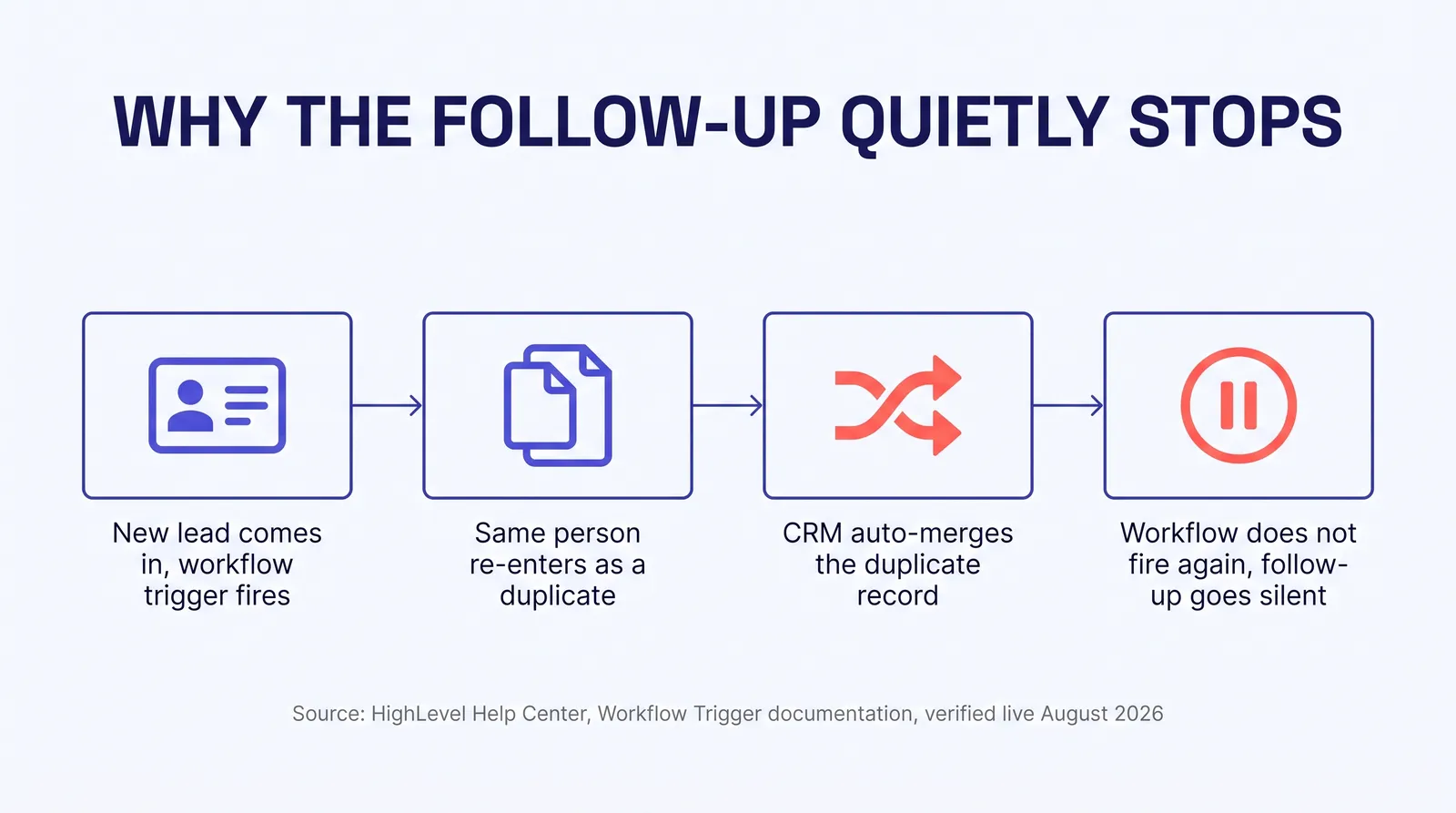
Here is the pattern, told the way it actually happens. A prospect fills out a quote form on your site. The CRM creates a contact, the welcome workflow fires, message one goes out. Two days later, the same prospect calls your office directly, or fills out a second form after seeing an ad, or gets added by a producer typing their info into the CRM by hand during the call. The CRM now has two records for the same person, or it recognizes the match and merges them into one. If it merges them, the workflow tied to the original record does not carry over to the survivor. Nothing crashed. Nothing errored. The follow-up simply never runs again, and nobody gets an alert that says so.
Why this is so easy to miss
A broken automation usually announces itself: an error message, a failed integration, a red status badge somewhere in a dashboard. A merged contact does not. The CRM did its job correctly by combining two records for the same person. The workflow did its job correctly by not double-messaging someone. The gap between those two correct behaviors is where the lead goes quiet, and it is invisible unless you go looking for it specifically.
This is not rare, and it is not a fringe edge case that only happens to disorganized agencies. It is a structural property of how most CRM platforms handle deduplication, and it happens more often as an agency's lead volume grows, because more lead sources means more chances for the same person to enter the system twice. An agency running Meta ads, Google ads, a website form, a referral pipeline, and a call center is not creating one clean stream of new contacts. It is creating four or five streams that regularly collide on the same person, and every collision is a chance for a workflow to quietly stop.
Why CRM automation actually breaks
It helps to see this in a CRM vendor's own documentation rather than guess at it. HighLevel, one of the platforms most independent agencies run their CRM and automation on, publishes exactly how its Contact Created trigger behaves, and the behavior explains most of what agencies experience as "automation is unreliable."
The trigger "activates whenever a new contact is added to the CRM" and "works regardless of how the contact is created, manually, via form submissions, or through integrations1." That much is straightforward. The documentation then addresses duplicates directly: "if a contact with the same email or phone number is added again, the system may recognize it as an existing contact, depending on the CRM's duplicate detection settings. If the contact is merged with an existing record, the workflow will not trigger again1." If instead the system treats the new entry as a brand-new contact rather than recognizing the match, "the workflow will execute as expected1," which creates the opposite problem: a second, parallel automation running for one real person, doubling up texts and calls until someone notices and merges the records by hand, at which point the first failure mode kicks in.
| What happens to the contact | What HighLevel's documentation says |
|---|---|
| New contact, manual entry, form, API, or integration | The trigger activates and the workflow executes as expected1 |
| Duplicate submitted, system treats it as a new record | The workflow executes again for that record, doubling the automation1 |
| Duplicate submitted, system merges it into the existing record | The workflow will not trigger again1 |
| Contacts added through a bulk import | Does not trigger this workflow, to prevent accidental automation overload1 |
Read that last row again, because it is the one agencies discover the hard way. If you buy a reactivation list, inherit a book of business, or bulk-export contacts from a spreadsheet into your CRM, HighLevel's documentation is explicit that the Contact Created trigger will not fire for any of them, by design, specifically to keep a bulk import from blasting hundreds of people at once1. That is a sensible guardrail. It also means every contact you have ever bulk-imported has zero automated follow-up attached to it unless someone built a separate workflow to catch that specific case, and most agencies never do, because nobody told them the gap existed.
None of this is unique to HighLevel. Salesforce, HubSpot, and every other major CRM handle deduplication with some version of the same tradeoff: merge logic that protects data integrity at the cost of quietly detaching whatever was watching the record that got absorbed. The platform is not the villain in this story. The absence of a process to catch it is.
The mistake we see most
An agency notices leads going cold, assumes the AI or the automation vendor is unreliable, and spends real money migrating to a new platform. Three months later, the new platform shows the exact same pattern, because the dirty data and the untracked duplicates moved with the migration. The platform was never the problem. Nobody audited what was actually happening to individual records.
What dirty CRM data actually costs
There is no dollar figure specific to independent insurance agencies we could verify this session, and we are not going to invent one. What exists, and what we can cite plainly, is Validity's 2025 survey of the broader CRM market, which is directly relevant because the mechanism it measures, duplicate and inaccurate records breaking downstream processes, is the same mechanism at work in an agency's book.
Validity surveyed 602 CRM users and stakeholders for its State of CRM Data Management in 2025 report2. Thirty seven percent of respondents said they had lost revenue directly as a consequence of poor data quality2. Seventy six percent said less than half of their organization's CRM data was accurate and complete2. This is the only survey of this kind we found and verified this session, so we are stating that plainly rather than implying broader consensus than one report actually supports.
| Metric | Figure | What it means for an agency |
|---|---|---|
| Respondents surveyed | 602 | CRM users and stakeholders across organizations, not insurance-specific2 |
| Lost revenue directly from poor data quality | 37% | More than one in three reported a real, attributable cost, not a theoretical one2 |
| Say less than half their CRM data is accurate | 76% | The majority default state of a CRM is more wrong than right, absent active maintenance2 |
Put a worked number on the time cost specifically, using a sourced wage rather than a guess. The U.S. Bureau of Labor Statistics puts the median hourly wage for insurance sales agents at $29.02, as of May 20243. If a producer or an office manager spends even four hours a week finding duplicate contacts, correcting bad phone numbers, and re-tagging leads that landed in the wrong pipeline stage, a conservative, illustrative estimate rather than a researched average, that is 208 hours a year. At the BLS median wage, that is $6,036 a year of someone's time spent maintaining a database instead of selling or serving clients3. That number will move up or down depending on your actual hours and your actual staff cost, but the shape of it does not change: the time is being spent somewhere, whether or not anyone is tracking it as a line item.
A five minute check on your own CRM
Pull ten leads from three weeks ago that never booked. Check whether the follow-up sequence actually ran to completion for each one, not whether the workflow shows as "active" in your CRM's dashboard, which only tells you the workflow exists, not that it fired for that specific contact. If two or more never got the full sequence, you likely have exactly the merge or bulk-import gap this guide describes.
How to clean it up, step by step
This is the part worth giving away in full, because the method is not secret. It is real, learnable work that a single-office agency can do on its own contact list in a weekend. What makes it hard at scale is doing it on a recurring schedule, not the individual steps.
Export and audit before you touch anything
Pull a full contact export and look at it as data, not as a list of names. Sort by email and by phone number and see how many rows share a value. That single sort tells you, in minutes, roughly how large your duplicate problem actually is before you change a single record.
Dedupe by email and phone, not by name
Names get misspelled, shortened, and entered inconsistently across five different lead sources. Email addresses and phone numbers are the two fields most CRMs, including HighLevel, actually use for duplicate detection1, so match on those first and treat name similarity as a secondary signal, not the primary one.
Standardize tags and pipeline stages before you merge
A merge keeps one record's tags and drops the other's, depending on your platform's merge rules. If your tagging has drifted, "hot lead" on one rep's records and "priority" on another's for the same meaning, standardize the taxonomy first, so the merge does not quietly erase a signal you actually needed.
Rebuild or reconnect the workflow triggers on survivor records
After a merge pass, check whether the surviving records still have an active workflow attached. This is the step most cleanups skip, and it is the one that directly fixes the silent-follow-up problem this guide opened with. A clean contact list with no working automation on it has not actually solved anything.
Build a catch-all for bulk imports specifically
Since bulk imports do not trigger the standard Contact Created workflow on platforms like HighLevel by design1, any list you import in bulk needs its own, separate automation step, or a manual review queue, so those contacts are not left with zero follow-up indefinitely.
Set a recurring light check, not a one-time project
A cleanup done once and never repeated drifts back to the same state within a few months, because every new lead source is a new chance to create a duplicate. A short monthly check and a fuller quarterly pass keep the problem from compounding again.
This part you can genuinely do yourself
For a book under a few hundred contacts on one CRM, all six steps above are a weekend project, not a specialist skill. Where this becomes a recurring job instead of a one-time task is doing it every month, across a growing list, without it becoming the thing that never actually gets scheduled once the busy season starts.
What good CRM hygiene looks like
It is worth being concrete about the difference between a CRM that looks fine and one that actually is, because the two are easy to confuse from the dashboard view alone.
The dashboard-clean CRM
- Workflows show as "active" across the board
- No error messages or failed integration alerts
- Duplicate and merge activity happens silently in the background
- Bulk-imported contacts sit with no automation, unnoticed
- Nobody has checked whether individual leads received the full sequence
What it hidesA shrinking share of leads actually getting followed up
The maintained CRM
- Duplicate rate checked and trending down, not just "no errors"
- A separate, working process for every bulk-imported list
- Tags and pipeline stages standardized across every rep
- Spot checks confirm real leads receive the full sequence, not just that a workflow exists
- A recurring monthly and quarterly maintenance rhythm, not a one-time project
What it protectsEvery lead source actually reaching a person, every time
Neither column is about the sophistication of the automation itself. An agency with a simple, three-message follow-up sequence on clean data will outperform an agency with an elaborate, twelve-step AI-driven nurture sequence sitting on top of a CRM full of duplicates and silently detached workflows. The sequence is not the bottleneck. The data underneath it is.
How we handle this differently
This is the one section built to describe what we do, so it stays narrow and sticks to what is on our own live pages. VA + AI pairs a trained virtual assistant, someone who actually does the CRM hygiene work described above, deduplication, tag standardization, pipeline cleanup, with automation, so the VA is not doing by hand the parts software should be doing instead, verified live on the Ambrose and AI Expert page this session4.
The sequencing matters more than any individual tool. We clean the data first, then build or repair the automation layered on top of it, because an automation rebuild on top of unresolved duplicates just reproduces the same silent-failure pattern on a new platform, at a higher cost, three months later. Digital Foundation's Pro tier includes a 24/7 AI receptionist and weekly content on top of the base site, verified live on the Digital Foundation pricing page this session at $497 a month4, and that receptionist and any follow-up automation built alongside it inherits whatever state your CRM's contact data is actually in.
| Tier | Price | What it adds |
|---|---|---|
| Starter | $247/mo | Complete, compliant site with AEO optimization, GBP management, AI chat widget4 |
| Pro | $497/mo | Plus 1 new blog post and 1 new location page every week, 24/7 AI receptionist4 |
| Scale | $997/mo | Plus daily blog cadence (20 to 22 posts a month) and 2 new location pages every week4 |
See where your own site and follow-up stand
The free Audit checks your site's AEO and technical readiness in about a minute, and a CRM hygiene review is exactly the kind of scoped conversation to have alongside it if follow-up gaps are the thing actually costing you leads. Run a free Audit.
Custom work like this is scoped on a call rather than sold as a fixed monthly line, because a 400-contact single-office book and a multi-thousand-contact FMO downline running five CRMs across five offices are not the same project, and pricing them identically would be dishonest in one direction or the other.
What changes once your data is clean
The outcome here is narrower than "more leads" or "more revenue," and we are not going to promise either, because nobody can honestly promise you a specific number. What changes, concretely, is that the automation you already built and already paid for starts actually reaching the people it was built to reach. A follow-up sequence that fires reliably for 95% of new leads instead of a silently shrinking share is not a new capability. It is the capability you already have, finally working the way it looked like it was working on the dashboard the whole time.
There is a second-order effect worth naming. Every hour a producer or an assistant is not spending on manual deduplication and record correction is an hour available for the parts of the job that actually require a human: the call that closes a policy, the conversation that catches an objection an AI follow-up sequence would have missed. Clean data does not just make automation work better. It frees up the time automation was supposed to free up in the first place, instead of quietly consuming it on maintenance nobody budgeted for.
Keeping it clean, and when DIY is fine
It is fair to ask whether any of this applies to a small, single-producer book with one lead source and a short contact list. For that agency, a quarterly manual check using the method in this guide is probably enough, and there is no reason to pay for ongoing management of a problem that size. This matters most for an agency running multiple lead sources, buying or inheriting lists, or watching a follow-up sequence that used to convert start quietly underperforming with no obvious cause.
If you already suspect this is happening in your own CRM, the five-minute check earlier in this guide, pulling ten stalled leads and checking whether the full sequence actually ran, will tell you more in five minutes than any dashboard metric will. Most agents who run that check for the first time find at least one or two leads that quietly fell through exactly the gap this guide describes.
Worth a real conversation at scale
Coordinating CRM cleanup and automation repair across multiple offices or multiple CRMs, the normal case for an FMO or IMO downline, is exactly the kind of work we scope on a call rather than sell as a flat monthly add-on. Book a call.
Questions agencies ask
Why does my insurance agency's automated follow-up randomly stop for some leads?
The most common cause is not the AI or the automation platform failing. It is a duplicate contact record getting merged into an existing one. HighLevel's own Help Center documentation states plainly that if a contact is merged with an existing record, the workflow tied to it will not trigger again. The automation did exactly what it was built to do. It just was not built to notice that the lead it stopped messaging is still a live prospect.
What's the difference between a duplicate contact and a merged contact in my CRM?
A duplicate contact is a second record for the same real person, created when they fill out a second form, get imported from a second source, or text in from a number already on file. A merged contact is what happens after your CRM's deduplication logic decides two records are the same person and combines them into one. The merge is usually the right outcome for your data. The problem is that any workflow tied to the record that got absorbed does not carry over and does not fire again, silently, unless someone checks for it.
Why don't leads from a bulk import trigger my automation?
Because most CRM platforms design it that way on purpose. HighLevel's documentation states that its Contact Created trigger activates for a contact added manually, through a form, via the API, or through an integration, but that bulk imports do not trigger that workflow, specifically to prevent accidental automation overload. That is a reasonable engineering decision. It also means every list you bulk import, a reactivation list, a bought list, a list from a merger or an acquired book, sits in your CRM with zero automated follow-up unless you build a separate process to catch it.
How much does bad CRM data actually cost an agency?
There is no dollar figure specific to insurance agencies that we could verify this session, so we will not invent one. What we can cite is Validity's 2025 survey of 602 CRM users and stakeholders, which found 37% had lost revenue directly because of poor data quality, and 76% said less than half of their organization's CRM data was accurate and complete. Layer in the actual hours a producer or an assistant spends finding and fixing bad records, priced at the U.S. Bureau of Labor Statistics' median hourly wage for insurance sales agents of $29.02 as of May 2024, and the cost is real even without a single insurance-specific study to point to.
Can I clean up my CRM myself, or do I need to hire someone?
You can, and for a small book on one CRM, a single focused push is genuinely doable in a weekend. The method in this guide, in order: export and audit, dedupe by email and phone, standardize your tags and pipeline stages, rebuild or reconnect your workflow triggers, then set a recurring light check. Where DIY breaks down is doing that on a schedule, across a growing contact list, without it sliding back to where it started in three months. That is the part most agency owners do not have the hours for, not because the work is hard, but because it is not the highest value use of a producer's time.
How often should an agency audit its CRM data?
A light check monthly, and a full audit at least twice a year, more often if your agency is actively buying leads, running a reactivation campaign, or absorbing another book of business. Data does not go bad all at once. It degrades a little with every new lead source, every dropped call that never gets logged, and every rep who tags things a little differently than the last one. A quarterly rhythm catches most of that before it compounds into workflows that quietly stop firing for a growing share of your list.
Does switching to a new CRM fix a dirty data problem?
No, and this is worth saying plainly because it is a common and expensive mistake. Migrating a messy contact list into a new platform moves the duplicates, the stale tags, and the broken pipeline stages with it. A new CRM can give you better deduplication tools and cleaner default automations, but it inherits whatever you import into it. Clean the data before the migration, not after, or you will spend your first month on the new platform doing the same audit you were avoiding on the old one.
How does Strategic AI Architects handle CRM cleanup differently?
VA + AI pairs a trained virtual assistant who does the actual CRM hygiene work, deduplication, tag standardization, pipeline cleanup, with automation built so the VA is not doing by hand what software should be doing instead. The work is scoped on a call rather than sold as a fixed line item, because a 400-contact single-office book and a multi-thousand-contact FMO downline are not the same project. What stays constant is the sequence: clean the data first, then build or repair the automation on top of it, because automation built on dirty data just breaks faster and harder to diagnose.
Sources
- HighLevel Help Center. "Workflow Trigger: Contact Created," duplicate detection, merge behavior, and bulk import exception, verified live 2026-08-09. help.gohighlevel.com.
- Validity. "The State of CRM Data Management in 2025," survey of 602 CRM users and stakeholders, revenue loss and data accuracy findings, verified live 2026-08-09. validity.com.
- U.S. Bureau of Labor Statistics. "Insurance Sales Agents," Occupational Outlook Handbook, median annual and hourly wage data, May 2024, verified live 2026-08-09. bls.gov.
- Strategic AI Architects. "Digital Foundation" and "Ambrose and AI Expert," pricing, tiers, and VA + AI service description, verified live 2026-08-09. strategicaiarchitects.com.
Talk it through
Want a second pair of eyes on it?
Free 30 minutes. Bring what you found, or bring nothing and we will look together at how AI engines read your site and which fixes move first.
Find out if your own follow-up is actually firing
Run the free Audit, a live AEO Audit plus a HIPAA tracking scan of your site, in under a minute.
Related reading: why your CRM remembers nothing and what that costs · turning dead CRM leads into booked appointments